Web Application Development Process
Custom web application development requires a process that produces predictable outcomes, transparent communication, and production-grade software — not a sequence of vague phases that leave stakeholders guessing what happens next. Most development process descriptions are written for developers. This one is written for the people hiring a development team — CTOs, VPs of Technology, and founders at mid-market companies who need to know what they will see, when they will see it, and what decisions they will make at each stage.
Kavara uses this process to build web applications across every project type — SaaS platforms, enterprise portals, dashboards, MVPs, and custom software development projects. Seven structured phases move from discovery and scoping through UX and UI design, architecture and technology selection, development, quality assurance, deployment, and ongoing support. Each phase produces specific deliverables and requires stakeholder sign-off before the project proceeds to the next phase. This phase-gate model prevents the scope drift and architectural rework that cause the majority of cost overruns in custom development.
Process discipline is not optional. According to the Standish Group's 2015 CHAOS Report, traditional software-project success rates stayed in the mid-30s from FY2011 to FY2015, with 36% of projects classified as successful in 2015. The difference between successful projects and failed ones is not talent or technology alone — it is the rigor of the custom web application development process that governs how decisions are made, how changes are managed, and how stakeholders stay involved from first discovery conversation through production launch and beyond. A mature process makes scope, architecture, progress, and risk visible early enough for the team to correct course before the correction becomes expensive.
The diagram below groups the seven phase-gated stages into four macro stages — Plan, Architect, Build, Operate.
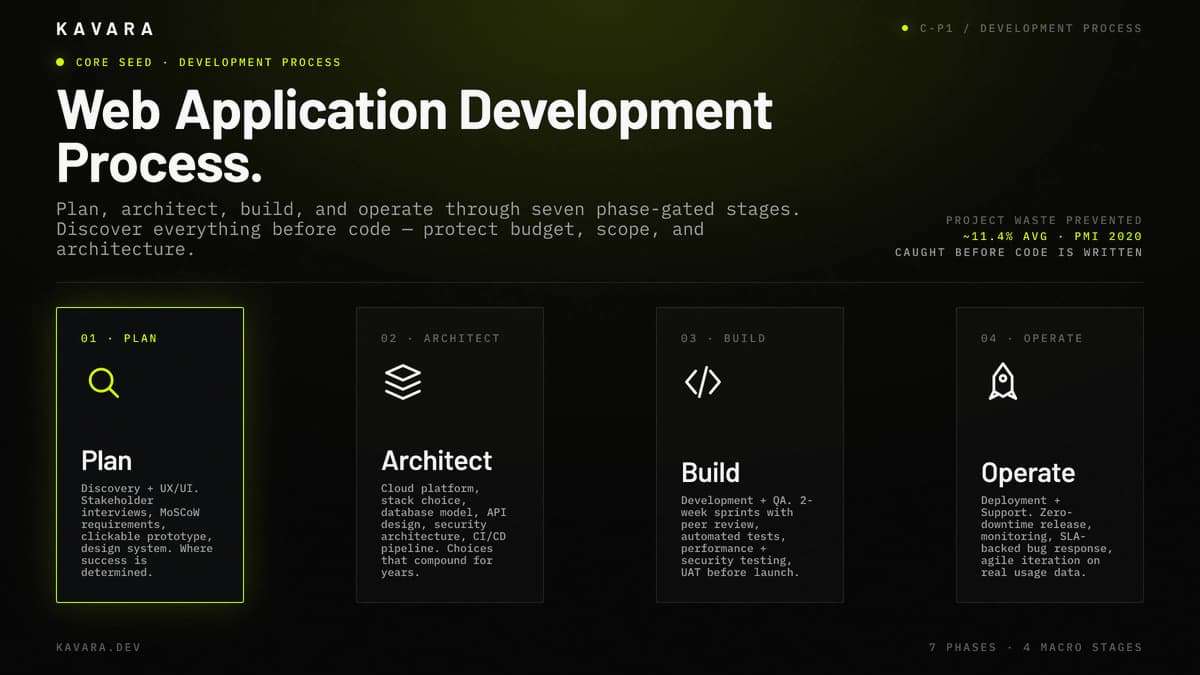
How Our Development Process Works
We build web applications through a structured seven-phase web application development process. Each phase produces specific deliverables, requires stakeholder review, and concludes with a sign-off checkpoint before the next phase begins. Learn more about our full custom web application development practice and the types of applications we deliver through this process.
This process is the delivery model behind Kavara's web application development services, so buyers can evaluate not only what we build, but how scope, architecture, quality, and launch decisions are controlled.
The table below lists each phase with its duration, deliverables, and stakeholder involvement.
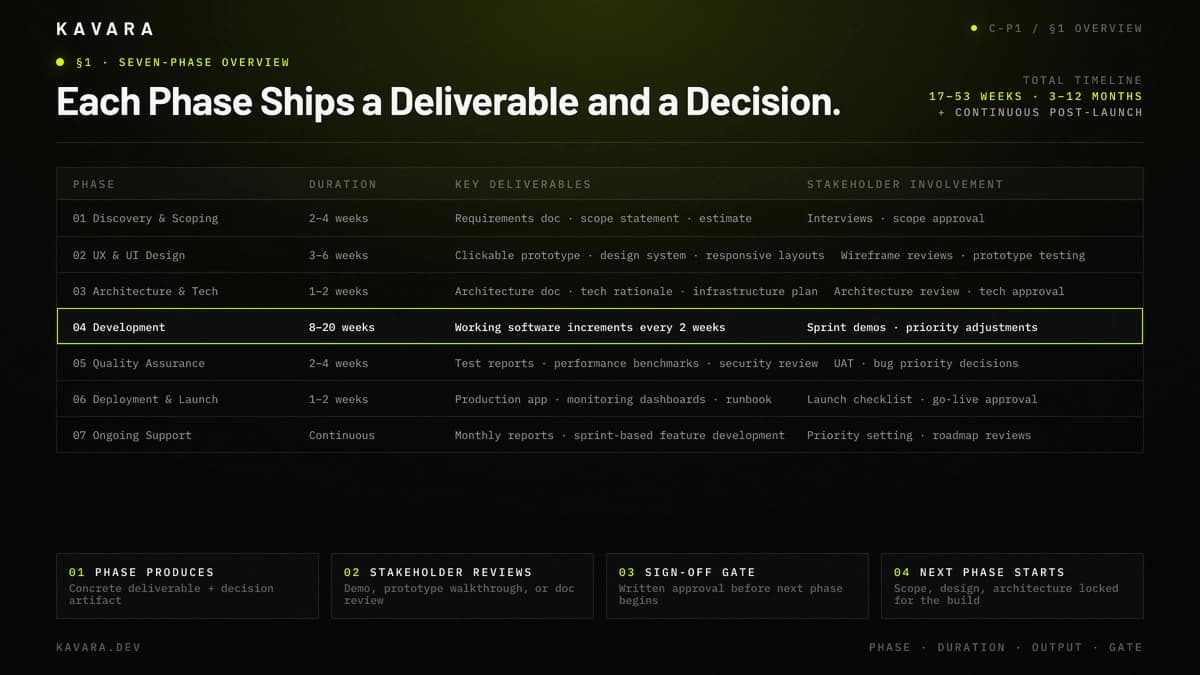
| Phase | Duration | Key Deliverables | Stakeholder Involvement |
|---|---|---|---|
| 1. Discovery & Scoping | 2–4 weeks | Requirements document, scope statement, project estimate | Stakeholder interviews, requirement reviews, scope approval |
| 2. UX & UI Design | 3–6 weeks | Clickable prototype, design system, responsive layouts | Wireframe reviews, prototype testing, design approval |
| 3. Architecture & Tech Selection | 1–2 weeks | Architecture document, technology rationale, infrastructure plan | Architecture review, technology approval |
| 4. Development | 8–20 weeks | Working software increments every 2 weeks | Sprint demos, feature reviews, priority adjustments |
| 5. Quality Assurance | 2–4 weeks | Test reports, performance benchmarks, security assessment | UAT participation, bug priority decisions |
| 6. Deployment & Launch | 1–2 weeks | Production application, monitoring dashboards, runbook | Launch checklist review, go-live approval |
| 7. Ongoing Support | Continuous | Monthly reports, sprint-based feature development | Priority setting, roadmap reviews |
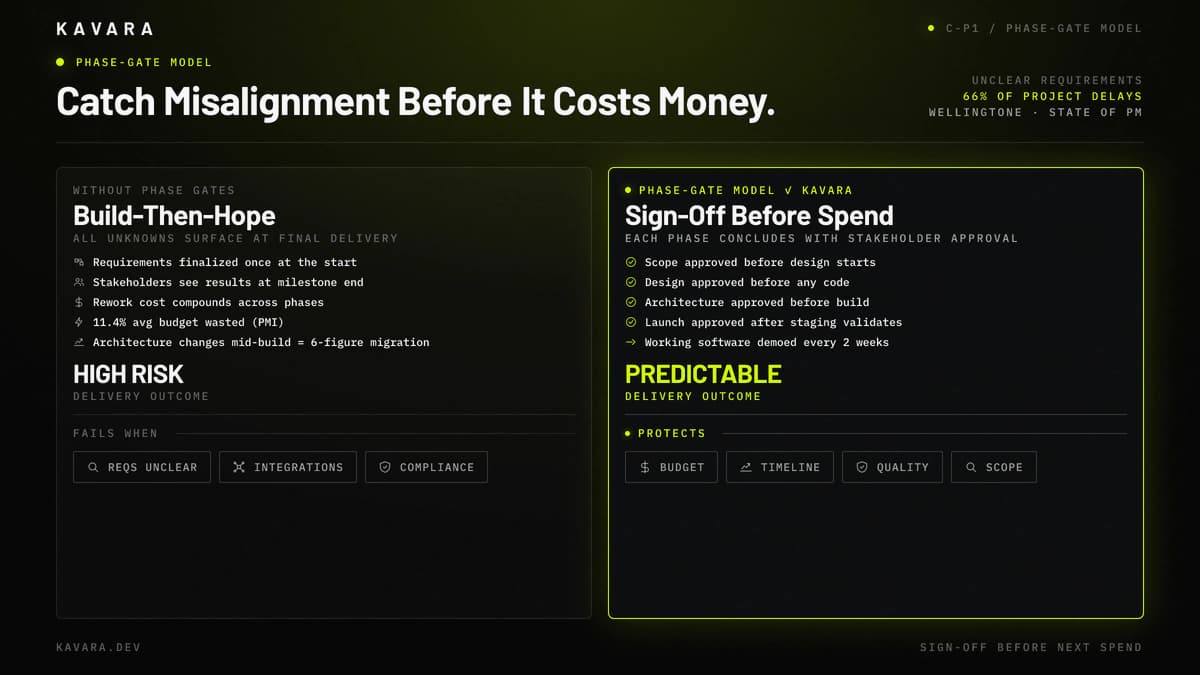
A phase-gate checkpoint is a formal sign-off point that requires stakeholder approval of one phase's deliverables before the next phase begins. This phase-gate checkpoint model protects both quality and budget. Each phase ends with a deliverable review, stakeholder feedback, and formal sign-off. Development does not proceed to the next phase until the current phase is approved. This catches misalignment early — before code is written — rather than at final delivery when changes are expensive.
According to PMI's 2020 Pulse of the Profession report, organizations waste an average of 11.4% of total project investment due to poor project performance — most commonly caused by requirements changes discovered after development begins. The phase-gate approach eliminates this waste by establishing clear decision points where scope, design, and architecture are validated before the next phase of investment begins.
The comparison below contrasts the build-then-hope waterfall with the sign-off-before-spend phase-gate model.
The first phase — discovery and scoping — sets the foundation that every subsequent phase depends on.
Discovery and Scoping
Discovery and scoping is the phase where project success or failure is determined — before a single line of code is written.
During discovery, we conduct stakeholder interviews across business, operations, and technical teams to understand not just what the application should do, but why it needs to exist and how it fits into existing workflows. We document functional and non-functional requirements, conduct user research and persona development, perform competitive analysis, and assess technical feasibility against the project's timeline and budget constraints.
At the end of discovery, you receive a requirements document detailing every feature with priority classification using the MoSCoW framework (Must Have, Should Have, Could Have, Won't Have). You also receive a scope statement defining project boundaries, architecture recommendations based on technical requirements, and a project estimate with phase-by-phase budget breakdown. The requirements document follows a structured web application requirements document template that covers functional requirements, non-functional requirements, user stories, and acceptance criteria, so stakeholders can review scope before estimation.
You make three critical decisions during discovery: feature priority, scope boundaries, and budget approval. These decisions set the parameters for every phase that follows.
Discovery costs 5 to 10 percent of total project budget but prevents the requirements-driven rework that causes the majority of cost overruns. According to Wellingtone's State of Project Management research, 66% of organizations report frequent project delays caused by unclear requirements. Discovery eliminates this risk by documenting requirements with stakeholder agreement before design or development begins.
For a detailed walkthrough of our product discovery and requirements process — including stakeholder interview methodology, requirements document templates, and scope definition frameworks — see our complete discovery guide.
With documented requirements and approved scope, the project moves to design — where the application takes visual and interactive shape.
UX and UI Design
Design translates documented requirements into visual, interactive experiences that stakeholders can review and test before development begins.
During the design phase, we conduct user research and journey mapping to understand how each user role interacts with the application. We build information architecture defining navigation, screen hierarchy, and data relationships. We create low-fidelity wireframes for structural validation, then high-fidelity interactive prototypes that stakeholders can click through in a browser. We develop a complete design system — color palette, typography, component library — that ensures visual consistency across every screen. We design responsive layouts for desktop, tablet, and mobile breakpoints. We conduct accessibility reviews against WCAG standards to ensure the application serves all users.
You receive a clickable prototype you can interact with directly, design system documentation covering every visual component, responsive layouts across all breakpoints, and accessibility compliance documentation. You approve visual direction, sign off on the prototype after usability testing, and approve the final design system before development begins.
Design work costs 10 to 15 percent of total project budget. Well-designed applications see higher user adoption and lower post-launch support costs. Fixing a design problem in code costs five to ten times more than fixing it in a prototype — which is why we validate design decisions with interactive prototypes before writing a single line of frontend code.
Our complete UX and UI design process guide covers user research methodology, prototyping tools, design system creation, and how we conduct usability testing with real users.
With an approved design system and clickable prototype, the architecture phase defines the technical foundation that will bring the design to life.
Architecture and Technology Selection
Architecture decisions made in this phase determine the application's performance ceiling, scaling limits, and maintenance cost for years — technology selection is never a developer preference decision.
During architecture, we design cloud infrastructure selecting the right platform (AWS, Azure, or GCP) based on project requirements and organizational context. We select the technology stack — frontend framework, backend language, database engine — based on the application's specific data patterns, performance needs, and team scalability. We design database architecture, choosing between relational and document models and defining schema structures. We design the API layer (REST or GraphQL) based on client consumption patterns. We plan authentication and security architecture including SSO integration, role-based access control, and encryption strategies. We configure the CI/CD pipeline for automated testing and deployment from the first sprint.
You receive an architecture document explaining every technology choice with rationale — not just what we selected, but why. You receive an infrastructure plan with projected hosting costs. You receive a security architecture review documenting how the application protects data at rest and in transit.
You review and approve the technology rationale, confirm cloud platform selection, and validate security and compliance requirements before development begins. Architecture choices compound over time. The wrong database selection at week three becomes a six-figure migration at month eighteen. We document every decision so future teams understand the reasoning.
Our web application architecture guide covers monolithic vs microservices patterns, database selection frameworks, and scalability strategies in detail.
With architecture approved and infrastructure provisioned, the application moves into active development.
Development
Development runs in two-week agile sprints — each sprint produces working software that stakeholders can see, test, and provide feedback on.
The sprint cycle below shows how planning, development, review, and stakeholder demo repeat every two weeks.
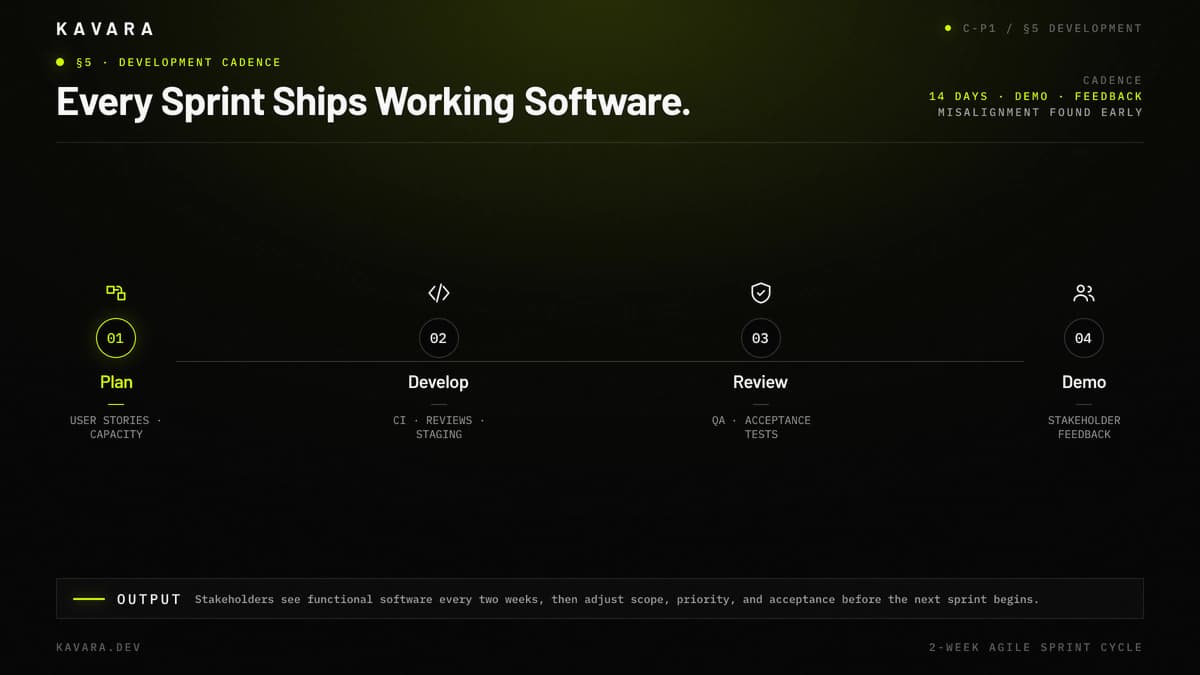
Each sprint begins with sprint planning, where the team selects user stories from the prioritized backlog based on capacity and dependencies. Daily standups keep the team aligned — fifteen-minute check-ins covering progress, blockers, and next steps, conducted asynchronously when distributed teams require schedule flexibility. Development happens with continuous integration: code is reviewed by a second engineer on every pull request, automated tests run on every commit, and merged code deploys to a staging environment daily. Each sprint concludes with a demo session where stakeholders see working features and provide feedback that shapes the next sprint's priorities.
Communication follows a defined cadence throughout the development phase. Weekly status updates summarize progress against the project plan, flag blockers, and outline next-sprint priorities. A shared Slack or Teams channel provides real-time access for questions between scheduled touchpoints. Stakeholders have direct access to the project board (Jira or Linear) for full transparency into what is in progress, what is completed, and what is queued. This agile communication structure ensures you are never more than a few days away from seeing exactly where the project stands.
You receive working software increments every two weeks. You do not wait months to see progress — you see functional features every fourteen days. Between sprints, you make feature priority adjustments, scope trade-off decisions if timeline pressure emerges, and accept or request changes to completed features.
Code quality is enforced through engineering practices, not promises. Every pull request receives a peer code review before merging. Automated unit and integration tests run on every commit through the CI pipeline. These agile practices prevent code quality degradation over the life of the project and ensure that technical debt does not accumulate silently during development.
According to PwC research, Agile projects are approximately 1.5 times more likely to succeed than Waterfall projects. Agile sprints reduce delivery risk when they create real feedback loops: working software, stakeholder review, scope decisions, and visible tradeoffs every two weeks. The benefit is not the agile label. The benefit is that misalignment appears during development rather than at final delivery.
Every feature developed in a sprint passes through quality assurance before it reaches production.
Quality Assurance and Testing
Quality assurance is not a phase that happens after development — it runs in parallel with every sprint and intensifies before launch.
Automated testing verifies the application at three levels. Unit tests verify individual components function correctly in isolation. Integration tests verify that components work together — that the API returns correct data, that the database writes persist, that third-party integrations respond as expected. End-to-end tests simulate real user workflows across the complete application, catching issues that only emerge when all components interact.
Manual testing covers what automation cannot. Edge case testing explores unusual input combinations, error states, and boundary conditions. UX validation ensures the application feels right — not just that it functions correctly. Cross-browser and cross-device testing confirms consistent behavior across Chrome, Safari, Firefox, and Edge on desktop, tablet, and mobile.
Performance testing simulates expected concurrent user volume to verify response times under load. Stress testing identifies breaking points — the user threshold where performance degrades. Response time benchmarks are measured against defined thresholds and documented in the performance report.
Security testing follows our web application security best practices framework, which maps OWASP Top 10 vulnerability standards to industry-specific compliance requirements including SOC 2, HIPAA, and PCI DSS. Authentication and authorization testing verifies that role-based access controls enforce correct permissions. Data encryption verification confirms that sensitive data is protected at rest and in transit. API security testing validates that endpoints resist injection, authentication bypass, and data exposure attacks.
You receive test coverage reports, performance benchmarks, a security assessment, and a categorized bug log with severity classifications. You make bug priority decisions (critical bugs block launch; deferred bugs are scheduled for post-launch sprints), accept performance thresholds, and provide security sign-off.
Our complete quality assurance and testing process guide covers test automation strategy, security testing methodology, and how we define quality metrics for production readiness.
When QA confirms the application meets performance, security, and functional requirements, the project moves to deployment.
Deployment and Launch
Deployment is not a single event — it is a structured sequence of staging validation, production release, and go-live support designed to eliminate launch-day risk.
Before launch, the staging environment mirrors production exactly. Full regression testing runs in staging to catch environment-specific issues. Performance benchmarks are validated against production-equivalent load. A launch checklist covers every operational requirement: DNS configuration, SSL certificates, CDN setup, monitoring and alerting configuration, backup verification, and rollback procedures.
Deployment follows zero-downtime patterns — blue-green or rolling deployments that allow the new version to serve traffic while the previous version remains available for instant rollback. Database migrations execute without service interruption. Feature flags enable controlled rollout — new features can be activated for a subset of users before full release.
During the launch window, the development team is on standby monitoring error rates, response times, and server health in real time. If a critical issue emerges, the team has immediate hotfix capability — or can roll back to the previous stable version within minutes.
You receive a production application accessible to users, monitoring dashboards tracking uptime, performance, and error rates, runbook documentation covering operational procedures, and confirmed DNS and SSL configuration. You approve launch timing and make the go/no-go decision after staging validation confirms readiness.
Launch is not the end of development — it is the beginning of the application's production lifecycle.
Ongoing Support and Iteration
Post-launch custom web application development creates the most value when the application evolves based on real usage data — not when it remains static after launch.
Post-launch support includes application performance monitoring with uptime alerting, error tracking with severity classification, and security patch management as vulnerabilities are disclosed in dependencies and infrastructure. Bug resolution follows SLA-backed response times: critical issues receive same-day response, high-severity issues within 24 hours, and standard issues within the agreed sprint cycle.
Feature iteration continues through the same agile sprint process used during initial development. New features are prioritized based on user feedback, usage analytics, and business objectives — ensuring that post-launch development addresses real needs rather than assumptions.
Infrastructure scaling responds to growth as the user base expands. Database optimization, caching layer implementation, CDN expansion, and load balancing architecture are deployed as traffic patterns demand — not as reactive emergency measures.
Ongoing maintenance and iteration typically costs 15 to 25 percent of the initial build cost annually, covering hosting, security updates, bug fixes, and feature development. These routines define what to expect when working with a development company after launch: clear support ownership, reporting cadence, and prioritization rules for bugs, patches, and feature iteration.
These post-launch routines lead into the practical questions buyers usually ask next: timeline, scope changes, application-type differences, and partner expectations.
How Long Does Web Application Development Take
Web application development typically takes 3 to 12 months from discovery to launch, depending on complexity, scope, and team size.
The useful planning range is not the calendar alone; it is the number of approval cycles, integrations, and testing gates that must be cleared before launch.
MVPs and simple applications require 2 to 4 months across all phases. Mid-complexity applications — SaaS platforms, enterprise portals, analytics dashboards — take 4 to 8 months. Complex enterprise applications with extensive integrations, compliance requirements, and multi-service architecture require 8 to 12 months or more.
Three factors most significantly affect timeline: scope clarity at project start (clear requirements compress every subsequent phase), stakeholder decision speed during review cycles (delayed approvals extend every phase proportionally), and integration complexity with external systems or legacy platforms (each integration adds testing and coordination time). Timeline directly affects cost — our complete cost guide breaks down investment by phase, application type, and team model.
What Happens When Requirements Change During Development
Requirements changes are normal and expected — the agile development process is designed to accommodate them without derailing the project.
Change requests are evaluated for scope, timeline, and budget impact before approval. Small changes that fit within existing sprint capacity are absorbed into upcoming sprints without schedule impact. Significant changes trigger a scope review with updated estimates, timeline adjustments, and stakeholder approval before implementation.
Trade-off decisions keep projects on track: adding scope means either extending the timeline or removing lower-priority features to maintain the original schedule. Because each request is priced against the active backlog, stakeholders can decide whether the change is worth the tradeoff before engineering work begins. The phase-gate model protects against the kind of scope drift that occurs when changes accumulate without impact assessment — every change is evaluated, documented, and approved rather than absorbed silently into the backlog. The practical goal is not preventing change; it is keeping every change visible enough to price, prioritize, or defer before it becomes hidden rework.
How Does the Development Process Differ by Application Type
The seven-phase structure remains consistent across all application types — what changes is the emphasis and duration of specific phases based on the application's requirements.
SaaS platform development requires an extended architecture phase for multi-tenancy design, additional billing integration work during development, and tenant-specific QA testing that verifies data isolation across customer environments. Enterprise portals require a heavier discovery phase for role-based access mapping and SSO integration that adds complexity to the architecture phase. MVP development compresses the timeline across all phases while maintaining architectural quality that supports future scaling — feature prioritization is more aggressive, but the phase-gate checkpoints remain. Dashboards and analytics applications receive deeper architecture treatment for data pipeline design, and performance testing focuses on query optimization and real-time data handling under concurrent user load.
Whatever the application type, we evaluate each build against the same seven phase gates and weight the phases differently — heavier architecture for SaaS and dashboards, a compressed timeline for an MVP — rather than run a different process for each.
What Should You Expect from Your Development Partner
A structured web application development process means specific commitments from your development partner:
- Working software demonstrated every two weeks — not status reports, actual functional features you can interact with and provide feedback on.
- Clear deliverables at every phase gate — documents, prototypes, and artifacts you review and approve before the project proceeds.
- Transparent budget tracking — you know exactly where the project stands against the estimate at all times, not just at the end.
- Defined communication cadence — weekly updates, sprint demos, and a direct channel for questions between scheduled touchpoints.
- Post-launch support commitment — maintenance, security updates, and feature iteration do not stop when the application launches.
Kavara's web application development process delivers on each of these expectations because they are built into the phase-gate structure, not promised as afterthoughts. For broader evaluation frameworks and specific questions to ask when comparing development partners, read our guide on how to choose a web application development company.
Next Steps
A structured development process is what separates projects that launch on time and on budget from projects that spiral. Phase-gate checkpoints, stakeholder transparency, and agile iteration protect both quality and investment throughout the web application development process. We build web applications that are production-grade from day one — architected to scale, tested under load, integrated with the systems they depend on, and deployed with monitoring from the first release.
Explore our custom web app development services to see the full range of applications we build and launch through this process. Reach out to Kavara to start a discovery conversation and receive a scoped estimate with phase-by-phase timeline and deliverables.