Web Application Architecture Guide for Business Applications
Web application architecture is the structural blueprint that determines how an application handles user requests, processes data, scales under load, and evolves over its production lifetime. Architecture decisions made in the first weeks of a project determine the application's capabilities and constraints for years. A custom web application development project can have strong code quality and still fail if the architecture cannot support the business model, user volume, data relationships, or integration requirements.
The difference between an application that scales smoothly from 100 to 10,000 users and one that requires costly re-architecture at 1,000 users comes down to planning decisions, not only code written during development. A database chosen for speed during an MVP may create reporting limits later. A microservices architecture chosen too early may slow a small team with unnecessary DevOps overhead. A frontend rendering model chosen without SEO requirements may limit acquisition channels after launch.
This web application architecture guide covers monolithic vs microservices patterns, frontend architecture, backend and API design, database selection, infrastructure, deployment patterns, and the business requirements that should drive each choice. The goal is not to name trendy technologies. The goal is to explain when and why each architecture decision fits a production business application.
Kavara writes from the practitioner perspective of engineers who build web applications for mid-market companies: simple enough to launch, disciplined enough to scale, and explicit enough for another qualified team to maintain. Architecture is the operating model for how the application will build, launch, scale, integrate, deploy, and remain maintainable after real users depend on it.
For custom web application development, architecture is where business intent becomes technical constraint. Production-grade web applications are defined by whether the architecture lets the business build web applications users trust, teams maintain, and future requirements extend without forced rebuilds.
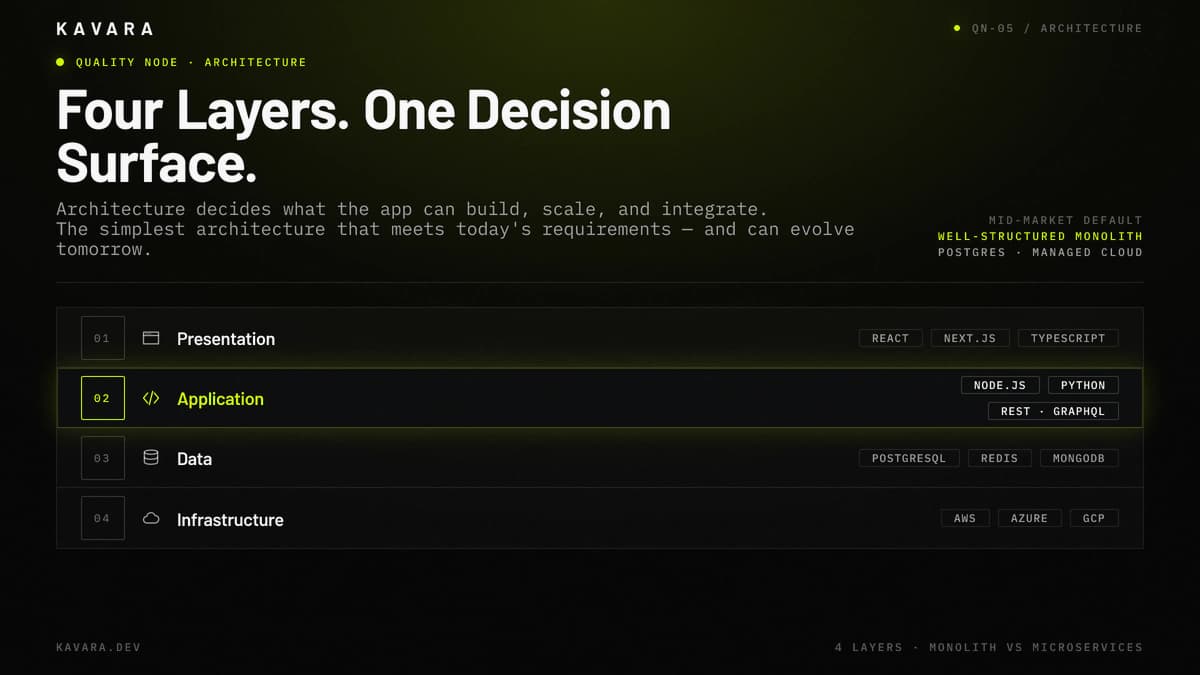
The diagram below shows the four-tier layer model with canonical mid-market choices.
What Is Web Application Architecture
Web application architecture is the organizational structure of an application's components: how the frontend communicates with the backend, how the backend processes requests and manages data, how the database stores and retrieves information, and how infrastructure supports all of it in production. The architecture defines the application's boundaries before implementation begins.
Most business applications use four architecture layers:
- Presentation Layer - The frontend layer is what users see and interact with: screens, forms, navigation, dashboards, charts, tables, and responsive layouts.
- Application Layer - The backend and API layer handles business logic, authentication, authorization, workflow execution, integrations, and data processing.
- Data Layer - The database layer stores persistent data, search indexes, cached data, session state, and reporting structures.
- Infrastructure Layer - The infrastructure layer provides cloud hosting, deployment pipelines, monitoring, backups, security controls, and scaling capacity.
Microsoft Azure Architecture Center's N-tier architecture guidance uses the same operating principle: layers separate responsibilities and manage dependencies, while higher layers use services exposed by lower layers.
For business leaders, this layer model makes architecture review concrete. A proposal should explain how users move through the presentation layer, how the application layer enforces business rules, how the data layer protects records, and how the infrastructure layer keeps the system available after launch. Architecture decisions at each layer interact. A frontend built with React communicates differently with the backend than one built with server-rendered templates. A PostgreSQL database handles relationships differently than MongoDB. Infrastructure choices affect security, deployment speed, scalability planning, and operating cost. These interactions compound, which is why web application architecture must be planned as an integrated system rather than as four independent technology choices.
The most consequential architecture decision for most business applications is the structural pattern: monolithic or microservices.
Monolithic vs Microservices: Choosing the Right Pattern
Monolithic architecture deploys the entire application as a single unit. Microservices architecture decomposes the application into independent services that communicate via APIs. Neither pattern is universally better. The right choice depends on team size, application complexity, deployment needs, and scaling requirements.
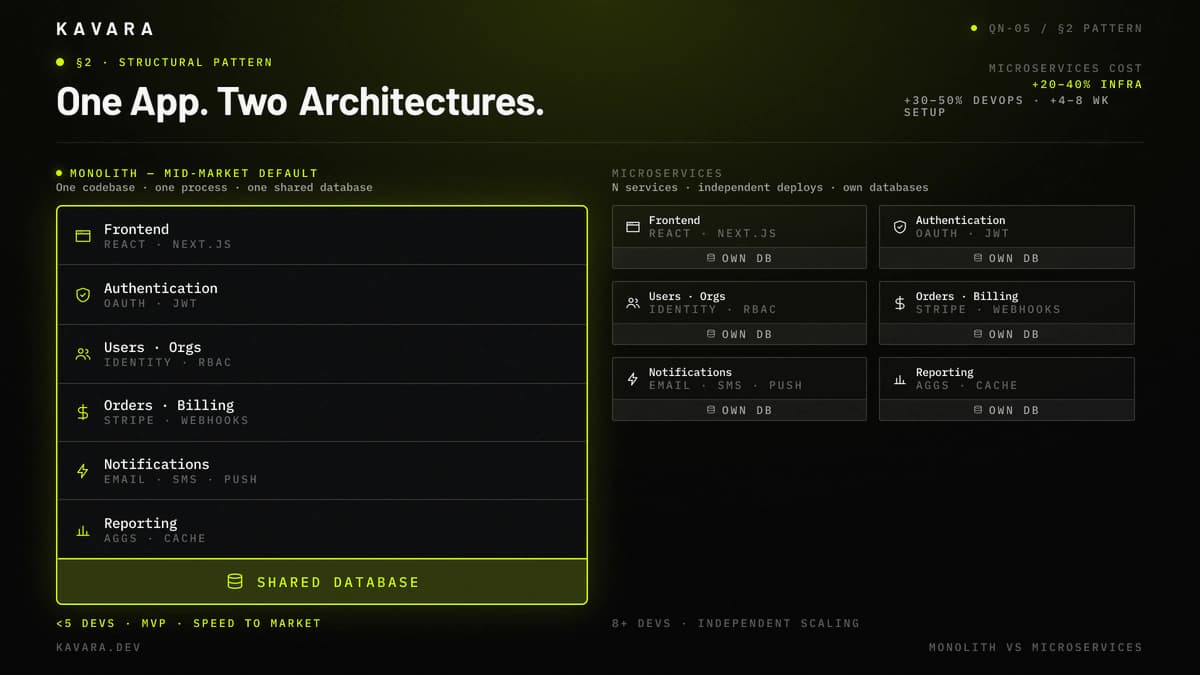
The diagram below shows the same six application functions rendered first as one stacked deployment unit (monolith) and then as six independent grid blocks (microservices).
| Factor | Monolithic | Microservices |
|---|---|---|
| Best for | MVPs, small teams, fewer than 5 developers | Large teams, complex domains, independent scaling |
| Deployment | Single unit, simpler release process | Independent services, more flexible but more complex |
| Scaling | Scale the entire application | Scale individual services |
| Development speed | Faster initially | Faster at scale when teams own services |
| Complexity | Lower initially, can grow over time | Higher initially, manageable with mature operations |
| DevOps overhead | Minimal | Significant: orchestration, monitoring, tracing |
| Cost | Lower initial cost, higher scaling tradeoffs | Higher initial cost, lower cost for targeted scaling |
Choose monolithic architecture when the team is small, the application is launching for the first time, speed to market matters, and the application can run as a single deployment unit. Most mid-market custom web application development projects should start as a well-structured monolith because a monolith reduces infrastructure cost, simplifies debugging, and lets a small team move faster.
Choose microservices when multiple teams need to deploy independently, different components require independent scaling, and the application has grown to the point where a monolith slows development velocity. Martin Fowler's canonical microservices article describes microservice architecture as a suite of small services running in their own processes and communicating through lightweight mechanisms, often HTTP APIs. That definition matters because independent deployment, service boundaries, and API communication are the point, not the number of services.
Consider a modular monolith when the business needs clean internal boundaries without distributed-systems overhead. A modular monolith organizes code into bounded domains with separate data access, business logic, and internal interfaces. This structure allows a future extraction to microservices if business requirements later justify it.
SaaS platforms with multi-tenant architecture are the most common mid-market application type where microservices may be justified. SaaS platform development requires decisions about tenant isolation, billing services, user provisioning, and scaling patterns alongside the monolith vs microservices choice. The key insight is practical: a well-structured monolith is usually the right starting architecture. Microservices introduce container orchestration, service discovery, distributed tracing, network failure handling, and service-level monitoring. That complexity is justified only when independent scaling or team autonomy creates measurable business value.
The structural pattern determines how the application is organized. Frontend architecture determines how users experience it.
Frontend Architecture
Frontend architecture determines how the user interface renders, responds to interaction, and communicates with the backend. The three primary approaches differ in rendering strategy, SEO capability, hosting complexity, and user experience.
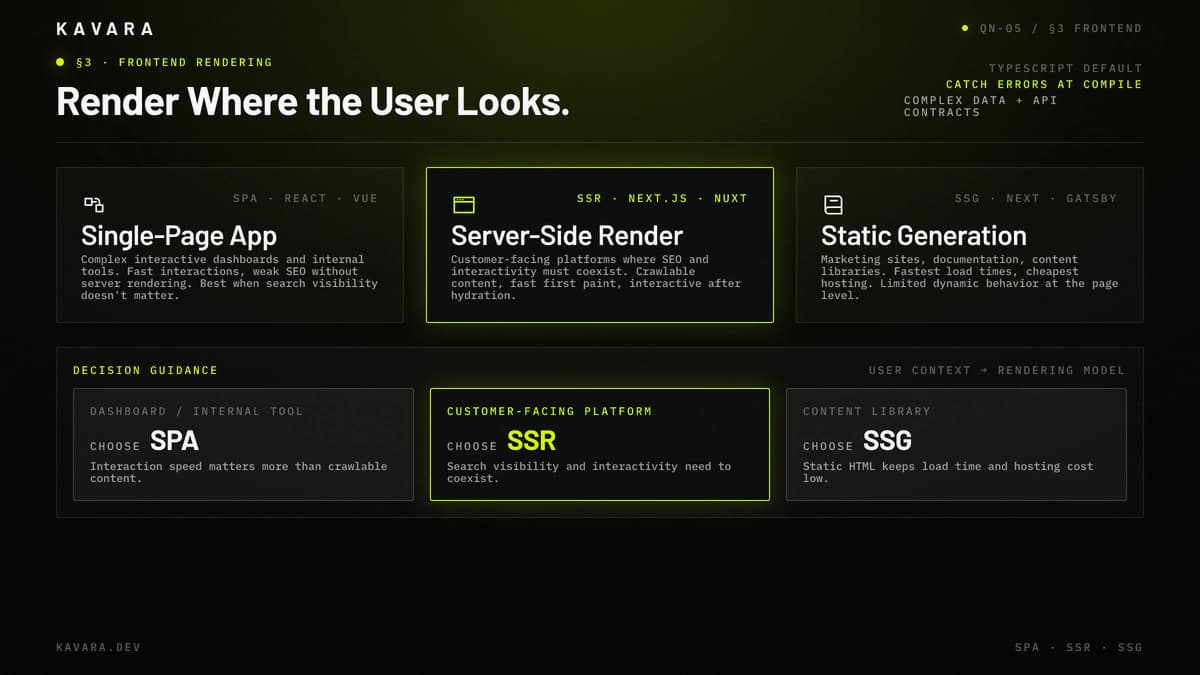
The comparison below positions the three frontend rendering models — SPA, SSR, SSG — against the user-facing context each one serves best.
| Approach | Technologies | Best For | Trade-off |
|---|---|---|---|
| Single-Page App | React, Vue.js | Complex interactive dashboards, data-heavy internal tools | Fast interactions, poor SEO without server rendering |
| Server-Side Rendering | Next.js, Nuxt.js | SEO-critical applications, content plus functionality | Better SEO, more server workload |
| Static Site Generation | Next.js, Gatsby | Marketing sites, documentation, content libraries | Fastest load times, limited dynamic behavior |
A dashboard or internal operations tool usually fits a single-page app because SEO does not matter and interaction speed does. A customer-facing platform that needs search visibility usually fits server-side rendering because SEO and interactivity must coexist. A content-heavy site with limited dynamic behavior usually fits static generation because speed and hosting simplicity matter most.
React and Next.js are common choices for production frontend architecture because they support component-based development, TypeScript, server rendering, static generation, and API-backed interaction patterns. Next.js documentation states that pre-rendering can improve performance and SEO, and separates Static Generation, which generates HTML at build time, from Server-side Rendering, which generates HTML on each request. TypeScript's handbook describes TypeScript as a static type checker, which is why it catches type errors before execution in applications with complex data models and API contracts.
Frontend architecture also includes state management, design-system structure, accessibility, and performance strategy. A dashboard with filters, permissions, and saved views needs more state discipline than a marketing site. A customer portal with forms and approvals needs reusable components that behave consistently across the application.
Frontend architecture should be chosen based on user behavior. Users who complete complex workflows need stable state management, predictable forms, and fast updates. Users who discover the application through search need crawlable content and fast first-page load. The frontend presents data. The backend processes it.
Backend and API Architecture
Backend architecture determines how business logic runs, how APIs expose functionality, how authentication works, and how the application integrates with external systems. The backend is the control center of the application because it enforces business rules, processes data, and protects access to the database.
| Language / Runtime | Best For | Why |
|---|---|---|
| Node.js | Real-time apps, API-first architecture, teams using JavaScript across the stack | Non-blocking I/O handles concurrent connections, and one language can span frontend and backend |
| Python | AI/ML integration, data processing, scientific computing | Machine-learning and data libraries support model inference, transformation, and experimentation |
| Go | High-performance services and system-level tools | Compiled speed, strong concurrency, and low memory footprint fit high-throughput services |
API design should match the product's access pattern. REST works for most business applications because the pattern is mature, cacheable, well understood, and supported by extensive tooling. GraphQL fits cases where the frontend needs flexible queries across related entities and where over-fetching or under-fetching data creates real friction. WebSockets fit real-time features such as chat, notifications, live dashboards, collaboration, or operational monitoring.
Node.js documentation explains that its standard-library I/O methods provide asynchronous, non-blocking versions, which is why Node fits API servers with many concurrent network calls.
Authentication architecture also shapes the backend. Session-based authentication fits traditional web applications. JWTs, or JSON Web Tokens, fit API-first and mobile-supporting architectures when token-based access is needed. OAuth 2.0 and OpenID Connect fit SSO, enterprise login, and third-party authentication. Managed services such as Auth0 or AWS Cognito reduce development time but add vendor dependency and per-user cost.
The OpenID Connect Core specification defines OpenID Connect as an identity layer on top of OAuth 2.0, which is why OIDC, not OAuth alone, is the usual enterprise-login architecture term.
Python's dominance in AI and machine learning makes it a natural backend choice for applications integrating model inference or data pipelines. AI implementation often uses Python-based inference APIs, vector search, scheduled data processing, and model monitoring alongside a broader application backend.
Backend and API architecture should stay boring unless the business requirement demands otherwise. Boring architecture is not weak architecture. It means the system uses well-understood patterns that other engineers can maintain after launch.
The backend processes requests. The database stores the data those requests operate on.
Database Architecture
Database architecture determines how data is stored, queried, updated, cached, secured, backed up, and analyzed. The database decision matters because the data model is harder to change than the frontend framework or cloud provider once the application is live.
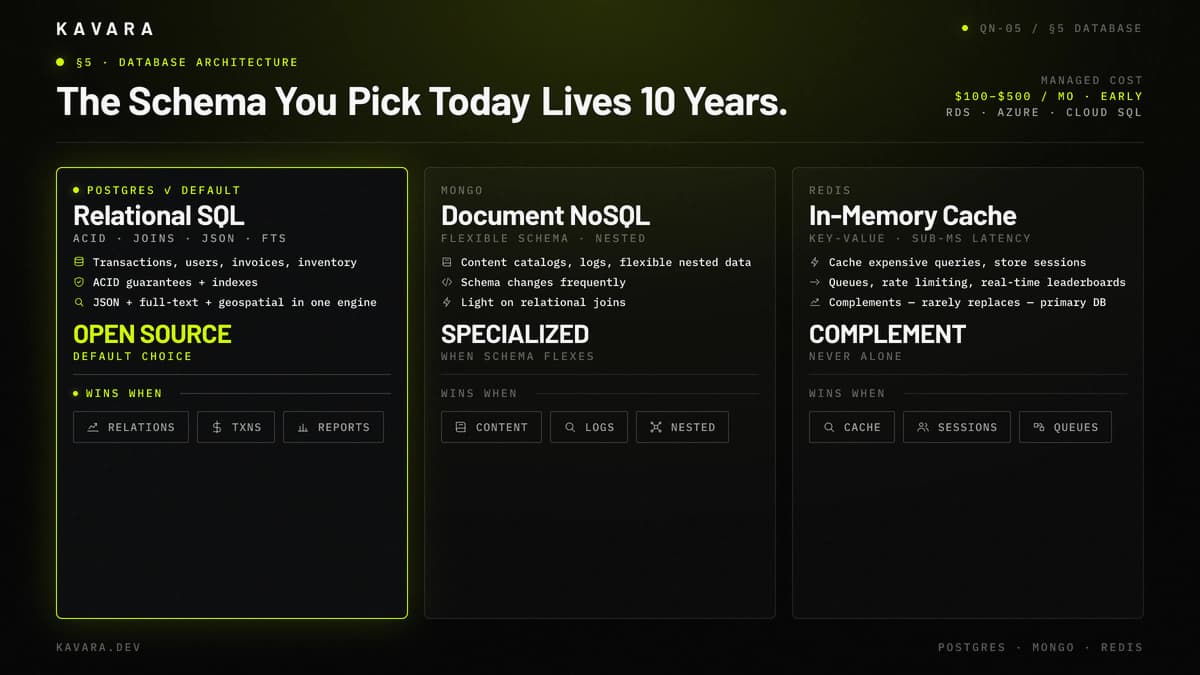
The decision cards below position PostgreSQL, MongoDB, and Redis against their primary use cases and best-fit categories.
| Database | Type | Best For | When Not to Use |
|---|---|---|---|
| PostgreSQL | Relational SQL | Structured data, complex queries, ACID transactions, most business apps | Massive horizontal scale with weak relational needs |
| MongoDB | Document NoSQL | Flexible schemas, content catalogs, rapid prototyping | Complex relational queries or strict transaction requirements |
| Redis | In-memory key-value | Caching, session storage, queues, rate limiting | Persistent primary storage or complex queries |
PostgreSQL is the right default for most mid-market business applications. Financial transactions, user management, order processing, approvals, permissions, subscriptions, invoices, inventory, and customer records are relational problems. PostgreSQL documentation describes transactions as all-or-nothing units whose committed updates are permanently recorded, and its JSON, jsonb, and full-text-search documentation explains why PostgreSQL can support relational records, structured documents, indexes, and search before a separate document database is justified.
MongoDB fits when the data is document-shaped, the schema changes frequently, and the application does not rely heavily on relational joins. MongoDB documentation describes its model as flexible: documents in one collection do not need the same fields, and field types can vary by document. It remains a poor default for transaction-heavy business applications where relationships and data integrity matter more than schema flexibility.
Redis usually complements a primary database. It can cache expensive queries, store sessions, support rate limiting, power real-time leaderboards, and reduce database load for read-heavy patterns. Redis rarely replaces PostgreSQL or MongoDB as the primary system of record.
Dashboard and analytics applications place heavier demand on database architecture than simple CRUD systems. Analytical queries aggregating millions of rows may require materialized views, pre-aggregation, denormalized reporting tables, and caching strategies that differ from transactional patterns. For deeper data-pipeline planning, dashboard and analytics development covers the architecture between operational databases and visualization layers.
The data layer stores information. Infrastructure makes everything accessible, reliable, and secure in production.
Infrastructure and Deployment Architecture
Infrastructure architecture determines how the application runs in production: cloud provider, environments, deployment pipeline, monitoring, backups, security controls, and scaling patterns. Infrastructure is where architecture becomes operational reality.
AWS is the default cloud provider for many business applications because it has the broadest service catalog and mature managed services. Azure fits organizations already standardized on Microsoft identity, Microsoft 365, and enterprise procurement. Google Cloud fits AI/ML-heavy workloads, data-intensive use cases, and teams already invested in Google tooling. Multi-cloud adds complexity without clear benefit for most mid-market applications.
CI/CD, or continuous integration and continuous deployment, should automate build, test, and deploy steps. A practical pipeline runs automated tests on every code change, deploys passing code to staging, and requires manual approval for production. This pipeline removes "works on my machine" deployment risk and makes releases repeatable.
Environment strategy should include development, staging, and production. Development environments serve individual developers. Staging should mirror production configuration: database type, security settings, API integrations, environment variables, and deployment process. If staging does not mirror production, testing becomes unreliable.
Monitoring and observability should be configured before launch. Application performance monitoring tracks response time, throughput, and bottlenecks. Error tracking captures exceptions and stack traces. Uptime monitoring validates availability. Log aggregation supports incident investigation. AWS Well-Architected guidance emphasizes using observability data to improve performance, reliability, and cost, which aligns with how production web application architecture should operate.
Scalability patterns depend on the bottleneck. Horizontal scaling adds servers behind a load balancer for the web and API tier. Read replicas support database read scaling. A CDN reduces global latency for static assets. Redis caching reduces repeated expensive queries. A scalable infrastructure plan identifies the likely bottleneck before traffic exposes it. Infrastructure security, including encryption, network segmentation, access control, and vulnerability scanning, is covered in the web application security guide.
Infrastructure decisions work only when their cost and timeline impact is understood before development starts.
How Architecture Decisions Affect Cost and Timeline
Architecture decisions are not just technical choices. They are business decisions with direct cost and timeline consequences. In custom web application development, a simple architecture can launch faster but may need later refactoring, while a complex architecture can support future scale but may add cost before the business needs that scale.
Microservices can add 20% to 40% to infrastructure cost because orchestration, service monitoring, distributed tracing, API gateways, and deployment automation become necessary. Microservices can also add 30% to 50% to DevOps effort because every service needs build pipelines, environments, logs, alerts, and deployment rules. The added cost is justified only when independent scaling or team autonomy creates more business value than the operational burden.
Database choices also affect cost. PostgreSQL is open source, but managed PostgreSQL on AWS RDS, Azure Database, or Google Cloud SQL may cost $100 to $500 per month for early production workloads. That managed cost is usually lower than the engineering time required to self-host backups, failover, patching, monitoring, and recovery.
Authentication choices affect both budget and risk. Managed authentication services may charge per monthly active user, while custom authentication may require $15,000 to $30,000 in implementation and long-term security maintenance. For applications with modest user counts, managed authentication is often cheaper and safer.
Architecture decisions are made during the planning phase of the Kavara development process, and their complexity cascades through development, QA, and deployment timelines. A microservices architecture can add 4 to 8 weeks of setup that a monolith does not require.
For detailed cost ranges showing how architecture complexity affects total project investment, see the web application development cost guide.
Architecture cost is easiest to control when the team adds complexity only after a business requirement justifies it; serverless architecture is one way to add that complexity selectively.
What Is Serverless Architecture and When Should You Use It
Serverless architecture runs application code in cloud functions that execute on demand without persistent server infrastructure to manage. AWS Lambda documentation describes Lambda as a compute service that runs code without requiring the team to manage servers, while AWS manages capacity provisioning, automatic scaling, logging, and server maintenance.
Serverless works well for event-driven workloads such as file processing, webhook handling, background jobs, email sending, report generation, and bursty API endpoints. It works poorly for applications requiring persistent connections, long-running processes, or consistently low-latency responses where cold starts and runtime limits create user experience risk.
The business advantage is operating simplicity for irregular workloads. The tradeoff is runtime constraint and cloud-provider coupling. A serverless function is excellent for resizing uploaded files or processing a payment webhook, but it is usually a poor fit for the core request path of a complex business application.
Serverless works best as a complement to traditional architecture. A conventional API server can handle core application workflows while serverless functions handle asynchronous tasks around the edges, and a proposal should explain that boundary clearly.
How to Evaluate Architecture in a Development Proposal
Architecture in a development proposal should be evaluated by asking whether each technical choice is tied to the project's business requirements. Five questions expose whether the proposed architecture is sound:
- Why this structural pattern, monolith or microservices?
- Why this database, PostgreSQL, MongoDB, or another data store?
- How does the architecture scale when users, transactions, or data volume increase?
- What happens when an API, queue, database, or payment provider fails?
- Can another team maintain this architecture using mainstream documentation and skills?
The answer should reference the specific project, not the team's default preference. Architecture evaluation is one component of the five-criteria framework in the guide to how to choose a development company, which covers technical expertise, process transparency, and team composition alongside architecture.
A strong proposal should also identify tradeoffs. If a team recommends microservices, the proposal should explain the added monitoring and deployment cost. If a team recommends a monolith, the proposal should explain how module boundaries will preserve future migration options.
When Should You Migrate From Monolithic to Microservices
Migrate from monolithic to microservices when, and only when, the monolith's limitations create measurable business cost. Microservices should solve a real delivery, scaling, or team autonomy problem rather than satisfy an architecture preference.
Migration signals include limited deployment frequency, full-application scaling when only one component needs capacity, slower development velocity, and 8 to 10 or more developers working in the same codebase.
Do not rewrite everything at once. Use the strangler fig pattern: extract one service at a time, starting with the component that benefits most from independent scaling or deployment. Keep the monolith running while services are extracted incrementally.
Web application architecture decisions made early determine an application's capabilities and constraints for years. Most mid-market applications should start with a well-structured monolith, use PostgreSQL as the default database, deploy on managed cloud infrastructure, and add complexity only when business requirements justify it. Microservices, NoSQL, serverless, and multi-cloud are tools, not goals.
Good architecture is not the most sophisticated architecture. In custom web application development, good architecture is the simplest architecture that meets requirements today and can evolve tomorrow. Kavara's web application development services apply that standard to production systems. Explore Kavara application services to see how Kavara architects production applications, or request a scoping conversation to discuss your application's architecture requirements.