Enterprise Web Portal Development
Enterprise portal development is the process of building secure, role-based web platforms that centralize communication, data access, and operational workflows for specific stakeholder groups — clients, employees, vendors, or partners. Unlike standard web applications that often serve one primary user type, enterprise portals serve multiple stakeholder groups through shared infrastructure while showing each group different data, features, documents, and workflows based on permission level.
Portal security and access control are not secondary features. Security defines the foundation because a portal must expose business data to the right users without exposing the wrong records, files, dashboards, or actions. Role-based access control, SSO integration, audit logging, and permission management determine whether the portal can launch safely across organizational boundaries.
Kavara builds client portals, employee portals, and vendor or partner portals as a focused branch of custom web application development for mid-market companies that need secure access layers over existing enterprise systems. These portals integrate with ERP, CRM, HRIS, accounting, document storage, and operational platforms rather than replacing those systems. According to Okta's Businesses at Work 2025 report, the global average number of apps per customer reached 101, which explains why mid-market companies need unified portal access instead of another disconnected login.
Our web portal development services focus on production architecture: SSO authentication, granular permission matrices, document management, workflow automation, and API-based integration with the systems your team already runs. We build, launch, and scale enterprise portals that connect people, data, and workflows without forcing the business to rebuild its operational stack.
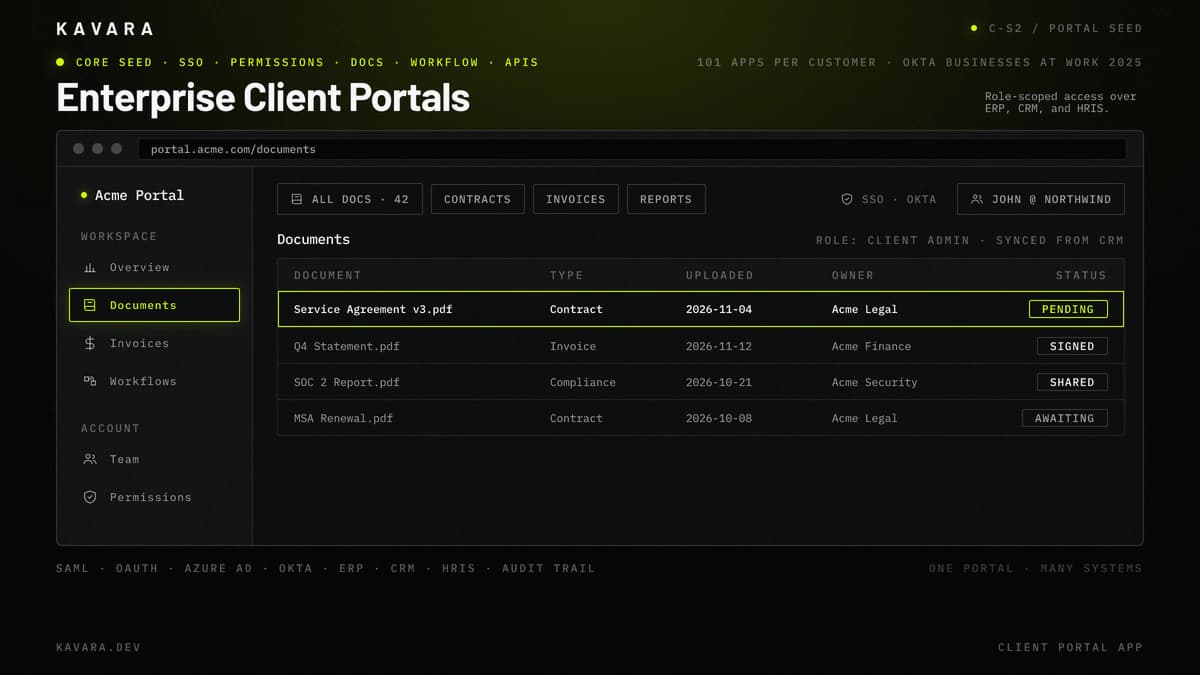
The mockup below shows an enterprise client portal with role-scoped documents, status pills, and SSO user context.
What Is Enterprise Portal Development
Enterprise portal development is the specialized practice of building secure web platforms that provide different stakeholder groups with role-based access to shared business information, documents, workflows, and communication tools. Enterprise portals differ because architecture must support multiple user groups, permission-scoped experiences, and enterprise integration from the first decision.
A standard web application typically serves one primary user type through a consistent feature set. A portal serves clients, employees, vendors, partners, administrators, and support teams through one platform while each group sees different navigation, data, documents, and actions. Role-based access control is the authorization model that maps each role to permitted features, records, documents, and field-level visibility.
Enterprise portal development falls within the broader category of custom web application development services, which also encompasses SaaS platforms, dashboards, MVPs, and enterprise software. Portals are access-first systems: they centralize stakeholder interaction while ERP, CRM, HRIS, and operational systems continue to own the source data.
Enterprise portals must integrate with ERP, CRM, HRIS, accounting, or operational systems while meeting security standards such as SSO integration, MFA, audit logging, and scalable permission management. They must also scale to hundreds or thousands of users across organizational boundaries without weakening access controls.
Enterprise portal development shares foundational engineering practices with all custom software development, but portal projects add specialized architecture for multi-stakeholder access control and enterprise integration. Those requirements make permission management and system connectivity central to the build, not late-stage enhancements.
A portal is still a production web application, but its success depends on access design more than feature volume. Kavara treats portal development as custom web application development for controlled access. The goal is direct: build web applications that expose the right data to the right stakeholder without weakening the underlying business systems.
Portal architecture requirements differ significantly depending on which stakeholder groups the portal serves — clients, employees, or vendors each bring distinct security, access, and integration demands.
Types of Enterprise Portals We Build
We build three primary types of enterprise portals, each serving different stakeholder groups with distinct security, integration, and workflow requirements:
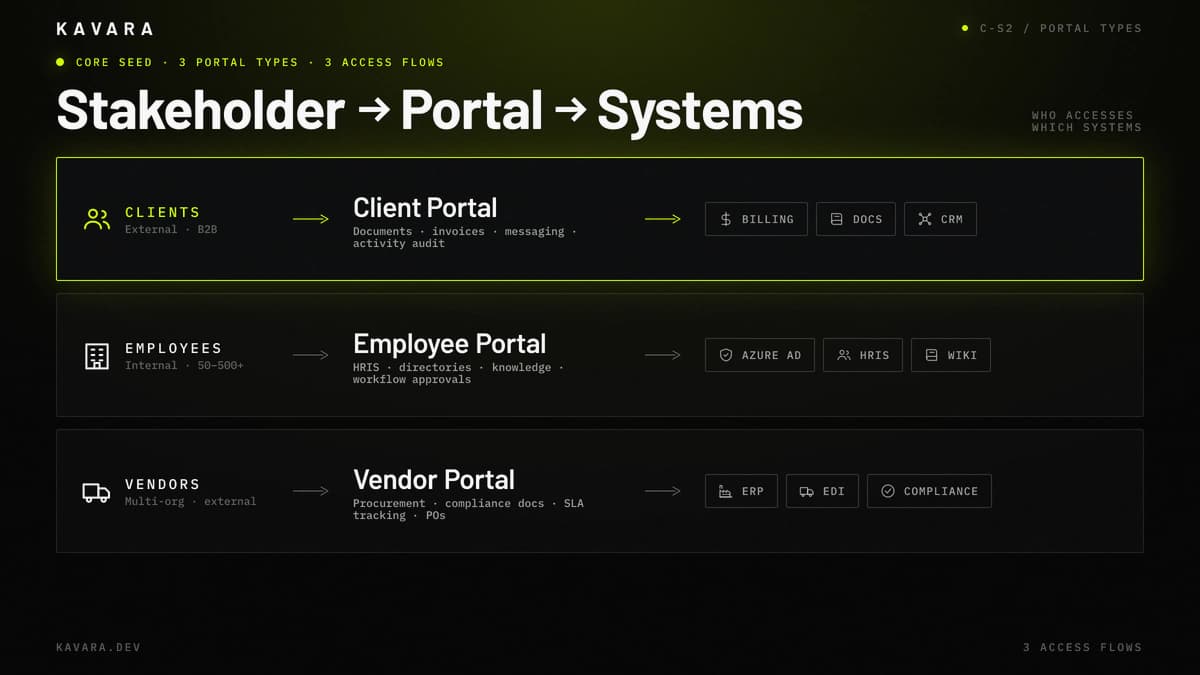
- Client Portals — Client portals are external-facing platforms where clients log in to view project status, access documents, review invoices, communicate with their account team, and manage their relationship with your organization. Client portal architecture usually includes secure document sharing with version control, billing integration, account-level dashboards, secure messaging, and activity audit trails that show who accessed what and when. Professional services firms, financial services companies, healthcare organizations, and B2B service providers use client portals to reduce email-based coordination and give clients a reliable access point for relationship-specific information. Our client portal development services cover document sharing, billing integration, and secure communication for professional services and regulated industries.
- Employee Portals and Intranets — Employee portals and intranets are internal platforms that centralize HR self-service, knowledge bases, internal communication, workflow approvals, policy documents, and operational tools. Employee portal architecture typically includes HRIS integration, organizational directories, document management, approval workflow engines, role-specific dashboards, and SSO with corporate identity providers such as Azure AD or Okta. Mid-market companies with 50 to 500 or more employees use employee portals when distributed teams need one secure place to find information, complete internal requests, and access operational workflows. Our employee portal and intranet development integrates with existing HR systems and corporate identity providers.
- Vendor and Partner Portals — Vendor and partner portals are external-facing platforms for procurement, document exchange, compliance tracking, performance monitoring, and supply chain coordination. Vendor portal architecture requires multi-organization data management, granular access control across organizational boundaries, compliance document workflows, SLA tracking dashboards, and integration with procurement, ERP, or warehouse systems. Manufacturing, distribution, logistics, and supply chain organizations use vendor portals to reduce manual procurement coordination, standardize compliance documentation, and give partners controlled access to operational data. Our vendor and partner portal development handles multi-organization data management and compliance tracking across organizational boundaries.
All three portal types share a common architectural foundation — role-based access control, SSO integration, and enterprise system connectivity — but the depth and configuration of each layer varies by portal purpose and user base. Kavara scopes portal development services around that portal type first because client, employee, and vendor users each create different access risks. According to Verizon's 2025 Data Breach Investigations Report, 88% of basic web application attacks involved stolen credentials, so portal access governance must be designed per user group. The portal model determines which integrations matter, which documents need protection, and which workflows should be automated before launch.
Portal Architecture: Security, Access Control, and Integration
Portal architecture is defined by three requirements that standard web applications rarely face at the same depth: granular access control across multiple user types, SSO integration with existing identity providers, and real-time data synchronization with enterprise systems.
The architecture diagram below maps the four portal security layers — SSO identity, RBAC enforcement, integration, and document permission — as one access-control stack.
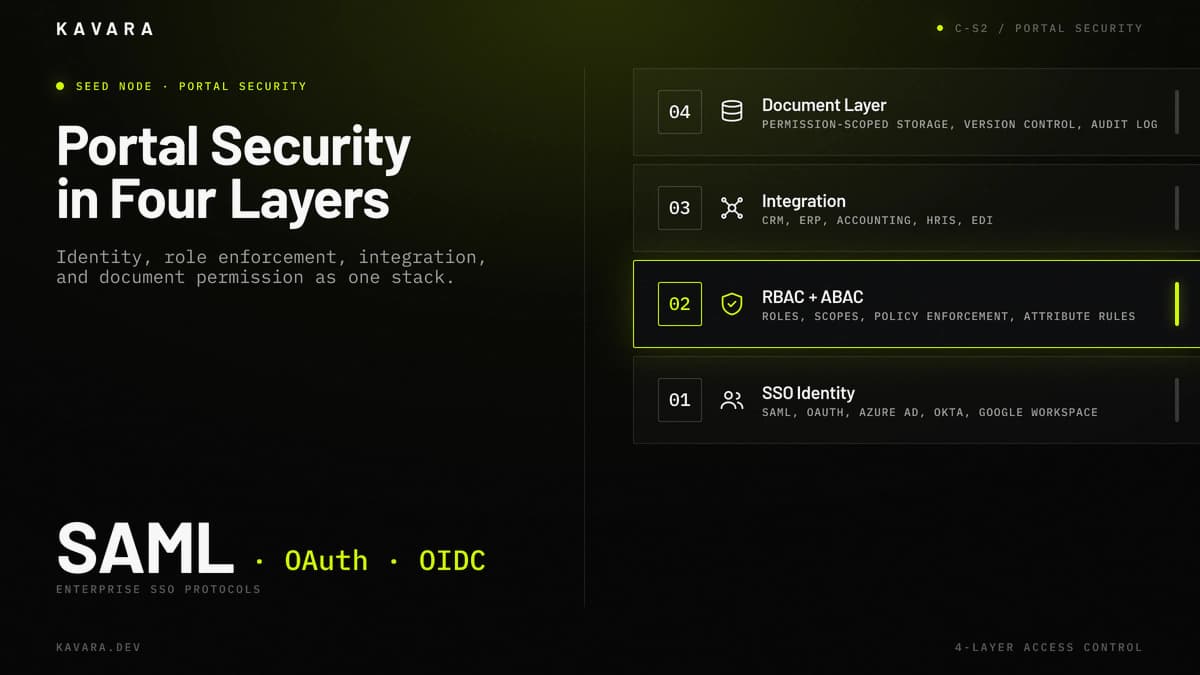
Role-based access control maps user roles to features, data views, documents, and permitted actions. Portal RBAC extends beyond "admin versus user" because client, internal, support, vendor, and contributor roles operate under different visibility rules. When permissions depend on organization, department, or record ownership, we extend RBAC with attribute-based access control (ABAC). Portal security architecture follows our web application security best practices framework for mapping authentication and authorization to compliance standards.
SSO integration connects the portal to identity providers such as Azure AD, Okta, Google Workspace, or another SAML 2.0, OAuth 2.0, or OpenID Connect (OIDC) provider. Enterprise clients expect existing credentials, MFA policies, and session rules. Verizon's 2025 Data Breach Investigations Report identified credential abuse as one of the leading initial attack vectors, which is why portal authentication must be engineered as infrastructure.
Enterprise system integration connects the portal to ERP, CRM, HRIS, accounting, document storage, and operational systems. The portal is a window into existing systems, so the integration layer determines whether portal data matches operational reality. Each connected system needs API design, middleware, and error handling that keep the portal accurate when upstream systems change.
Document management gives users permission-scoped access to files, versions, uploads, downloads, retention policies, and audit trails. Workflow automation moves requests through approval chains, notification rules, escalation paths, and task assignments without email coordination. IBM's 2025 Cost of a Data Breach Report reported a global average breach cost of $4.44 million, so portal document access and workflow permissions need auditability from launch.
The five portal architecture layers are:
| Architecture Layer | Portal Function | Key Requirements |
|---|---|---|
| Role-Based Access Control | Maps roles to features, records, documents, and actions | Organization scopes, document permissions, ABAC rules |
| SSO and Authentication | Connects to corporate identity providers | SAML 2.0, OAuth 2.0, OIDC, MFA, session management |
| Enterprise System Integration | Synchronizes portal data with ERP, CRM, and HRIS | APIs, data transformation, error handling, retry logic |
| Document Management | Controls permission-scoped file access and history | Version control, audit trails, retention policies, virus scanning |
| Workflow Automation | Routes requests through approvals and notifications | Approval chains, escalation rules, admin-managed routing |
These layers are engineered together: RBAC is enforceable only when SSO authenticates the user, integration delivers the right data, and document and workflow controls respect the same role boundaries. For broader database, monolith-versus-microservice, and scalability decisions, see our web application architecture guide.
Building this architecture requires a development process adapted for the security, integration, and access control demands that portals impose at every phase.
Our Portal Development Process
We build enterprise portals through our structured seven-phase development process, adapted for the security, integration, and access control requirements that portals demand at every phase. Integration is where portal projects most often stall: MuleSoft's 2025 Connectivity Benchmark Report found that the average enterprise runs 897 applications but only 29% are integrated, so portal delivery depends on disciplined integration.
- Discovery — Discovery maps every stakeholder group, role, permission boundary, and enterprise system the portal must connect to. The discovery phase also assesses compliance requirements such as HIPAA, SOC 2, PCI, or FERPA and produces an initial permission matrix before design begins.
- Design — Design creates role-specific UX and UI flows because clients, vendors, employees, and administrators should not see the same interface. Portal design includes document management workflows, dashboards by role, request flows, and notification states for each stakeholder group.
- Architecture — Architecture defines the SSO strategy, RBAC schema, integration approach, document storage model, and workflow engine. This phase determines which identity providers, APIs, middleware patterns, and data synchronization rules support the portal after launch.
- Development — Development proceeds through integration sprints that connect ERP, CRM, HRIS, accounting, and document systems to the portal. Development also implements role-based access control, document versioning, workflow automation, notification logic, and permission-tested user interfaces.
- Quality Assurance — QA verifies that each role sees only permitted data, documents, features, and actions. Portal QA includes cross-role access testing, SSO testing, enterprise integration testing, regression testing, and security testing focused on access boundaries.
- Deployment — Deployment configures production SSO with the client's identity provider, migrates data from legacy portals or manual processes, provisions initial user groups, and launches monitoring for integrations and access events.
- Support — Support adjusts permissions as roles evolve, maintains integrations as connected systems update their APIs, onboards new user groups, and improves workflows after real usage data exposes friction.
Technology selection for portals prioritizes security infrastructure, integration capability, and long-term maintainability.
Portal Technology Stack
Technology selection for enterprise portals prioritizes security infrastructure, integration capability, and long-term maintainability over cutting-edge frameworks.
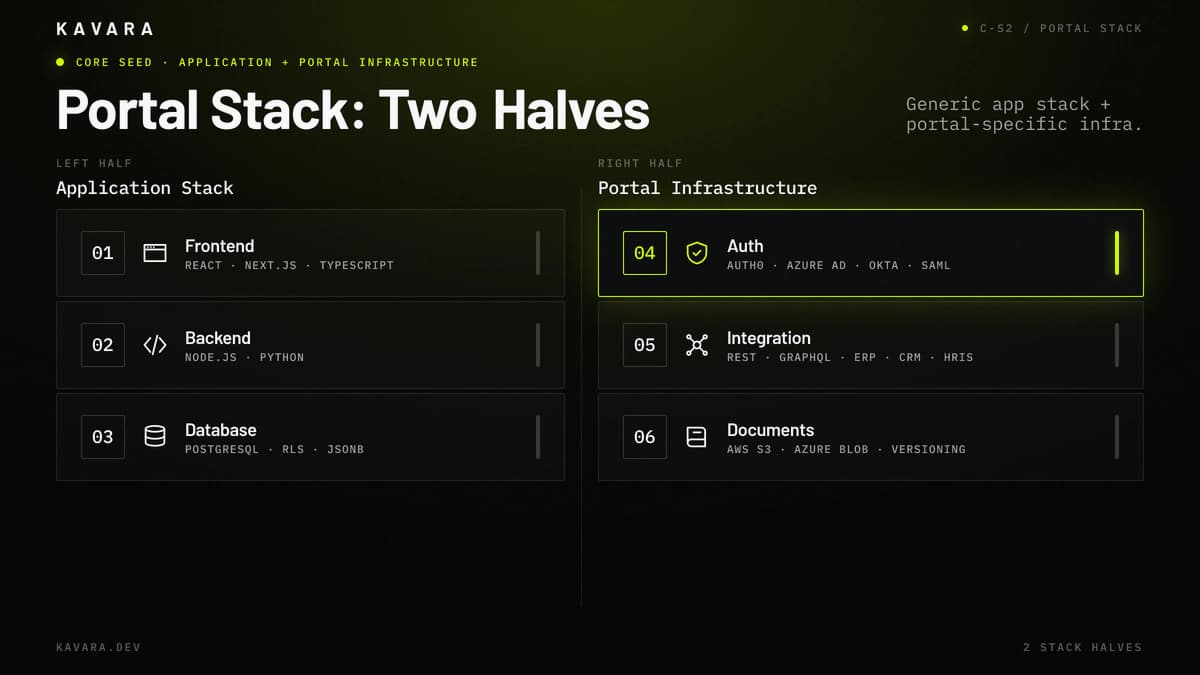
The diagram below splits the portal technology stack into the generic application half and the portal-specific infrastructure half.
| Layer | Technologies | Portal-Specific Rationale |
|---|---|---|
| Frontend | React, Next.js, TypeScript | Component-based architecture supports role-specific views and permission-driven UI rendering |
| Backend | Node.js, Python | Node.js supports real-time notifications and updates; Python supports complex integration logic |
| Database | PostgreSQL | Row-level security supports permission-scoped queries, while JSONB supports flexible document metadata |
| Auth | Auth0, Azure AD, Okta | SAML/OAuth SSO supports corporate identity providers, MFA, and session management |
| Integration | Custom APIs, middleware | REST and GraphQL APIs connect ERP, CRM, and HRIS platforms with transformation and error handling |
| Document Storage | AWS S3, Azure Blob | Version-controlled storage supports permission-scoped access and audit logging |
| Cloud | AWS, Azure | AWS fits broad portal infrastructure; Azure fits Microsoft-integrated enterprises using Azure AD |
Portal technology choices follow the client's existing ecosystem. If the organization runs Azure AD, Salesforce, NetSuite, and Workday, the portal must connect through stable APIs and maintainable synchronization. Integration carries long-term risk because each enterprise system updates on its own schedule, so we build middleware with versioned contracts, retry logic, and transformation rules. We choose Node.js or Python based on SDK support for the ERP, CRM, and HRIS systems in scope. We build web applications with pragmatic stacks because portal development services depend on maintainability, not a framework choice that looks current during the first sprint.
Technology and architecture decisions directly determine portal development cost — which varies significantly by portal type and integration complexity.
How Much Does Enterprise Portal Development Cost
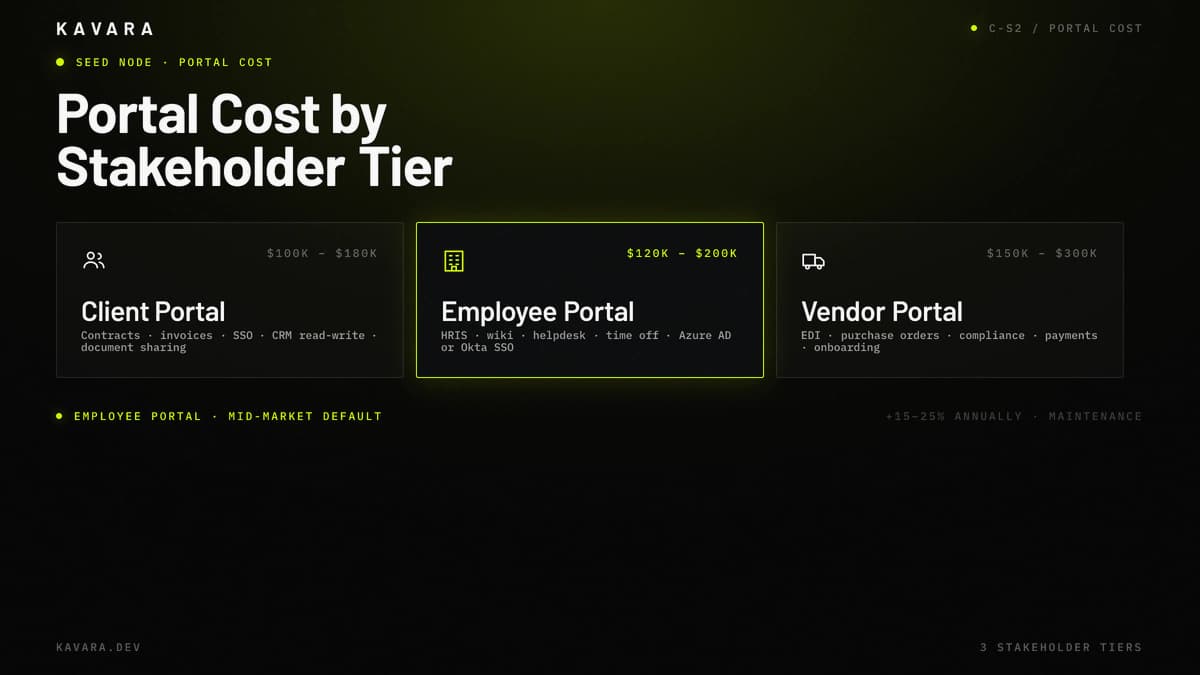
Enterprise portal development costs between $100,000 and $300,000 depending on portal type, integration requirements, and user management complexity. Client portals with document sharing, secure communication, and billing visibility typically cost $100,000 to $180,000. Employee portals and intranets with HR integration, knowledge bases, document management, and workflow automation range from $120,000 to $200,000. Vendor and partner portals with procurement workflows, compliance tracking, SLA dashboards, and multi-organization data management cost $150,000 to $300,000.
The comparison below shows the three stakeholder portal budget tiers, with employee portal as the mid-market default.
Portal development cost increases when SSO integration spans multiple identity providers, when role-based access control requires granular permission matrices across organizational boundaries, and when the portal connects to multiple enterprise systems through custom API layers. Cost also increases when compliance requirements require audit logging, retention policies, encryption controls, or formal security testing.
Ongoing portal costs typically add 15 to 25 percent of the initial build annually for hosting, monitoring, maintenance, security updates, integration upkeep, and feature iteration. These recurring costs are highest when the portal depends on multiple third-party APIs, stores regulated documents, or supports several external stakeholder groups. For detailed cost comparisons across all application types and phase-by-phase budget allocation, see our complete web application development cost guide.
What Is the Difference Between a Portal and a Web Application
A web application serves users who perform tasks, such as processing data, managing workflows, or completing transactions. A portal serves stakeholders who need access to information, documents, communication channels, and workflows relevant to their specific relationship with the organization.
The difference is architectural, not categorical. A portal is a web application, but not every web application is a portal. Web applications are usually feature-first, task-oriented, and built around one primary user type. Portals are access-first, relationship-oriented, and built around multiple stakeholder groups with different permission levels.
Enterprise portal development therefore requires role-based access control, multi-stakeholder views, document management, and enterprise system integration as foundational architecture. Standard web application development may include those capabilities, but portals require them from the start because access control defines the product.
How Long Does Enterprise Portal Development Take
Enterprise portal development typically takes 3 to 8 months from discovery to launch, depending on portal type, integration complexity, and the number of user roles requiring distinct access configurations.
Client portals with standard document sharing, communication, and billing integrations usually take 3 to 5 months. Employee portals with HRIS integration, knowledge bases, workflow approvals, and SSO integration usually take 4 to 6 months. Vendor portals with multi-organization data management, procurement workflows, compliance tracking, and external partner access usually take 5 to 8 months.
SSO integration and enterprise system connections are the main timeline variables. Each connected system can add 2 to 4 weeks depending on API quality. Authentication requirements, documentation accuracy, test data access, and the amount of data transformation the portal must handle safely all extend that estimate further.
What Industries Need Custom Enterprise Portals
Custom enterprise portals serve industries where stakeholder access to secure, role-based information is an operational requirement:
- Healthcare — Patient portals, provider portals, appointment workflows, secure document access, and clinical communication require HIPAA-aligned architecture. Our healthcare application development practice architects patient portals and provider platforms for HIPAA compliance from the foundation.
- Financial Services — Client portals for account access, portfolio visibility, document sharing, and secure communication require SOC 2 and PCI-conscious architecture. Our fintech application development practice builds SOC 2 and PCI-compliant client portals for secure account access and portfolio visibility.
- Professional Services — Client portals give customers access to project status, deliverables, invoices, approvals, and secure communication without scattering work across email threads.
- Manufacturing — Vendor portals support procurement, quality documentation, compliance tracking, shipment visibility, and supply chain coordination across external organizations.
- Education — Student and parent portals require FERPA-conscious access, grade visibility, resource management, and communication workflows across institutions, students, and families.
Should You Build a Custom Portal or Use an Off-the-Shelf Platform
Build custom when your permission model, integration requirements, or workflow logic exceeds what platforms like SharePoint or Liferay can accommodate without extensive customization. Use off-the-shelf when standard document sharing and communication features meet 80 percent or more of your needs.
Custom portal development is the better fit when you need granular role-based access control beyond standard role templates, integration with three or more enterprise systems, conditional workflow routing that platform tools cannot configure, or compliance controls that must be designed into the architecture. Custom development also fits portals that need to become a competitive operating advantage rather than a generic employee or client information hub.
Off-the-shelf portal platforms work when standard roles such as admin, editor, and viewer are enough, when basic document storage meets the requirement, and when integrations use standard connectors without custom business logic. For a complete decision framework including TCO analysis across custom and off-the-shelf approaches, read our custom vs off-the-shelf software comparison.
Next Steps
Enterprise portal development gives mid-market companies secure, role-based platforms that integrate with existing enterprise systems. RBAC, SSO integration, document management, workflow automation, and enterprise integration are the architectural foundation of every portal Kavara builds, launches, and scales. As a focused branch of custom web application development, web portal development depends on access design: getting the right data to the right stakeholder without weakening systems of record. Explore our custom application development services to see how portal work fits across SaaS, dashboard, and enterprise software categories. talk to Kavara to map stakeholder groups, define permission requirements, and scope your portal build from discovery through launch.