Custom Software vs Off-the-Shelf: Complete Decision Framework
The decision between custom software and off-the-shelf solutions is not about which is better in the abstract — it is about which is right for your business, your workflows, and your five-year cost trajectory. Off-the-shelf software delivers faster time to value with lower upfront cost. Custom software delivers exact workflow fit with lower long-term cost at scale. The right choice depends on factors that most comparison articles never quantify.
Mid-market companies often outgrow the simple build vs buy rule because their software needs sit between commodity tools and full product engineering. A $10M services company may need Salesforce for CRM, QuickBooks for accounting, Slack for communication, and a custom operations platform that connects all three. A $75M logistics company may need off-the-shelf payroll and HR tools, but custom routing, carrier exception handling, and customer visibility workflows that create competitive advantage.
This decision framework provides five tools for evaluating the choice: a five-factor scoring model, a total cost of ownership methodology, a break-even analysis, scenario-based recommendations, and an honest treatment of when not to build custom. It is written for CTOs, founders, operations leaders, and project owners at mid-market companies with $5M to $100M in revenue who need to decide whether custom web application development is justified.
Custom software typically breaks even against off-the-shelf licensing between years 2 and 4 for mid-market companies with 50 or more users, high per-seat costs, or significant workflow customization needs. That range is not a universal rule. It is a signal that the correct decision requires a five-year TCO model and decision framework rather than a year-one budget comparison.
For teams that build web applications with Kavara, that framework comes before vendor comparison, not after proposals arrive. The framework clarifies whether the business needs configuration, integration, or custom development before budget, timeline, and team model choices become locked.
The practical rule is simple: build what differentiates, buy what commoditizes, and connect everything through architecture the business can control.
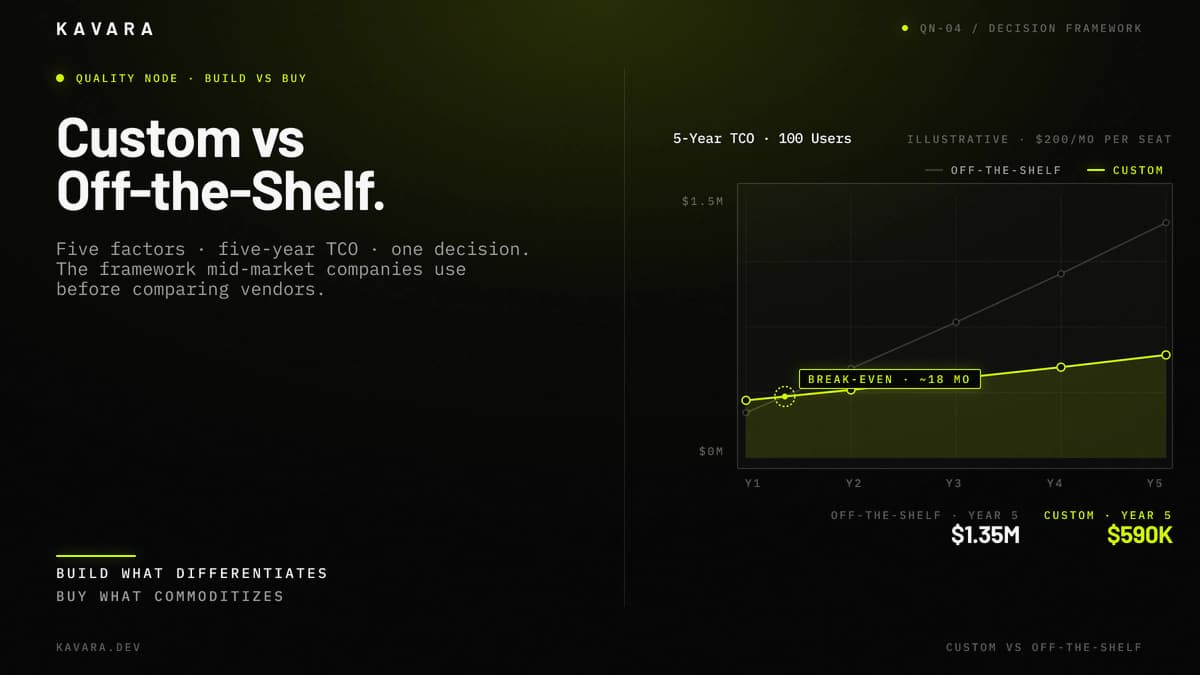
The chart below shows the five-year cumulative cost comparison, with break-even at roughly 18 months and a $757K Year-5 delta in favor of custom.
What Determines Whether Custom or Off-the-Shelf Is Right
Most build vs buy comparisons present feature lists and pros and cons tables. These are useful for understanding differences, but they are weak decision tools because they do not help a buyer weigh the factors that matter for one specific business. The custom vs off-the-shelf decision needs a scoring framework because different companies assign different value to speed, fit, control, cost, and risk.
The five decision factors are:
- Competitive Differentiation - Competitive differentiation measures whether the function creates advantage or merely keeps the business operating. Accounting, payroll, email, and basic CRM are usually costs of doing business. Pricing engines, proprietary workflows, customer portals, internal operations platforms, and data products can become sources of advantage.
- Workflow Complexity - Workflow complexity measures how closely existing software matches the business process. Off-the-shelf software works when processes are standard. Custom software becomes more valuable when approvals, exceptions, calculations, routing, data models, or user roles do not fit vendor assumptions.
- Integration Requirements - Integration requirements measure how many systems must connect and how tightly they must share data. A standalone tool can stay off-the-shelf. A workflow that spans CRM, ERP, billing, warehouse, analytics, and customer-facing systems may require custom integration architecture.
- Scale Economics - Scale economics measures how cost changes as user count, transaction volume, data volume, or customer count grows. Per-seat licensing looks cheap at 10 users and can become expensive at 100 users. Custom software starts expensive and can become cheaper per user as adoption increases.
- Compliance and Data Control - Compliance and data control measure whether regulatory requirements, audit needs, data residency, or ownership constraints limit the software choice. Healthcare, fintech, education, manufacturing, and logistics workflows often need controls that generic software cannot model. IBM's 2025 Cost of a Data Breach Report put the global average breach cost at $4.4 million, so regulated data control belongs in the first decision screen.
If the function is a commodity, buy off-the-shelf. If the function is the competitive advantage, build custom. Most decisions are between those extremes, which is why the next step is calculating the actual cost comparison.
Total Cost of Ownership: Custom vs Off-the-Shelf
Year-one cost comparison almost always favors off-the-shelf. Five-year total cost of ownership often reverses that advantage for growing teams, high per-seat costs, workflow gaps, or disconnected systems. Total cost of ownership is the multi-year cost of a software decision: license or build cost plus integration, maintenance, infrastructure, support, and workaround labor.
Off-the-shelf 5-year TCO is calculated as:
`(Monthly per-seat cost x number of users x 60 months) + integration/customization costs + annual price increases + workaround costs + additional tool subscriptions`
The per-seat license is only the first line. Integration and customization commonly add $20,000 to $100,000 when a vendor tool must connect to internal systems or support custom workflows. Annual price increases should be modeled as scenarios rather than assumptions. Blue Ridge Partners' March 2024 software CXO survey found nearly 90% had raised or planned 2024 prices, with a 5% median increase. TechTarget reported Vertice's Q1 2024 SaaS inflation projection at 10.6%, so TCO models should test 5%, 10%, and 15% renewal scenarios.
Custom software 5-year TCO is calculated as:
`Initial development cost + Year 1 hidden costs + annual maintenance for years 2-5 + infrastructure costs`
Custom development cost ranges depend on scope: $50,000 to $150,000 for MVPs, $150,000 to $350,000 for mid-complexity internal applications, and $500,000+ for enterprise platforms. Year 1 hidden costs usually include hosting, monitoring, training, migration, and first-round iteration. Annual maintenance commonly requires 15% to 25% of the initial build cost, and infrastructure may cost $500 to $5,000 per month depending on traffic, data, and compliance needs.
The TCO model should compare the same operational outcome, not two different levels of capability. In projects Kavara delivers, off-the-shelf is often under-counted until add-ons, exports, staff workarounds, and gap tools are included. Custom migration, training, monitoring, and iteration belong in the custom column.
| TCO Component | Off-the-Shelf Treatment | Custom Treatment |
|---|---|---|
| Initial cost | Setup, implementation, configuration | Discovery, design, development, QA, deployment |
| Recurring cost | Per-seat subscriptions and vendor tiers | Maintenance, hosting, monitoring, support |
| Change cost | Vendor customization, consultants, workaround labor | Feature iteration and roadmap development |
| Integration cost | Connectors, middleware, API limits, manual exports | Native integration and owned data flows |
| Exit cost | Data export, migration, retraining | Refactoring, replatforming, documentation |
The table shows why the cheaper year-one option can become the more expensive five-year operating model when change, integration, and exit costs are counted.
The custom software cost ranges in this TCO model, from $50,000 for MVPs to $500,000 or more for enterprise applications, are detailed in the custom web application development cost guide with phase-by-phase allocation.
Consider a 100-user company paying $200 per user per month for an off-the-shelf operations platform. Licensing alone costs $240,000 per year and $1,200,000 over five years before price increases, integration work, and gap tools. A custom application costing $300,000 to build with $60,000 per year in maintenance costs $540,000 over five years. Break-even is the point where cumulative custom cost falls below cumulative off-the-shelf cost; in this example, it occurs in approximately 18 months.
The TCO comparison below shows off-the-shelf at $1.35M and custom at $590K over five years at 100 users.
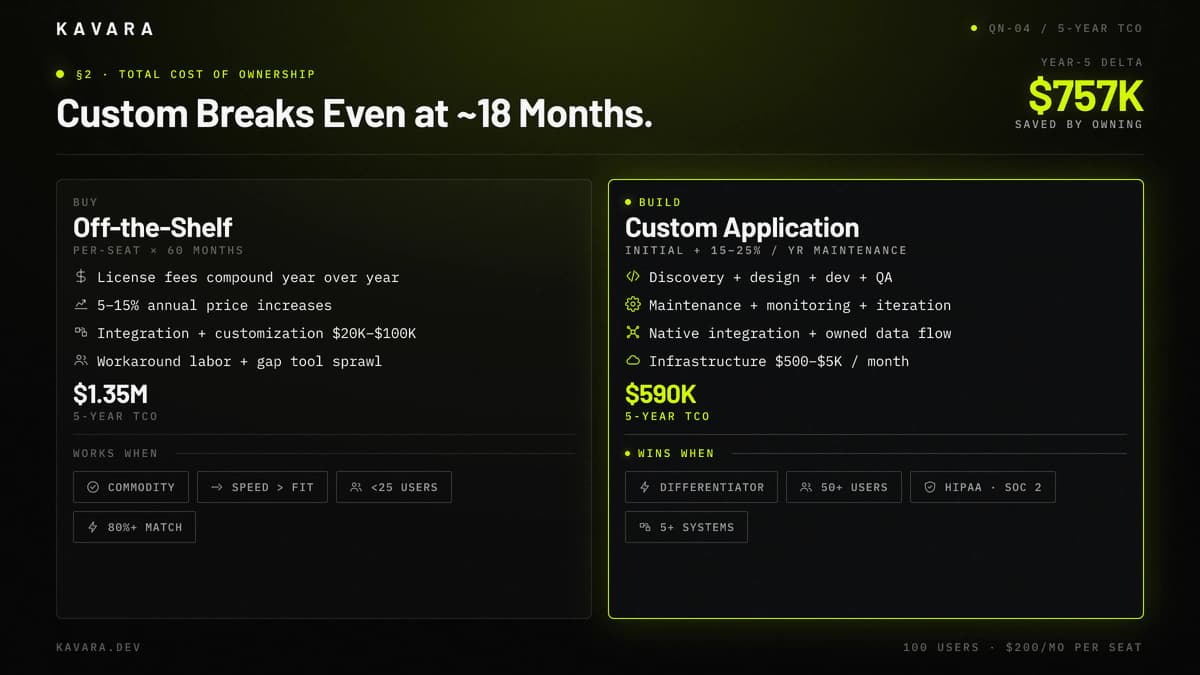
Break-even moves earlier with more users, higher per-seat costs, expensive vendor customization, or heavy workaround labor. Break-even moves later when the application is simple, the user count is low, or off-the-shelf software meets most requirements with minimal configuration. TCO tells which option costs less. The decision framework tells which option is right.
The Decision Framework: When to Build Custom
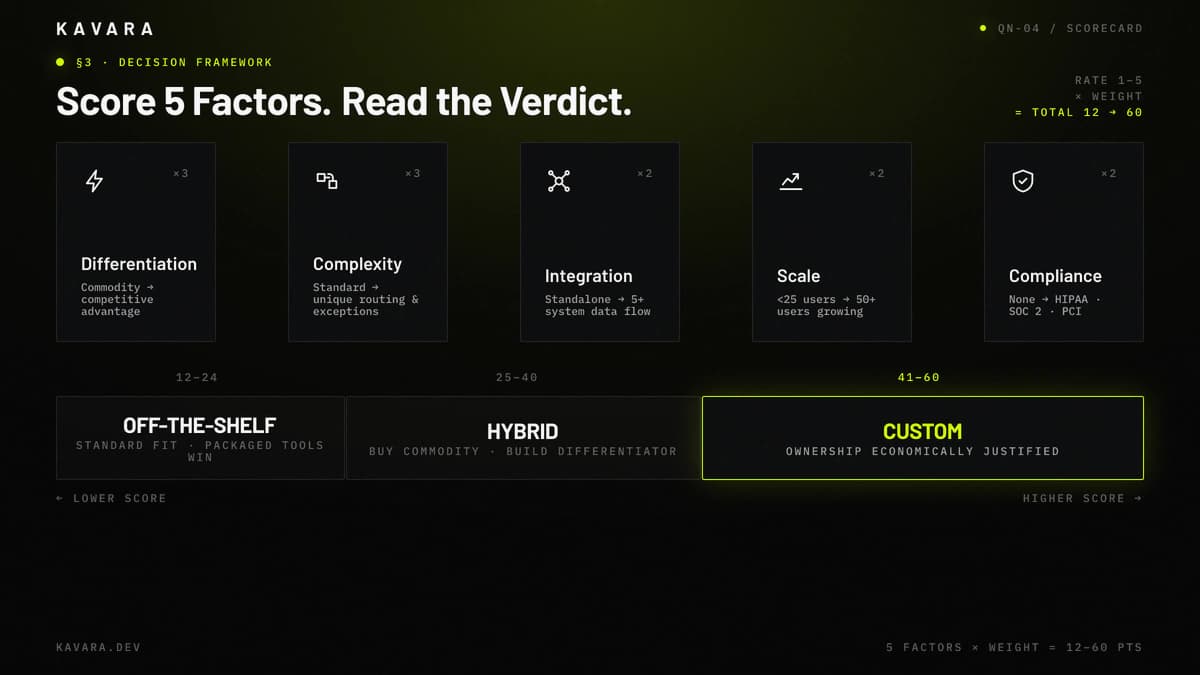
Use this framework to evaluate your specific situation. Rate each factor from 1 to 5, multiply by the weight, and total the weighted score. A low score favors off-the-shelf software, a middle score favors a hybrid approach, and a high score supports custom development.
The scorecard below shows the five weighted factors and the three score bands that determine off-the-shelf, hybrid, or custom.
| Factor | Weight | Score 1: Favor Off-the-Shelf | Score 5: Favor Custom |
|---|---|---|---|
| Competitive Differentiation | x3 | Commodity function | Core competitive advantage |
| Workflow Complexity | x3 | Standard processes | Unique, complex workflows |
| Integration Requirements | x2 | Standalone or simple | Deep integration with 5+ systems |
| Scale Economics | x2 | Fewer than 25 users, stable | 50+ users, growing |
| Compliance / Data Control | x2 | No regulatory requirements | HIPAA, SOC 2, PCI, or data sovereignty |
The table converts each factor into a score band before the final interpretation.
The scoring interpretation is:
- 12 to 24 points: Off-the-shelf is likely the right choice. The need is standard, the workflows are common, the user count is modest, and existing products solve most requirements.
- 25 to 40 points: Hybrid is likely the right choice. Buy commodity functions and build the workflow, integration layer, portal, or analytics system that creates specific business value.
- 41 to 60 points: Custom development is justified. The function creates competitive advantage, the workflow is complex, the system must integrate deeply, or compliance and data control require ownership.
A regional logistics company may score around 48 because proprietary routing and customer shipment visibility are central to margin. That company should build custom for operations and use off-the-shelf software for accounting, HR, and communication.
A professional services firm may score around 20 because project management, time tracking, invoicing, and basic CRM are standard functions. That company should use off-the-shelf software unless a proprietary client experience creates measurable differentiation.
A health tech startup may score around 52 because a HIPAA-scoped patient portal with EHR integration, role-based access, audit logging, and patient-specific workflows cannot be reduced to generic configuration. That company should build custom and treat compliance architecture as a foundational requirement.
If the scoring reveals workflow complexity and integration requirements driving the score upward, the signs you need custom software guide provides additional diagnostic criteria.
The framework is not meant to replace judgment. It forces the real tradeoffs into the open: speed vs fit, subscription cost vs ownership, vendor roadmap vs internal roadmap, and generic workflow vs business-specific process. Standish Group's 2015 CHAOS Report classified 36% of traditional software projects as successful in 2015, so a high score needs measurable cost, revenue, compliance, or operational impact.
Kavara's strongest scoring sessions involve more than one stakeholder: finance validates TCO, operations scores workflow complexity, security scores data control, and revenue leadership scores competitive differentiation. Disagreement is useful when it reveals assumptions before money is committed.
If the score indicates custom development is justified, understanding the development process helps set realistic launch timeline and budget expectations. The web application development process guide explains the seven phases, deliverables, team composition, and client responsibilities.
The ownership test is simple: teams should build web applications through custom web application development only when ownership changes cost, capability, compliance, or competitive position. If ownership only recreates vendor configuration, off-the-shelf software may still be the better answer.
Knowing when to build custom is half the decision. Knowing when not to build is equally important.
When Off-the-Shelf Is the Right Choice
Custom development is not always the right investment. Off-the-shelf software is the better choice in several clearly identifiable situations because speed, maturity, vendor support, and lower entry cost matter more than exact workflow fit.
Off-the-shelf wins in these cases:
- The function is a commodity - Accounting, email, basic CRM, HR management, payroll, internal chat, and document storage are solved problems for most companies. Building custom versions wastes budget that should be reserved for differentiated workflows.
- Speed matters more than fit - If the company needs a solution operating within weeks, off-the-shelf software is the correct starting point. Custom software may take 3 to 12 months depending on complexity, compliance, integrations, and stakeholder availability.
- Requirements match 80% or more - If the off-the-shelf tool does what the business needs with minor configuration, the remaining gap may not justify a $200,000 or larger custom development investment.
- The team is small and stable - A team with fewer than 25 users and predictable growth may keep per-seat licensing manageable for years. Custom development economics become stronger as the user base grows.
- The function is temporary - A company validating a business model may need a tool for 1 to 2 years before committing to a proprietary system. Build after validation confirms the investment.
The test is simple: if a competitor could buy the same tool tomorrow and be equally effective, the function is probably not worth building custom. Build what differentiates. Buy what commoditizes. Save custom development budget for workflows that affect margin, speed, compliance, customer experience, or data advantage.
Off-the-shelf also wins when vendor expertise matters more than ownership. Tax calculation, payroll compliance, commodity email delivery, payment processor compliance, and broad CRM ecosystem management require constant vendor-side updates. Gartner forecast worldwide cloud application services spending at $299.1 billion in 2025, which reflects the maturity and breadth of SaaS categories a mid-market company should not rebuild unless ownership changes the business model.
In practice, most mid-market companies do not choose exclusively between custom and off-the-shelf. They use both.
The Hybrid Approach: Custom and Off-the-Shelf Together
The hybrid approach, off-the-shelf for commodity functions and custom for competitive advantage, is the practical reality for most mid-market companies. The question is not build or buy. The question is what to build and what to buy.
Commodity functions usually stay off-the-shelf. Accounting may run in QuickBooks or Xero. CRM may run in Salesforce or HubSpot. Communication may run in Slack or Teams. HR may run in BambooHR, Gusto, or Workday. These tools solve broad problems and come with vendor support, integrations, and adoption patterns that would be expensive to replicate.
Differentiated workflows are candidates for custom software. A customer-facing portal may require proprietary approval flows, self-service capabilities, document access, and account visibility. An internal operations platform may encode routing rules, pricing logic, compliance checks, or exception management. An analytics dashboard may pull data from CRM, billing, product usage, and finance systems to show metrics no single vendor can provide.
Custom applications often sit between off-the-shelf tools. They pull data from CRM, push data to accounting, orchestrate workflows across departments, and provide a unified interface for employees or customers. The custom layer becomes connective tissue, not a replacement for every vendor product.
That connective-tissue problem is measurable. MuleSoft's 2026 Connectivity Benchmark commentary reported that the average organization manages 957 applications, with only 27% currently connected. The direction is clear: tool sprawl creates integration debt.
Mid-market companies may not run 1,000 applications, but many run 15 to 30 SaaS subscriptions across sales, finance, operations, HR, support, and analytics. When these tools do not communicate, staff spend hours on exports, imports, spreadsheets, and manual reconciliation. A custom integration layer or operations platform can eliminate that friction while preserving the off-the-shelf tools that work well independently.
When the hybrid analysis reveals that custom development is right for core operational workflows, custom software development services can cover enterprise applications, workflow automation, integration platforms, and legacy modernization.
The hybrid approach is a strategy. The next step is modeling the five-year cost difference between the options.
Five-Year Cost Projection: Custom vs Off-the-Shelf
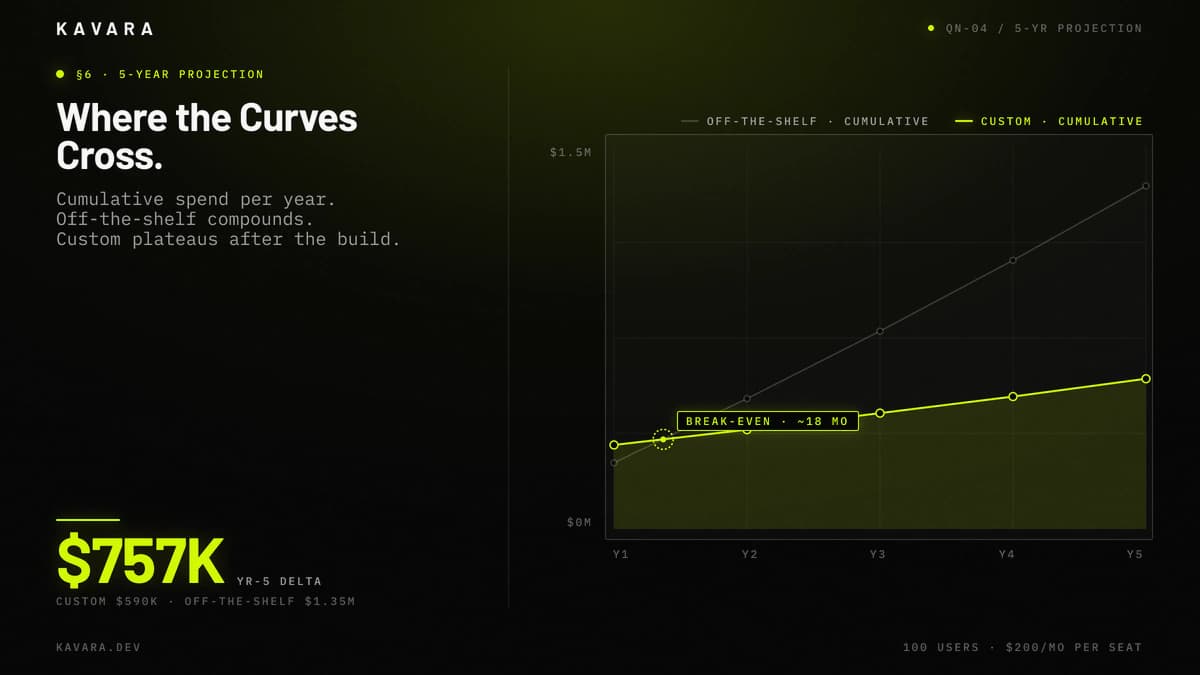
A five-year cost projection converts the custom vs off-the-shelf decision from opinion into financial comparison. The example below models a mid-market company with 100 users evaluating an operations platform. These numbers are illustrative and should be replaced with the company's actual license cost, setup cost, integration cost, development estimate, maintenance budget, and expected growth.
| Year | Off-the-Shelf | Custom |
|---|---|---|
| Year 1 | $260K license + integration | $330K build + hidden costs |
| Year 2 | $252K license + 5% increase | $60K maintenance |
| Year 3 | $265K license + increase + gap tools | $65K maintenance + iteration |
| Year 4 | $278K license + increase | $65K maintenance |
| Year 5 | $292K license + increase | $70K maintenance + scaling |
| 5-Year Total | ~$1.347M | ~$590K |
The methodology matters more than the specific numbers. If the company has 20 users at $50 per user per month, off-the-shelf remains cheaper. If the company has 150 users at $250 per user per month with $80,000 in integration needs, custom may break even much earlier. The model should include license growth, price increases, gap tools, internal labor, customization, migration, maintenance, and infrastructure.
The projection should also include adoption risk. Off-the-shelf software may launch faster but fail to remove manual work if the workflow fit is weak. Custom software may cost more upfront but can consolidate multiple workflows into one interface if discovery is accurate. The five-year model should measure the cost of the operational outcome, not only the cost of the software contract.
Cost projection shows when ownership becomes economically rational. Operational symptoms show when the current off-the-shelf stack has already become too expensive.
How Do You Know When You Have Outgrown Off-the-Shelf Software
A company has outgrown off-the-shelf software when workarounds become daily operations rather than temporary exceptions.
Five signals indicate that the off-the-shelf tool may no longer fit:
- The team maintains 5 or more spreadsheets alongside the tool to handle missing workflows.
- Staff spend 10 or more hours per week on manual data entry between systems.
- The platform is customized so heavily that vendor upgrades break internal workflows.
- Competitive differentiation requires capabilities no off-the-shelf product provides.
- Per-seat licensing costs exceed $100,000 per year and continue growing.
These signals rarely appear individually. When three or more are present simultaneously, the off-the-shelf tool may be more expensive than the custom alternative it was supposed to prevent.
The outgrown point is measurable. Add the license cost, workaround labor, re-entry errors, reporting delays, integration maintenance, and missed customer experience improvements. If that annual cost approaches the yearly maintenance cost of a custom platform, the replacement conversation is no longer theoretical, but replacement introduces custom development risks that need deliberate controls.
What Are the Risks of Custom Development
The main risks of custom development are cost overruns, delays, quality problems, vendor dependency, and maintenance burden. PMI's 2026 Pulse of the Profession report found that roughly one-third of complex projects fail, nearly twice the overall project failure rate, so these risks should be evaluated before approval.
The five main risks are:
- Cost overruns - Poorly defined requirements lead to scope creep. Mitigation starts with discovery, requirements documentation, and phase-based approvals.
- Timeline delays - Integration complexity and slow stakeholder decisions affect schedule. Mitigation requires realistic planning and fast decision ownership.
- Quality problems - Junior teams or insufficient QA produce buggy software. Mitigation requires experienced engineers, code review, automated testing, and user acceptance testing.
- Vendor dependency - If the development partner disappears, the company needs code, documentation, deployment access, and technical context. Mitigation requires code ownership and maintainable documentation.
- Maintenance burden - Custom applications require ongoing investment, usually 15% to 25% annually. Mitigation requires post-launch budget from day one.
Mitigating these risks depends on partner selection and team model. Whether the company engages an agency, freelancers, or an in-house team affects cost structure, accountability, knowledge retention, and delivery risk. See the agency vs freelancer vs in-house comparison for total cost of ownership by team model.
Mitigating custom development risks also starts with partner selection. The guide to how to choose a development company provides an evaluation framework for assessing process, team quality, ownership terms, technical diligence, and support model.
These risks are not arguments against custom development. They are arguments for choosing the right development partner, managing the process properly, and deciding whether the safer path is a staged migration from off-the-shelf to custom.
Can You Start With Off-the-Shelf and Switch to Custom Later
Yes, and for many mid-market companies this is the right approach. Start with off-the-shelf software to validate the business need and learn the real requirements. Switch to custom software when the limitations become measurable cost through licensing, workarounds, integration friction, compliance gaps, or customer experience constraints.
Migration requires planning. The buyer should verify data export capabilities before committing to the off-the-shelf product, budget for change management, and expect a transition period where both systems run temporarily. The custom replacement should incorporate lessons from the off-the-shelf experience because the company now knows which workflows matter, which features are unused, and which gaps create the most operational pain.
An MVP product development approach lets the company replace off-the-shelf limitations incrementally by building custom for the highest-pain workflows first while validating the investment before committing to a full platform build.
The custom vs off-the-shelf decision is not binary. It is a framework for deciding which systems should be bought, which systems should be built, and which systems should be connected through architecture the company controls. Use the five-factor scoring model to identify where custom development is justified, calculate five-year total cost of ownership to quantify the investment, and consider the hybrid approach when each option plays its proper role.
Build what differentiates. Buy what commoditizes. Connect everything through architecture that supports scale. Explore Kavara web application development services to see where custom development fits, or discuss your project with Kavara for a build-vs-buy consultation.