Mobile Application Development Services
Mobile application development is the process of building native iOS, Android, and cross-platform applications that extend product capabilities beyond the desktop browser — reaching field teams, customers, and users who need access on the go. Mobile applications use device hardware, app-store distribution, push notifications, offline storage, and platform-specific user experience patterns that browser-based applications do not fully control.
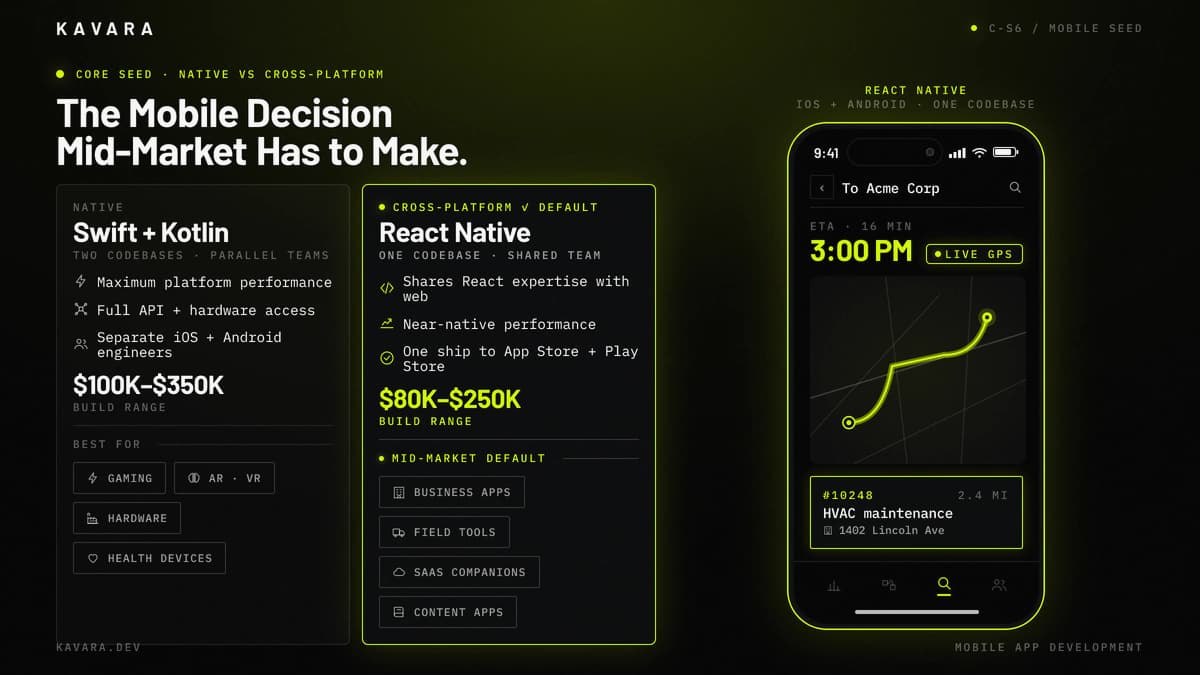
The central mobile development decision is native versus cross-platform. Native iOS development with Swift and native Android development with Kotlin deliver maximum platform integration, but they require separate codebases, separate platform engineers, and parallel QA cycles. Cross-platform development with React Native or Flutter shares one codebase across iOS and Android, which typically reduces total cost compared with building two native apps when the product does not require deep platform-specific performance.
The diagram below contrasts the two platform paths mid-market companies choose between — native Swift and Kotlin builds, or cross-platform React Native — with build-cost ranges and a field-service app mockup.
Kavara positions mobile as an extension of web platform capabilities, not as an isolated mobile project. When a company builds web and mobile for the same product, shared backend infrastructure, API layers, authentication, and business logic reduce total cost and keep user data consistent across platforms. The mobile app becomes another client of the same product ecosystem rather than a separate system that drifts from the web application.
Kavara builds mobile applications for mid-market companies that need to launch standalone products, extend SaaS platforms, support field teams, or deliver customer-facing access beyond desktop workflows. Our mobile app development services cover discovery, UX, native or cross-platform engineering, backend integration, device testing, app-store submission, and post-launch support. Our mobile development services integrate mobile clients with web platforms so products can scale across devices without duplicating core business logic. That platform role is the starting point for defining what mobile application development actually includes.
What Is Mobile Application Development
Mobile application development is the practice of designing, engineering, testing, and deploying software applications for iOS and Android devices. Mobile development differs from web app development because mobile apps run directly on device operating systems, access hardware capabilities, and must satisfy platform-specific distribution requirements before users can install them.
Mobile apps can use device features that browser-based applications cannot reliably control at the same depth: camera, GPS, biometrics, push notifications, background processing, offline storage, Bluetooth, sensors, and native sharing. These capabilities make mobile apps valuable for field operations, customer engagement, delivery workflows, inspections, and any product experience that must work outside a desktop browser. Mobile application development extends Kavara's custom web application development practice to platforms beyond the browser, reaching users through native device experiences.
Mobile development uses three main approaches. Native app development uses platform-specific code: Swift and SwiftUI for iOS development, and Kotlin with Jetpack Compose for Android development. Cross-platform development uses React Native or Flutter to share application logic across iOS and Android. A progressive web app is a browser-delivered application that uses web technology with limited native-device capability and simpler distribution.
Mobile development is also one category within Kavara custom software development, sharing the same engineering discipline used to build web applications, the same production standards, and the same need for clear architecture. The difference is distribution and device context. Mobile applications must navigate app store approval, device fragmentation, platform design rules, OS updates, and offline behavior. This device context changes testing, deployment, monitoring, and release planning from the first sprint. The most consequential mobile development decision happens before a single line of code is written: native or cross-platform.
When mobile is part of a larger product, custom web application development remains the center of gravity. The mobile client should consume the same backend, authorization model, audit trail, and business logic as the web platform unless a specific device requirement justifies a separate architecture. This keeps mobile application development connected to web application development services instead of creating a second product that duplicates rules and drifts from the source system. For mid-market software development, shared architecture usually lowers cost, improves data consistency, and gives the development partner one production system to support across web and mobile clients.
That shared foundation is why custom web application development planning should precede most companion mobile builds.
Native vs Cross-Platform Development
The native vs cross-platform decision determines your development cost, timeline, team structure, and long-term maintenance burden. Neither approach is universally superior — the right choice depends on what the application needs to do and how it connects to your broader technology ecosystem.
The matrix below contrasts native iOS plus Android against React Native across six tradeoff dimensions — codebase, cost, timeline, performance, team, and best-fit project types.
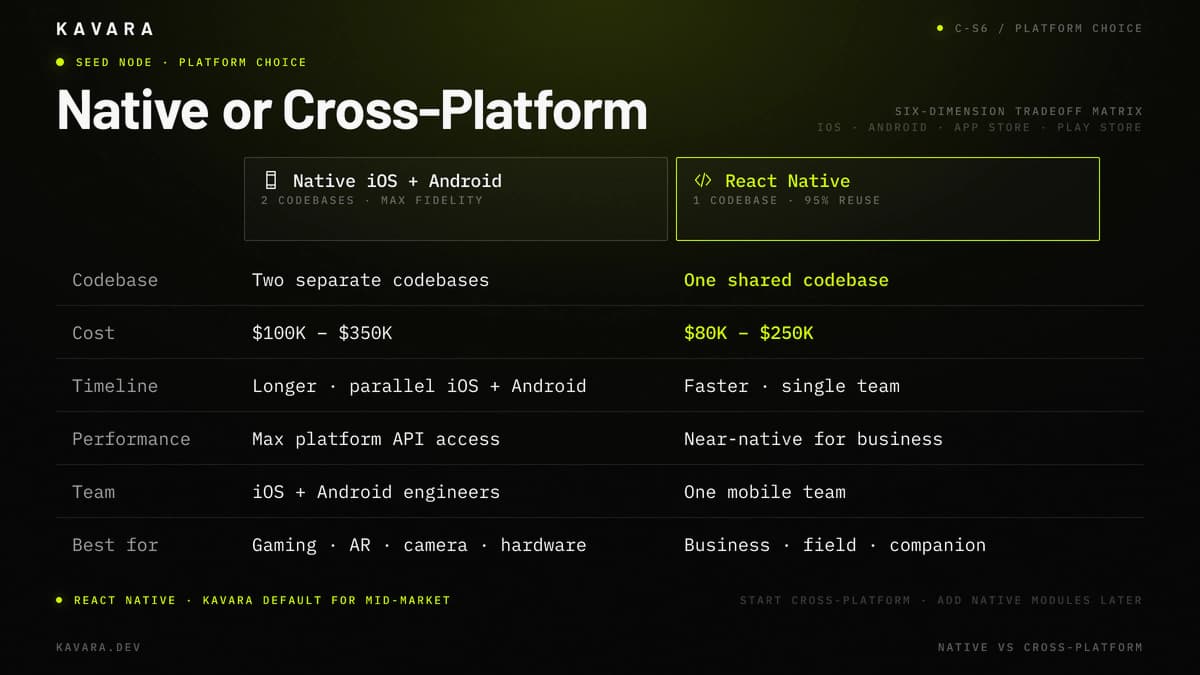
| Factor | Native iOS + Android | Cross-Platform React Native / Flutter |
|---|---|---|
| Codebase | Two separate codebases | One shared codebase |
| Performance | Maximum platform API access | Near-native performance for most business use cases |
| Cost | $100,000-$350,000 for native builds | $80,000-$250,000 for one shared build |
| Timeline | Longer because development runs in parallel | Faster because one codebase drives both platforms |
| Platform Features | Full access to every API and hardware capability | Access through bridges and modules |
| Team | Separate iOS and Android engineers | One shared mobile team |
| Maintenance | Two codebases to update, test, and deploy | One codebase to update across platforms |
| Best For | Gaming, AR, camera-heavy, hardware-dependent apps | Business apps, companion apps, content apps, field tools |
Native app development fits when the app is the product and performance is a competitive differentiator. Camera-intensive workflows, AR/VR, gaming, advanced animation, health device integrations, or hardware-dependent features justify platform-specific engineering. Native development also fits when the product roadmap depends on the newest iOS or Android APIs immediately after release.
Cross-platform development fits when the app is a tool for accessing functionality. Business applications, client portals, field tools, content delivery apps, and most mid-market products benefit from a shared codebase because the core value comes from workflow access, data synchronization, and reliable user experience rather than extreme device performance. React Native is Kavara's default recommendation for many mid-market mobile products because it shares React expertise with web development and supports production-grade mobile apps without maintaining two fully separate codebases. React Native's official documentation describes it as a way to create native apps for Android and iOS using React, with primitives that render to native platform UI. That means one team can reuse React patterns, API clients, validation logic, and state management while still reserving native modules for device-specific features.
If the platform decision is uncertain, we usually start cross-platform and add native modules for specific features later. Teams can isolate performance-critical features without forcing the entire product into two native codebases. For a detailed React Native vs Flutter comparison including performance, ecosystem analysis, and framework selection criteria, see our dedicated comparison guide.
Whether native or cross-platform, the types of mobile applications mid-market companies build fall into three categories — each with different architecture, integration, and deployment requirements.
Types of Mobile Applications We Build
We build three categories of mobile applications for mid-market companies:
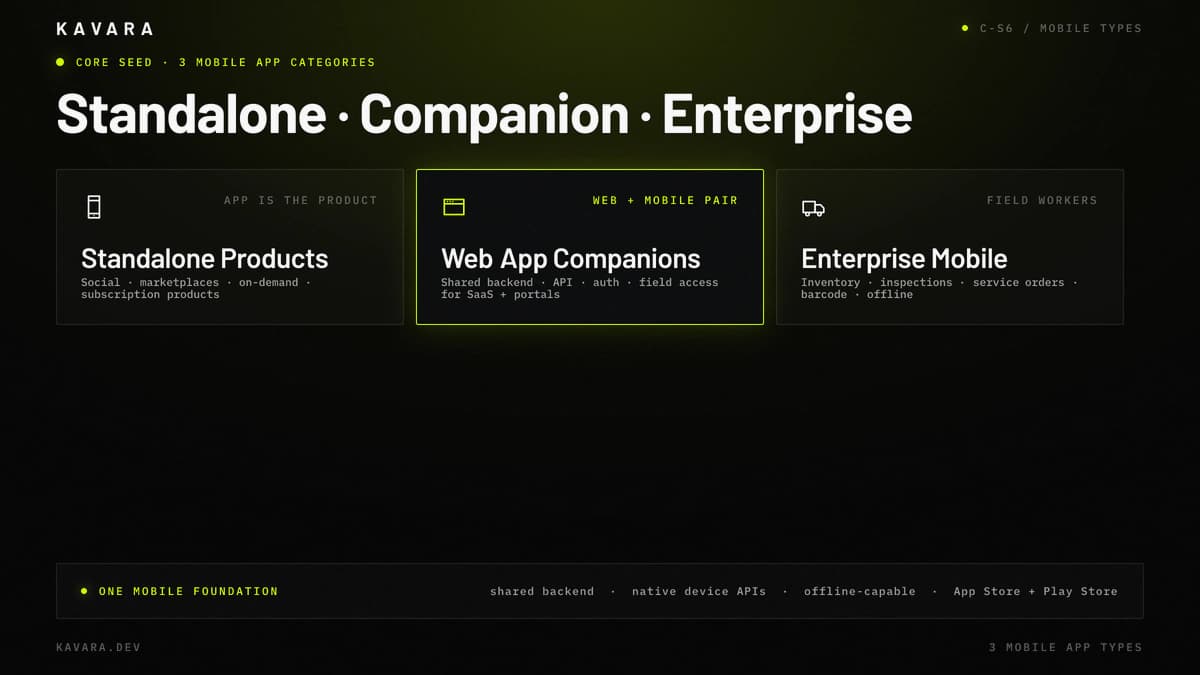
- Standalone Mobile Products — Standalone products are mobile apps where the app itself is the product. Social platforms, marketplace apps, on-demand services, consumer tools, and subscription-based mobile products require the full product lifecycle from concept through App Store launch. These projects need the deepest mobile engineering: push notifications, offline capability, background processing, deep linking, in-app purchases, and analytics. Our iOS application development covers Swift and SwiftUI engineering, Apple Human Interface Guidelines compliance, and App Store submission.
- Web Application Companions — Companion apps extend an existing web platform to mobile users. The web application remains the primary product, while the mobile app provides on-the-go access to core workflows, notifications, field data entry, or customer account activity. A SaaS platform may need a mobile field-user app, and a portal may need a mobile stakeholder app for status updates away from the desk. Building web and mobile together shares backend infrastructure, API layers, authentication, and business logic, reducing redundant development and preserving data consistency.
- Enterprise Mobile Applications — Enterprise mobile applications are internal tools for employees in the field. Inventory scanning, inspection reporting, service order management, delivery tracking, quality checks, and field approvals often require offline capability because workers lose connectivity. Enterprise mobile apps also use camera, GPS, barcode scanning, push notifications, and mobile device management compatibility. These applications connect to existing enterprise systems through the same integration architecture used in portal and enterprise software development.
Most companion and enterprise mobile apps are strong candidates for cross-platform development because shared workflow logic matters more than extreme device-specific performance. Standalone products may require native app development when performance, animation, or hardware integration defines the user experience. Our Android application development handles Kotlin and Jetpack Compose engineering, Material Design implementation, and Google Play deployment across the Android device ecosystem.
Building these applications for mobile requires a development process adapted for platform-specific challenges — app store compliance, device testing, and deployment workflows that web applications do not face.
Our Mobile Development Process
We build mobile applications through our structured development process, adapted for the platform-specific requirements that mobile projects demand:
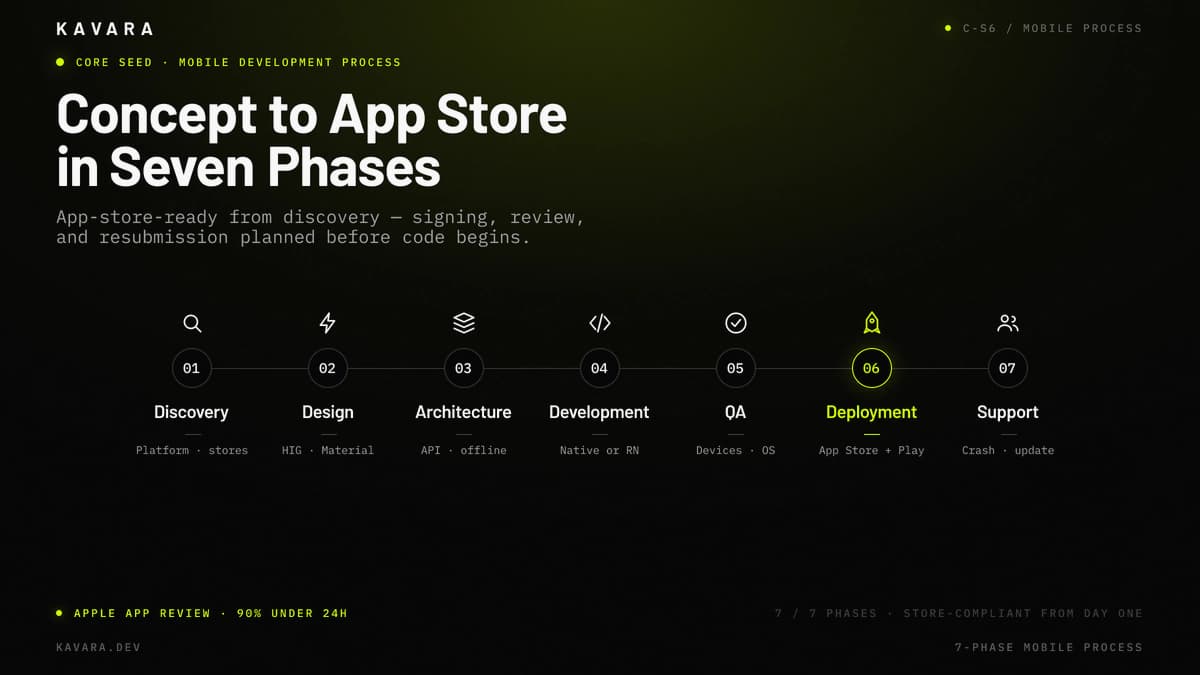
- Discovery — Discovery defines the platform strategy, target device matrix, app store requirements, offline capability, push notification needs, and whether the app shares backend infrastructure with a web platform.
- Design — Mobile design follows Apple Human Interface Guidelines for iOS and Material Design patterns for Android. Apple's Human Interface Guidelines emphasize platform conventions, hierarchy, harmony, consistency, accessibility, patterns, and components; Android Developers' Design & Plan guidance covers UI design, architecture planning, adaptive layouts, privacy, and quality. The design phase covers phone and tablet layouts, gesture navigation, touch target sizing, loading states, empty states, and offline states.
- Architecture — Mobile architecture defines shared backend access, API payload strategy, authentication, local storage, caching, offline synchronization, and push notification infrastructure. Companion apps usually share the same backend as the web application.
- Development — Cross-platform development uses one shared codebase with platform-specific modules where needed. Native development runs parallel iOS and Android tracks while sharing backend services, product logic, and delivery milestones.
- QA — Mobile QA tests multiple screen sizes, OS versions, hardware capabilities, network conditions, offline transitions, push notification behavior, and performance on mid-range devices instead of only flagship devices.
- Deployment — Deployment includes App Store Connect, Google Play Console, signing, release builds, store listing assets, privacy disclosures, and review process management. Apple says 90% of app submissions are reviewed in less than 24 hours, but guideline corrections and resubmissions can add another review cycle.
- Support — Support includes crash monitoring, OS compatibility testing, app store policy monitoring, dependency updates, analytics review, and feature iteration after launch.
Our mobile development methodology follows our structured development process, adapted for app store deployment, device testing, and platform-specific compliance requirements. These mobile development services keep platform choices, release workflows, and backend integration aligned before development begins. Technology selection for mobile balances platform reach, development efficiency, and long-term maintenance — with the native vs cross-platform decision driving every subsequent technology choice.
Mobile Technology Stack
Mobile technology selection is driven by the native vs cross-platform decision, which determines the primary development framework, language, and toolchain. Kavara selects the stack based on platform requirements, performance needs, backend integration, long-term maintainability, and the team's ability to support the product after launch.
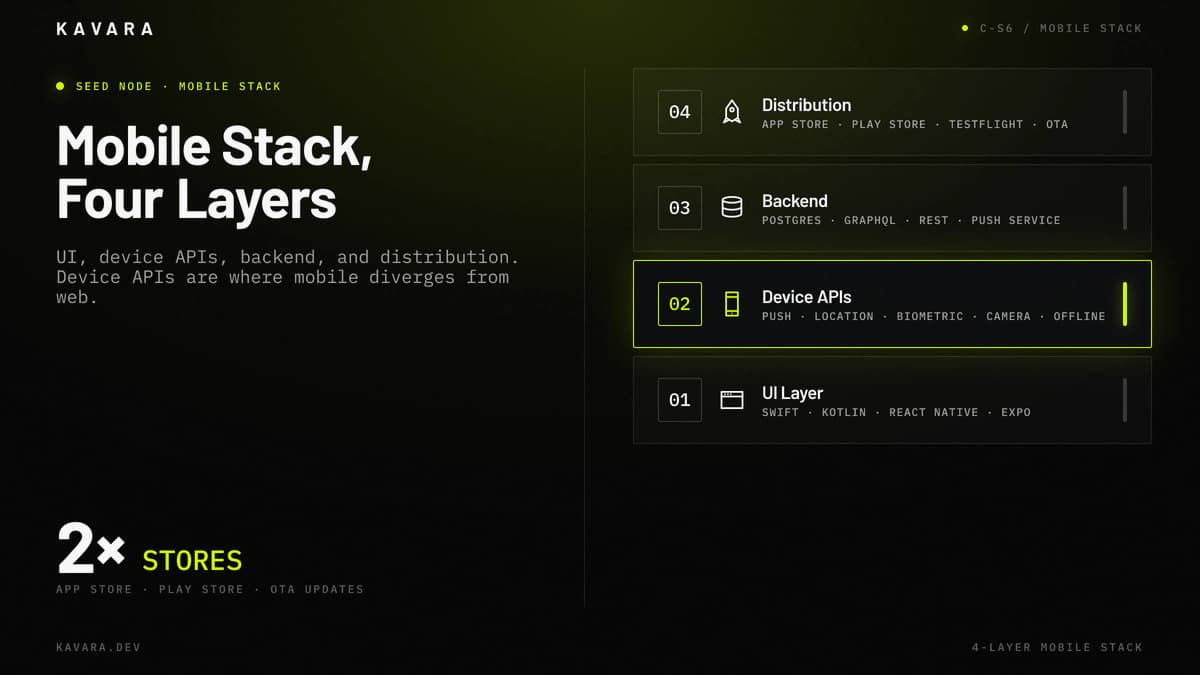
The stack diagram below shows the four production mobile layers, with device APIs as the layer where mobile diverges most sharply from web.
| Layer | Technologies | Mobile-Specific Rationale |
|---|---|---|
| iOS Native | Swift, SwiftUI | Maximum iOS performance, full Apple API access, watchOS and tvOS options |
| Android Native | Kotlin, Jetpack Compose | Full Android API access, Material Design, Wear OS options |
| Cross-Platform | React Native, Expo, Flutter | Shared codebase, mobile UI, reusable logic, faster iteration |
| Backend and API Layer | Node.js, Python, Postgres, GraphQL, REST | Shared API and data layer so one backend serves web and mobile clients |
| Push Notifications | Firebase Cloud Messaging, APNs | FCM for Android and cross-platform, APNs for iOS-native push |
| Analytics | Firebase Analytics, Mixpanel, Sentry | Crash reporting, behavior tracking, funnel analysis, production monitoring |
| Cloud | AWS, Google Cloud | AWS for general infrastructure, Google Cloud for Firebase-heavy mobile stacks |
The most important mobile technology decision is backend sharing. When web and mobile apps share the same backend, API layer, authentication, and business logic, changes deploy once and apply everywhere. This shared-backend architecture prevents data inconsistency, duplicate business rules, and feature drift between web and mobile clients.
The backend architecture shared between web and mobile applications follows the patterns detailed in our architecture guide for web applications, including database selection, API design, authentication, and scalability strategies that serve both web and mobile clients from one infrastructure. Technology and platform decisions directly determine mobile app development cost — which varies primarily by native vs cross-platform approach and app complexity.
How Much Does Mobile App Development Cost
Mobile app development costs $100,000 to $350,000 for native iOS or Android applications and $80,000 to $250,000 for cross-platform development using React Native or Flutter. These ranges reflect US-based agency rates for production-grade mobile application development with discovery, UX, engineering, QA, app-store submission, and launch support.
Native app development costs more because separate iOS and Android codebases require parallel engineering, platform-specific QA, and separate release management. Cross-platform development typically reduces total cost compared with building separate native applications because one team ships one shared codebase. Companion apps sharing a web backend reduce redundant backend work by 20% to 30% compared with building web and mobile independently.
App store compliance adds cost and timeline complexity that web applications avoid. Apple's App Review page says 90% of submissions are reviewed in less than 24 hours, but guideline corrections can require fixes and resubmission. Apple Developer Program membership is $99 per year, while Google Play Console Help lists a $25 one-time registration fee for Play Console developer accounts.
For detailed mobile-specific cost breakdowns by platform, complexity tier, and hidden costs including app store fees and OS update testing, see our mobile app development cost guide. Mobile development cost should also be compared against the broader application portfolio.
For cost comparisons across all application types — web, mobile, SaaS, portal, dashboard, and enterprise software — see our complete custom application cost guide. Cost establishes the budget; timeline establishes when users can actually launch and adopt the mobile application.
How Long Does Mobile App Development Take
Mobile app development typically takes 3 to 9 months from concept to App Store launch, depending on platform approach, complexity, and whether the app shares backend infrastructure with an existing web application. Cross-platform companion apps usually take 3 to 5 months. Cross-platform standalone apps usually take 4 to 7 months. Dual native iOS and Android apps usually take 5 to 9 months.
Primary timeline factors include platform decision, scope clarity, device testing matrix, integration complexity, and app store review. Mobile companion apps for existing SaaS development services projects often have shorter timelines because backend, API, and authentication infrastructure already exist. App store review, privacy disclosure, screenshots, metadata, and potential resubmission add launch steps that web deployments avoid. Timeline risk increases when release ownership is not defined early.
Should You Build a Mobile App or a Progressive Web App
Build a native or cross-platform mobile app when you need push notifications, offline capability, camera or GPS access, biometrics, or App Store distribution for discoverability. Use a progressive web app when the mobile use case is content consumption with limited device hardware interaction.
Beyond that baseline, a mobile app wins when push notifications drive engagement, offline access is required, hardware features are core to the workflow, or users expect installation through the App Store or Google Play. In Kavara's mobile application development planning, this decides whether the web platform stays primary or the mobile client becomes a core product surface. A progressive web app wins when the experience is content-first, the user acquisition channel is web search, and the budget does not justify native or cross-platform app development services.
The decision should follow the user workflow. If users need to capture photos, scan barcodes, receive time-sensitive alerts, or complete tasks without connectivity, build a mobile app. If users mainly read, search, submit simple forms, or access lightweight account information, a progressive web app may serve the need.
How Do App Store Requirements Affect Mobile Development
App store requirements add compliance, timeline, and cost constraints that web applications do not face. Apple and Google require privacy policies, data collection disclosures, permission explanations, store metadata, screenshots, age ratings, and release builds before publication. Apple's App Store Connect reference lists a Privacy Policy URL as required for all apps, so privacy documentation becomes part of mobile development scope rather than launch paperwork.
Apple's review process checks guidelines for privacy, design, content, payment rules, permissions, and technical behavior. Apple's official App Review page says 90% of submissions are reviewed in less than 24 hours, but incomplete submissions may be delayed or rejected. Google Play review is often faster, but Google has become stricter on permissions, account verification, and data safety disclosures. For companion apps, this review work has to stay synchronized with the shared web application release plan.
Update deployment also changes mobile iteration. iOS updates generally go through App Review, while React Native code-push workflows can update JavaScript logic without a full binary release when the change follows store rules. App store requirements therefore affect not only launch, but also post-launch support, release planning, privacy documentation, and customer communication.
Next Steps
Mobile application development helps mid-market companies build, launch, and extend products beyond the browser through native iOS, Android, and cross-platform apps. Kavara treats mobile as part of custom web application development, sharing backend infrastructure, API layers, authentication, and business logic with web applications to reduce cost and maintain data consistency. This product ecosystem helps mobile apps scale without becoming disconnected from the web platform.
Explore our full Kavara custom web application development services to see how mobile apps connect to SaaS platforms, portals, dashboards, and enterprise software in a unified product ecosystem. Reach out to Kavara to define your platform strategy, map mobile feature requirements, and scope your build.