Dashboard and Analytics Application Development
Dashboard and analytics application development is the process of building data-driven platforms that transform raw operational data into interactive visualizations, custom reports, and actionable insight for decision-makers across an organization. Mid-market companies generate more operational data than their teams can process through spreadsheets, manual exports, and recurring status reports. Custom dashboards make this data visible, filterable, and actionable so teams can analyze performance while the information is still useful.
Custom dashboard development differs from Tableau or Power BI configuration because custom dashboards support proprietary data models, real-time data requirements, embedded analytics inside other applications, and role-based data access that off-the-shelf BI tools cannot handle without heavy customization. A logistics company tracking live shipment exceptions, a fintech team monitoring portfolio risk, and a SaaS company exposing tenant-level analytics all need different data pipelines, permission models, and visualization behavior.
Kavara builds dashboard development services from the data layer upward. We solve the data problem first: source inventory, pipeline architecture, transformation logic, query optimization, caching, and real-time streaming where the business need justifies it. Then we build the visualization layer with React, TypeScript, D3.js, Recharts, and interactive analytics patterns that help users move from summary metrics to drill-down investigation. Custom web application development for dashboards must build, launch, visualize, and analyze through the same architecture because beautiful charts on unreliable data do not create business insight. Companies that build web applications around analytics need dashboard development services that treat data reliability as the foundation, not a cleanup task.
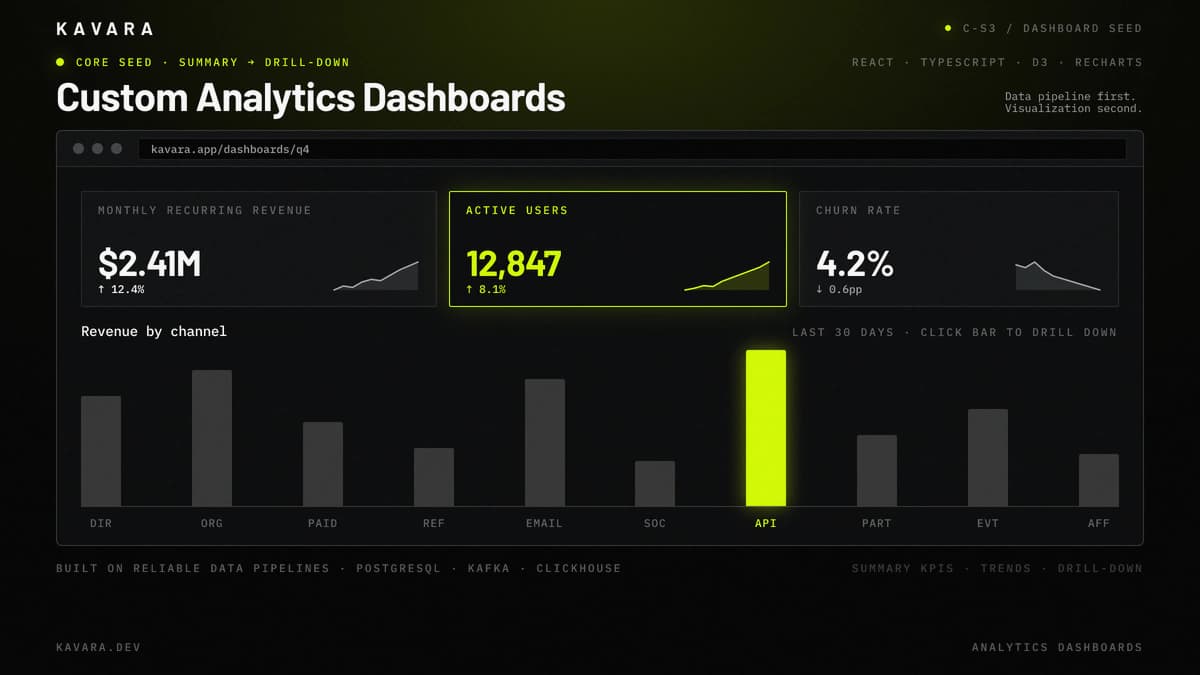
The mockup below shows a custom analytics dashboard with KPI cards, sparklines, and a drill-down bar chart.
What Is Dashboard and Analytics Development
Dashboard and analytics development is a data-first application development discipline that builds interactive software around operational data, analytical queries, and visualization workflows. Dashboard development differs from standard web application development because the primary engineering challenge begins with where data comes from, how data moves, how queries perform, and how results render for users.
Standard web applications usually start with feature workflows, user stories, and transactional database models. Dashboards start with data sources, data pipeline design, aggregation strategy, metric definitions, and latency requirements. IDC's Data Age 2025 white paper, by John F. Gantz, David Reinsel, and John Rydning, projected annual global data creation and replication rising from 33 zettabytes in 2018 to 175 zettabytes in 2025. Data visualization becomes useful only after the underlying data pipeline produces accurate, timely, and permission-scoped results.
Dashboard and analytics development falls within the broader category of web application development services, which also encompasses SaaS platforms, portals, MVPs, and enterprise software. Within custom web application development, dashboards are specialized because they combine a transactional application layer with an analytical data layer. This combination creates engineering requirements that standard CRUD applications rarely face: ETL workflows, materialized views, query caching, chart rendering performance, and real-time analytics.
Custom dashboards also differ from generic BI tools. Tableau and Power BI serve standard business intelligence needs through drag-and-drop configuration and common database connectors. Custom dashboards serve proprietary data models, real-time data streams, embedded analytics inside other platforms, and access rules that become difficult to express inside generic BI configuration. Like all custom software engineering, dashboard applications are architected around specific business requirements, but dashboards add data pipeline and visualization engineering on top of standard application architecture.
The dashboard spectrum ranges from SQL-based reporting dashboards to complex real-time analytics platforms processing IoT events, financial feeds, logistics updates, or operational system data. The type of dashboard determines the data architecture, visualization approach, and engineering complexity - and these types serve fundamentally different analytical needs.
Types of Dashboards and Analytics Applications We Build
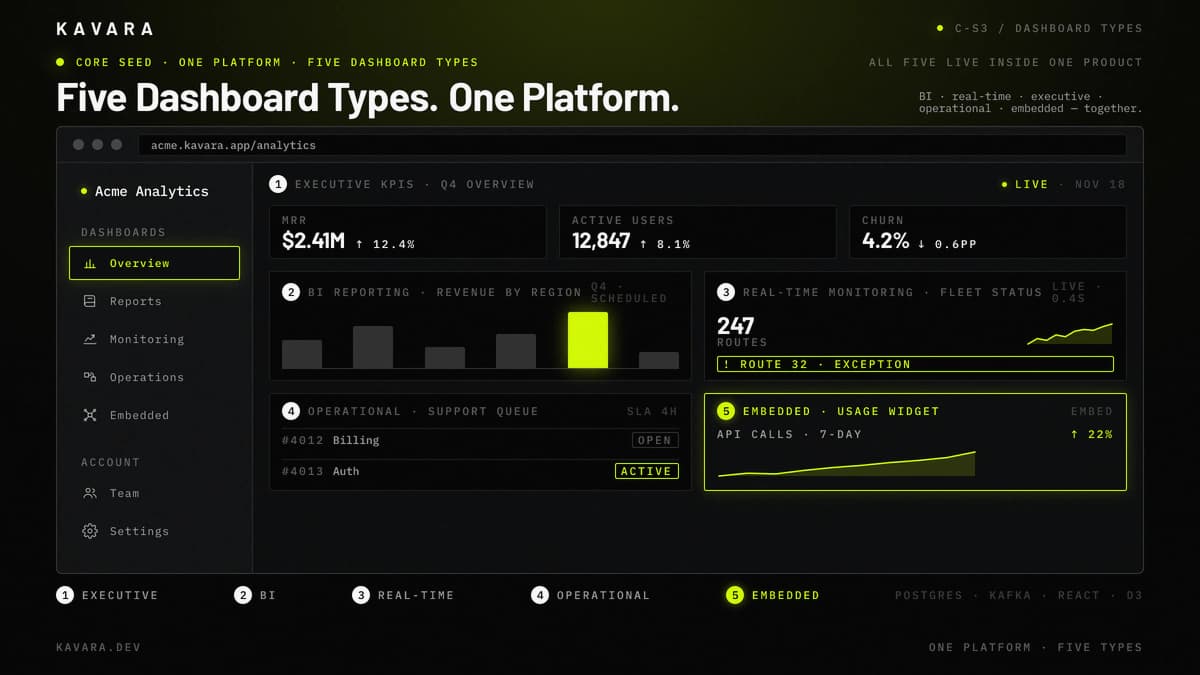
We build five types of dashboard and analytics applications, each addressing different data complexity, latency requirements, and user needs:
A 2023 Human-Computer Interaction paper by Joanna Purich, Arjun Srinivasan, Michael Correll, Leilani Battle, Vidya Setlur, and Anamaria Crisan analyzed 25,620 Tableau Public dashboards, which is useful evidence that dashboards are a broad interface family rather than one chart template. The product view below shows the five dashboard types running inside one analytics platform.
- Business Intelligence Dashboards - Business intelligence dashboards are SQL-based reporting platforms that query relational databases, warehouses, or curated reporting tables. These dashboards provide interactive charting, cross-filtering, scheduled reports, CSV or PDF export, and historical trend analysis. Operations managers and analysts use business intelligence dashboards when they need periodic performance reviews, comparative metrics, and drill-down views across departments or product lines. Our BI dashboard development covers data warehouse integration, OLAP processing, and interactive reporting for mid-market analytics needs.
- Real-Time Monitoring Dashboards - Real-time monitoring dashboards display live operational data with fast refresh cycles and alerting. These dashboards support server health monitoring, IoT sensor visibility, financial transaction tracking, logistics status, and production line operations where delayed information loses value. Operations teams use real-time monitoring when they need immediate visibility into system status, exceptions, and threshold breaches. Our real-time data dashboard development handles WebSocket architecture, streaming data pipelines, and live alerting for operational monitoring.
- Executive Dashboards - Executive dashboards provide high-level KPI summaries with drill-down capability for C-suite, VP, and board-level users. These dashboards prioritize revenue, customer metrics, margin, operational health, growth trends, and risk indicators over detailed transaction views. Executive users need answers in 30 seconds, not 30 minutes, so the interface emphasizes clean hierarchy, visible exceptions, and fast movement from summary to supporting detail.
- Operational Dashboards - Operational dashboards track workflow status, queue depths, SLA compliance, resource utilization, backlog, throughput, and bottlenecks. Department managers use operational dashboards to allocate resources, resolve constraints, and identify process breakdowns before small delays become customer-facing failures. These dashboards often sit closest to day-to-day work because they visualize current process health rather than quarterly performance.
- Embedded Analytics - Embedded analytics are dashboard components integrated into SaaS platforms, enterprise portals, and internal software instead of deployed as standalone analytics applications. Embedded analytics must be tenant-scoped and permission-aware inside multi-tenant SaaS products, and role-scoped inside portals with multiple user groups. These dashboard components are white-labeled, API-driven, and designed to feel native to the host application while still supporting interactive analytics.
Every dashboard type depends on the same architectural foundation - a data pipeline that connects raw sources to the visualization layer through transformation, storage, and optimized query execution.
Dashboard Architecture: Data Pipelines, Visualization, and Performance
Dashboard architecture begins with the data layer - not the visualization layer. A dashboard that renders beautiful charts but queries slow databases, processes stale data, or chokes under concurrent user load fails its primary purpose regardless of how well-designed the UI is.
The flow diagram below shows the five analytics pipeline stages from source to visualization, with the warehouse as the highest-leverage architectural choice.
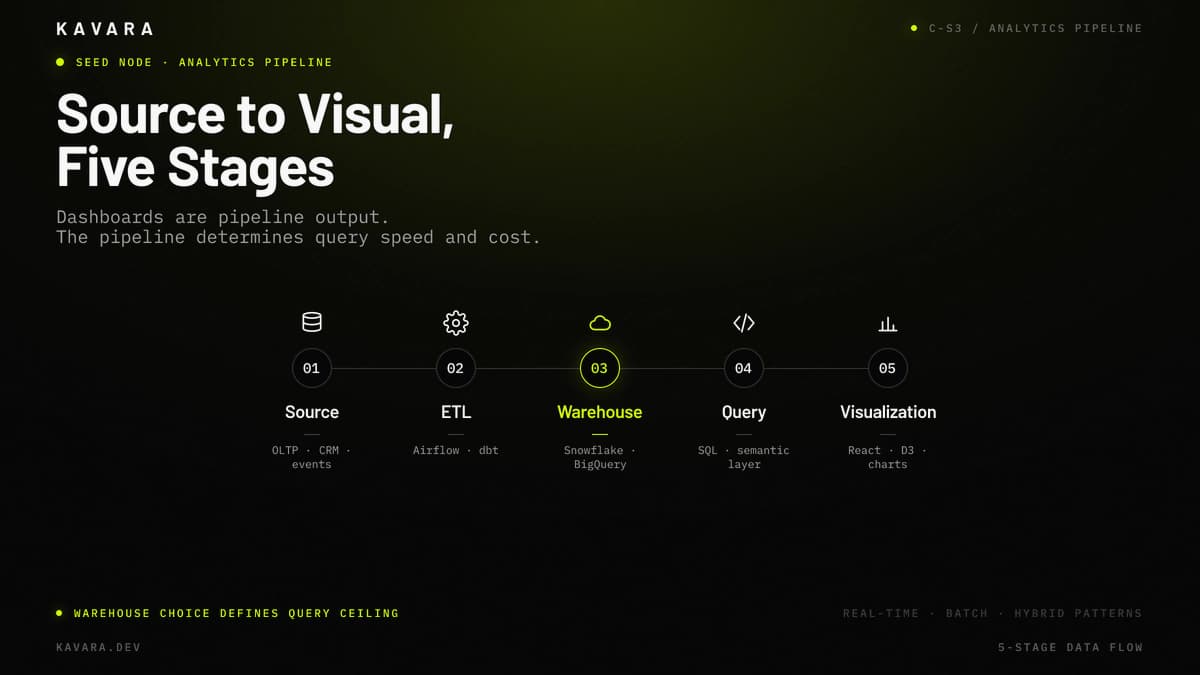
Data pipeline architecture determines how raw operational data becomes usable analytics data. ETL, or extract, transform, load, supports batch processing from operational databases into analytics-optimized storage through orchestration tools such as Airflow and transformation tools such as dbt. ELT, or extract, load, transform, supports data lake and warehouse architectures where transformation happens closer to query time. Streaming pipelines using Kafka or AWS Kinesis support real-time data dashboards where sub-second latency matters more than batch simplicity.
Data storage and query optimization determine whether the dashboard feels instant or frustrating. Analytical warehouses and databases such as Snowflake, Google BigQuery, ClickHouse, Amazon Redshift, and PostgreSQL with materialized views optimize aggregation queries differently than transactional databases optimize writes. Indexing strategies, Redis query caching, pre-aggregation tables, and materialized views, which store precomputed query results, can reduce dashboard queries from seconds to milliseconds when the dashboard must serve repeated filters and drill-down views. In a ClickHouse real-time dashboard benchmark, incremental materialized views reduced one query from 44 seconds to 6 milliseconds while keeping the result table continuously updated.
Visualization and rendering translate query results into usable interfaces. React-based dashboards with D3.js, Recharts, or Chart.js support custom data visualization, interactive filtering, cross-chart drilling, time-range selection, and embedded analytics inside other applications. Large datasets may require server-side aggregation, pagination, canvas rendering, or sampled visualization because sending every point to the browser can overwhelm memory and make the interface unusable.
As dashboards scale, performance under load requires deliberate architecture for a dashboard-specific reason: dashboard performance degrades non-linearly as concurrent users run expensive aggregation queries against the same source tables. Query result materialization, pre-aggregation, and rate-limited refresh cycles solve this dashboard-specific load pattern. For broader scaling architecture — horizontal scaling, read replicas, CDN strategy, monolith vs microservices — see our scaling architecture guide.
Role-based data access completes the architecture. Executives may see revenue metrics, department managers may see operational KPIs, analysts may see raw data, and external customers may see only account-specific results. Permission-scoped queries ensure users access only authorized data without relying on frontend hiding rules.
Building this data architecture requires a development process that prioritizes data connectivity and query performance alongside standard application engineering.
Our Dashboard Development Process
We build dashboard and analytics applications through our structured development process, adapted for the data engineering requirements that dashboard projects demand at every phase:
- Discovery - Discovery inventories every data source, documents current reporting pain points, defines KPIs with stakeholders, and maps user roles for data access. Data freshness requirements are defined here because freshness is an architecture decision with direct cost impact; choosing real-time streaming when hourly batch refresh would serve the business need adds significant infrastructure and development cost.
- Design - Design creates dashboard layout wireframes with realistic data samples rather than placeholder charts. The design phase defines interactive filtering, drill-down navigation, mobile-responsive chart layouts, empty states, and exception visibility so users can analyze data without fighting the interface.
- Architecture - Architecture defines data pipeline strategy, ETL vs streaming decisions, analytics database selection, caching strategy, and API structure for delivering data to the frontend. This methodology follows our structured web application development process, adapted for the data pipeline and query optimization requirements unique to dashboard applications.
- Development - Development implements the data pipeline first, query optimization second, and visualization layer third. This sequence ensures the data foundation is accurate and performant before interface development depends on it.
- Quality Assurance - QA verifies query performance under realistic data volumes, tests dashboard load under concurrent users, and confirms that dashboard numbers match source systems exactly. Data accuracy testing matters because dashboard trust disappears the first time a CFO finds a metric that does not reconcile.
- Deployment - Deployment configures data pipeline monitoring, query performance dashboards, alerting for data freshness violations, and production analytics infrastructure. The dashboard needs monitoring because stale or broken data can create bad decisions even when the interface still loads.
- Support - Support optimizes queries as data volume grows, integrates new data sources, adds dashboard views as KPIs evolve, and iterates based on user feedback. Dashboard development continues after launch because the business questions that teams need to answer change over time.
Technology selection for dashboards prioritizes data processing capability and visualization rendering performance.
Dashboard Technology Stack
Technology selection for dashboards splits into two categories: the data layer, which moves and stores data, and the visualization layer, which renders data for users.
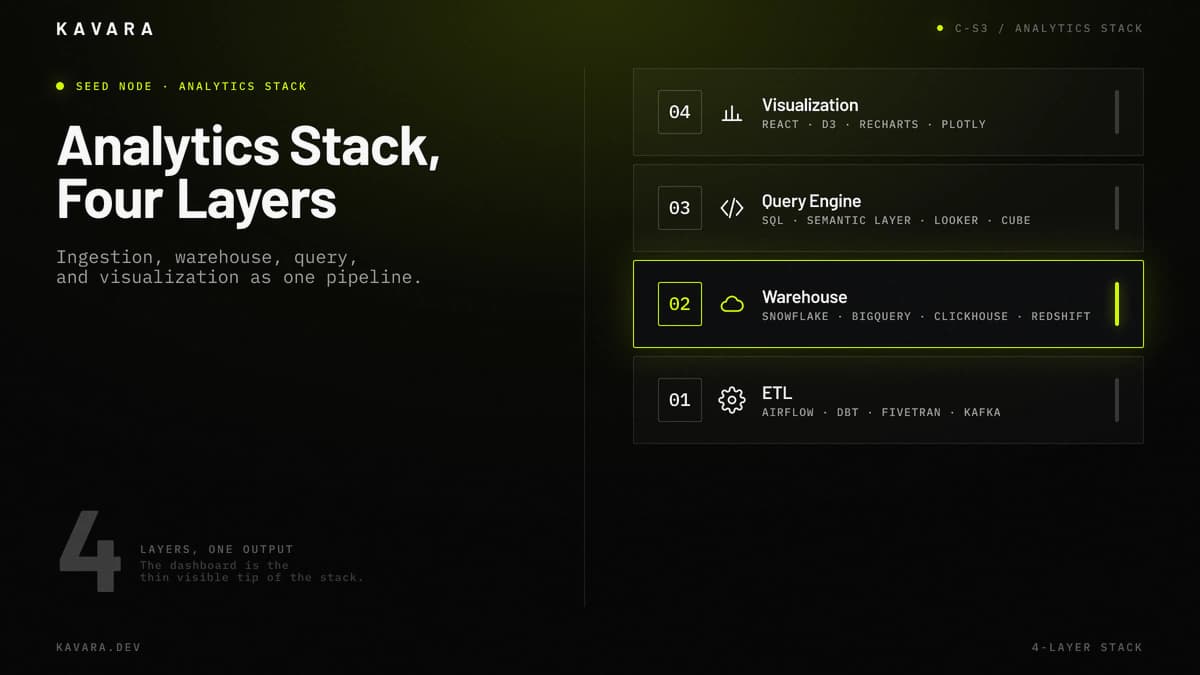
The stack diagram below shows the four canonical layers of a production analytics stack.
| Layer | Technologies | Dashboard-Specific Rationale |
|---|---|---|
| ETL | Airflow, dbt, Fivetran, Kafka | Airflow schedules batch jobs, dbt manages transformations, Fivetran handles managed connectors, and Kafka supports streaming ingestion |
| Warehouse | Snowflake, BigQuery, ClickHouse, Redshift | Analytics storage handles high-volume aggregation, columnar querying, and warehouse-scale dashboard workloads |
| Query Engine | SQL, semantic layer, Looker, Cube | Metric definitions, semantic models, caching, and governed query access keep dashboard numbers consistent |
| Visualization | React, TypeScript, D3.js, Recharts, Chart.js | Component architecture and charting libraries render modular widgets, custom visuals, filters, and embedded analytics |
Dashboard technology stacks differ from standard web app stacks because they require ingestion, warehouse, query, and visualization layers to work as one pipeline. A dashboard can use PostgreSQL for users and permissions while using ClickHouse, Redshift, Snowflake, or BigQuery for analytics workloads. The query engine layer is where metric definitions, caching, and semantic modeling prevent two charts from producing two different answers to the same business question.
Data architecture and visualization technology directly determine dashboard development cost, which varies primarily by data source complexity and real-time requirements.
How Much Does Dashboard Development Cost
Dashboard and analytics application development costs between $80,000 and $250,000 depending on data source complexity, real-time requirements, and visualization sophistication.
Standard BI dashboards with SQL queries, charting, filtering, and exports typically cost $80,000 to $130,000. Real-time monitoring dashboards with WebSocket interfaces and streaming pipelines typically cost $130,000 to $200,000. Complex analytics platforms with predictive models, ML-powered insights, custom visualization, or large-scale data processing typically cost $200,000 to $250,000 or more.
The diagram below breaks dashboard development cost into three build tiers, with each tier inheriting the previous tier's capability.
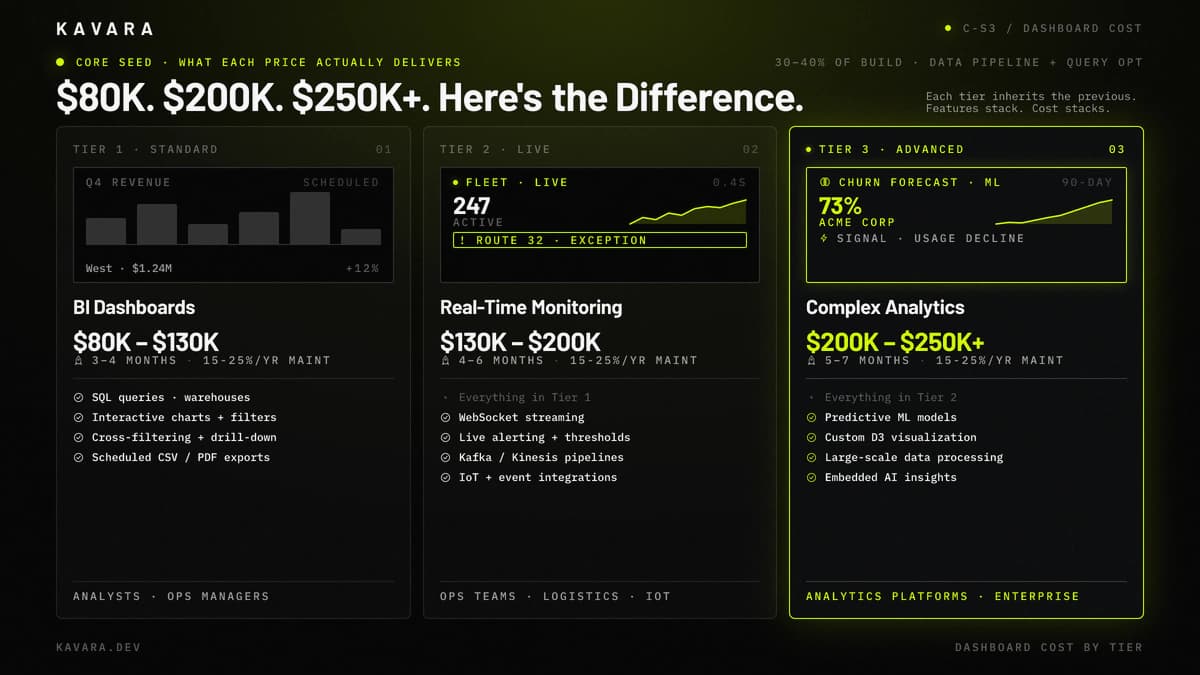
Dashboard development cost is driven by data source count and variety, real-time vs batch requirements, concurrent user load, number of user roles with different data access permissions, and custom visualization needs. Standard charts are faster to build than bespoke visualization. Hourly batch refresh is cheaper than streaming data infrastructure. Simple role groups cost less than permission-scoped query models across departments, customers, or tenants.
Mid-market companies should evaluate whether Tableau, Power BI, or Looker can meet their needs before investing in custom dashboard development. Custom is justified when proprietary data models, real-time requirements, embedded analytics, or complex role-based access exceed what off-the-shelf BI tools can deliver. For cost comparisons across all application types and phase-by-phase budget allocation, see our complete development cost breakdown.
Dashboard cost depends heavily on whether custom development is actually necessary, which makes the custom-vs-BI-tool decision the first supplementary question.
Should You Build a Custom Dashboard or Use Tableau or Power BI
Build custom when your data model is proprietary, when you need real-time data with sub-second refresh, when dashboards must embed within another application, or when role-based data access exceeds standard BI tool capabilities. Use Tableau or Power BI when standard connectors reach your data sources and drag-and-drop configuration meets your visualization needs.
Build custom when:
- Data requires custom query logic or proprietary metric definitions.
- Real-time streaming cannot wait for scheduled refresh.
- Dashboards need to live inside SaaS platforms, portals, or enterprise software.
- Role-based data access requires complex permission scoping.
Use Tableau or Power BI when:
- Standard database connectors reach the data.
- Scheduled refresh is acceptable.
- Drag-and-drop configuration and standard chart types are sufficient.
- Users already understand the BI interface.
The decision should start with data complexity rather than chart preference. If the problem is visualization, a BI tool may be enough. If the problem is data movement, access control, embedded analytics, or real-time data reliability, custom dashboard development is usually the more durable path.
How Long Does Dashboard Development Take
Dashboard development typically takes 3 to 7 months from discovery to launch, depending on data source complexity, real-time requirements, and the number of dashboard views and user roles. Standard BI dashboards usually take 3 to 4 months. Real-time monitoring dashboards usually take 4 to 6 months. Complex analytics platforms usually take 5 to 7 months or more.
Data pipeline development and query optimization consume 30% to 40% of total dashboard development time. This work makes dashboard timelines different from standard web application timelines because the application must reconcile source data, transform metrics, optimize queries, and validate numbers before visualization is trustworthy.
Timeline also depends on how quickly stakeholders can define KPI logic and provide source-system access. Dashboard development slows when teams disagree on metric definitions or when vendors restrict API access during discovery.
What Is the Difference Between a Dashboard and a Reporting Tool
A reporting tool generates static documents, scheduled PDFs, CSV exports, or emailed summaries with predefined data at predefined intervals. A dashboard provides interactive, real-time access to data with filtering, drill-down, and visualization that users explore dynamically.
Reports answer predefined questions on a schedule. Dashboards let users ask new questions interactively. The architectural difference is practical: reports run batch queries and format output, while dashboards serve live queries and render responsive visualizations. In other words, dashboards differ from reporting tools because they support repeated exploration instead of one-way distribution. Kavara builds dashboards - interactive, data-driven platforms that users explore in real time, not static reports they receive and file.
This distinction matters for custom web application development because dashboards require stateful interaction, permission-aware filtering, and performance tuning for repeated exploration. Reporting tools can remain document generators; dashboards become operational decision systems for teams making active decisions.
What Industries Use Custom Analytics Dashboards
Custom analytics dashboards serve industries where operational data volume, real-time requirements, or proprietary metrics exceed what off-the-shelf BI tools can handle. Many custom analytics dashboards now embed AI-powered analytics - predictive analytics, anomaly detection, and intelligent alerting - inside the same decision surface.
- Financial services - Portfolio analytics, risk dashboards, compliance monitoring, and real-time market data feeds require permission-scoped access and precise auditability. Our fintech application development practice builds compliance-ready financial dashboards for real-time market data and portfolio analytics.
- Healthcare - Clinical analytics, patient outcome tracking, resource utilization, and HIPAA-aligned data access require dashboards that respect role-based clinical visibility.
- Logistics - Fleet tracking, route optimization visualization, warehouse throughput, and IoT sensor integration require real-time operational visibility.
- Manufacturing - Production line monitoring, quality metrics, predictive maintenance, and equipment data visualization require fast exception detection.
- SaaS companies - Usage analytics, churn prediction, revenue metrics, and tenant-level performance monitoring support product and customer success teams.
Across these industries, dashboard development remains data-pipeline work first and visualization work second.
Next Steps
Dashboard and analytics development gives mid-market companies interactive, data-driven platforms that make operational data visible and actionable. Kavara solves the data problem first - pipeline architecture, query optimization, storage, caching, and data access - then builds the visualization layer on top so teams can launch dashboards that visualize reliable data. Beautiful charts on inaccurate data are useless. Explore our full web application development services to see how we build across dashboard, SaaS, portal, and enterprise software categories. Start a project conversation to inventory your data sources, define KPI requirements, choose the right architecture, and scope your dashboard build from discovery through launch.