Internal Business Application Development Services
Internal business application development is custom software for company teams: operations, finance, support, sales, and compliance. These applications become the operating layer employees use to manage work, approve exceptions, coordinate handoffs, and make decisions without spreadsheets or disconnected SaaS tools.
For mid-market companies, internal software often becomes necessary before an enterprise IT organization exists. A $20M company may have outgrown spreadsheets, email approvals, and project management tools without having an engineering team that can design, build, launch, and maintain production systems. That is where custom web application development becomes practical: the company can own the workflow without building a product team first.
Kavara builds internal business applications inside a broader custom software development services context. The goal is not to create a prettier admin panel. The goal is to engineer the business logic, data model, permissions, integrations, and reporting that let teams operate with less manual coordination and fewer tool gaps.
That custom software development context matters because internal applications usually combine workflow automation, system integration, and production-grade custom web application development in one operating tool. They use the same web application development services discipline used to build web applications for customers, but success is measured by internal throughput, decision quality, and process reliability.
Internal applications succeed when they match how the company actually works. They fail when they copy a generic vendor workflow, ignore edge cases, or treat integrations as an afterthought. The application has to reflect who starts work, who approves it, what data is required, what exceptions occur, and what each role can see.
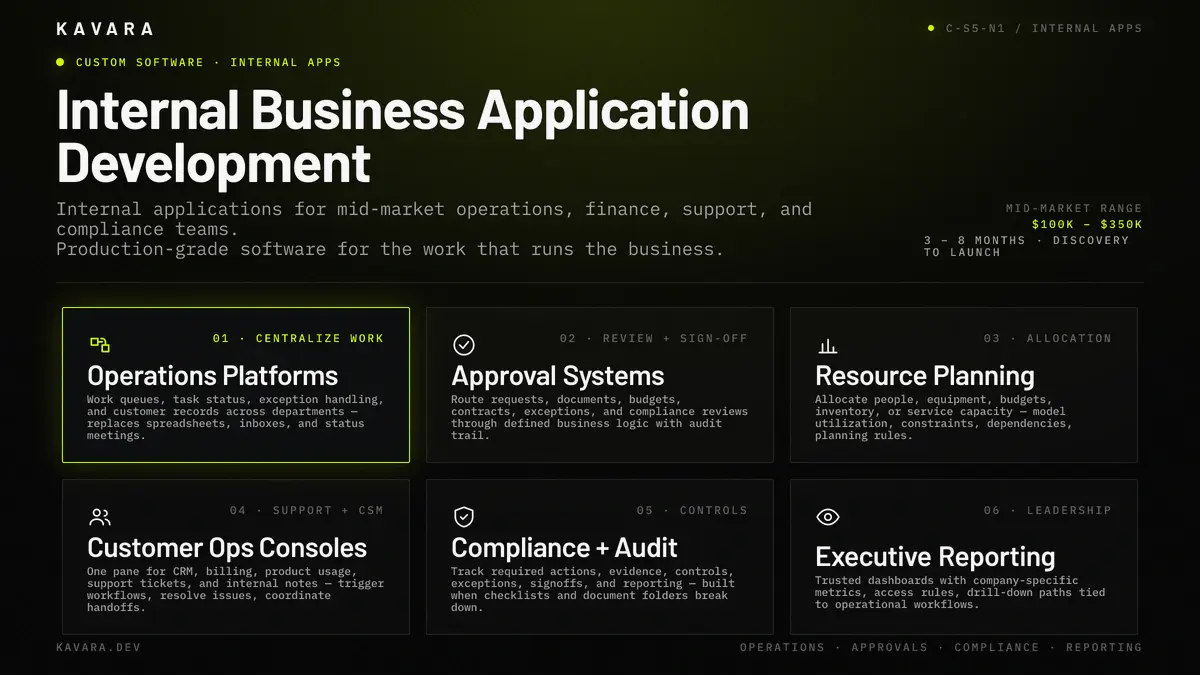
The catalog below summarizes the six internal application types we build for operations, finance, support, and compliance teams.
What Is an Internal Business Application
An internal business application is custom software that employees use to run company-specific workflows, enforce business rules, connect systems, and report operating outcomes. It may support approvals, routing, customer operations, resource planning, document review, compliance tracking, financial controls, inventory visibility, or executive reporting. Unlike public SaaS products, internal applications are designed for controlled users, known workflows, and measurable operating outcomes.
The difference between an internal application and a standard internal tool is ownership. A spreadsheet tracks work, but it does not enforce process. A project management board organizes tasks, but it does not model business rules. A generic SaaS tool may store data, but it may not connect the systems that create and consume that data. An internal business application owns the workflow logic directly.
That ownership creates four requirements. First, the application needs a data model that reflects the business, not a vendor category. Second, it needs role-based access. Role-based access is a permission model that limits views, actions, and data changes by job function, approval authority, and operational responsibility. Third, it needs integration with CRM, ERP, accounting, HRIS, billing, document storage, or analytics platforms. Fourth, it needs reporting that shows process health, bottlenecks, exceptions, and outcomes.
Internal business applications sit inside the same engineering discipline as custom web application development. Kavara delivers them through our broader custom software services, with discovery, architecture, UX design, full-stack development, QA, deployment, monitoring, and support. The difference is the audience: internal teams whose productivity, accuracy, and decision speed affect operating margin. Those economics lead to the next question: when does workaround cost justify custom development?
When Do Internal Tools Need Custom Development
Internal tools need custom development when the cost of workarounds becomes larger than the cost of building the right workflow. The symptoms appear before budget approval: parallel spreadsheets, email approvals, manual status requests, copied data, and reports that need cleanup before they can be trusted. Asana's 2026 Anatomy of Work Index reported that knowledge workers spend 60% of their time on "work about work," including switching tools, chasing status, and duplicative communication.
Custom development is justified when one workflow depends on five or more disconnected systems. MuleSoft's 2024 Connectivity Benchmark reported more than 900 applications in the average enterprise, with only 28% integrated; a sales operations workflow touching CRM, quoting, billing, legal, onboarding, and analytics is a smaller version of the same integration debt. When the workflow crosses that many systems, the integration layer becomes the product.
Custom development is also justified when role complexity exceeds what off-the-shelf tools can model. Internal applications often need layered permissions: requesters, reviewers, managers, finance approvers, compliance reviewers, field users, support teams, and administrators. If every role needs a different view, different actions, and different audit requirements, configuration alone usually breaks down.
Compliance and auditability can make custom development necessary. Healthcare, fintech, education, manufacturing, and logistics teams may need evidence trails, access logs, approval history, data retention rules, and exception workflows that generic software cannot support. In those cases, the internal application is not just a productivity tool. It is part of the control environment.
The decision should still be disciplined. Off-the-shelf tools are better when the workflow is common, the user count is small, or a vendor tool satisfies most requirements with light configuration. The custom vs off-the-shelf decision framework should own that build-or-buy analysis. This page owns the implementation pattern when the decision is to build an internal business application.
Internal Application Types Kavara Builds
We build internal business applications around the workflows that create operational drag for mid-market companies:
- Operations platforms - Operations platforms centralize work queues, task status, exception handling, customer records, and team activity across departments. They replace spreadsheets, inboxes, and status meetings when the company outgrows its first operating process.
- Approval and review systems - Approval systems route requests, documents, budgets, contracts, exceptions, and compliance reviews through defined business logic. They enforce who can approve what, when escalation is required, and what evidence must be preserved for later review.
- Resource planning tools - Resource planning applications help teams allocate people, equipment, budgets, inventory, or service capacity when project management tools cannot model utilization, constraints, dependencies, or business-specific planning rules.
- Customer operations consoles - Customer operations consoles give support, success, account management, and implementation teams one place to view customer data, trigger workflows, resolve issues, and coordinate handoffs across CRM, billing, product usage, tickets, and notes.
- Compliance and audit applications - Compliance applications track required actions, evidence, controls, exceptions, signoffs, and reporting when regulatory or customer requirements need more structure than a checklist or document folder can provide.
- Executive reporting systems - Executive reporting systems consolidate operating data into trusted leadership dashboards with company-specific metrics, access rules, and drill-down paths tied to operational workflows.
These application types often overlap: an operations platform may include approval logic, a customer operations console may include executive reporting, and a compliance application may require resource planning. The architecture should reflect the workflow, not an artificial software category.
Architecture for Internal Business Applications
Internal business application architecture starts with the workflow. The technical stack matters, but the first architecture decision is the operating model: what entities exist, how they relate, what states they pass through, who can act on them, what events trigger notifications, what systems exchange data, and where the layered architecture has to scale.
The architecture diagram below shows how interface, application logic, data, integration, and reporting compose a production internal application.
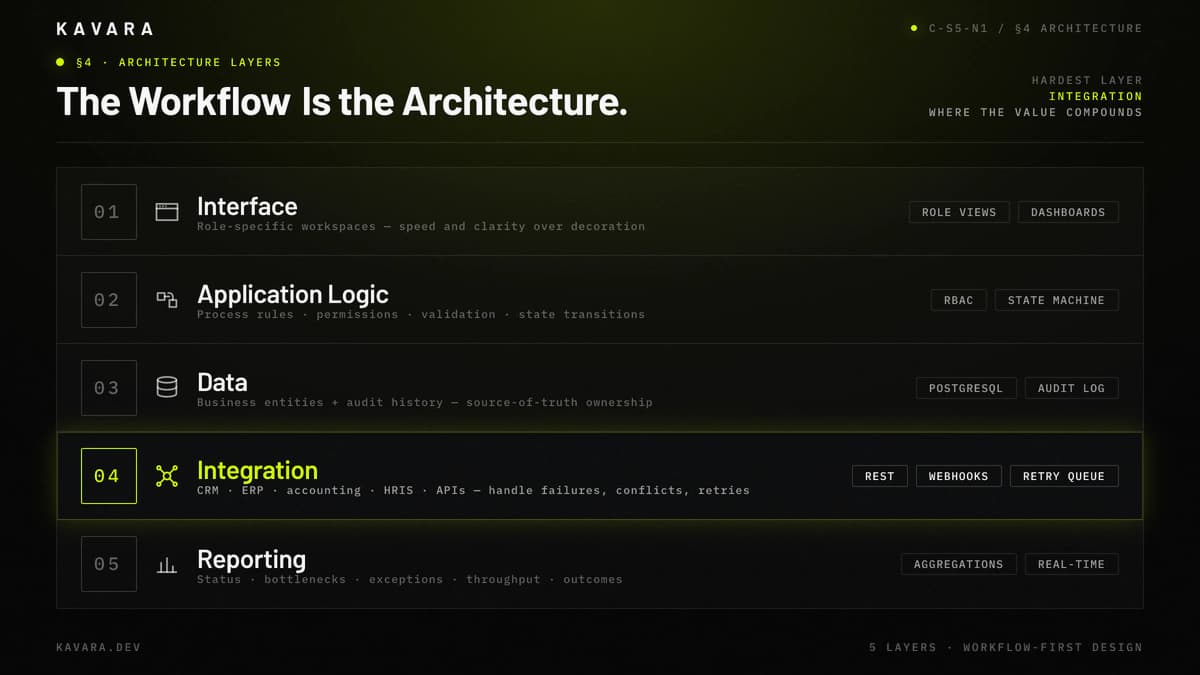
Most internal applications need five architectural layers. The interface layer gives each role a clear workspace. The application logic layer enforces process rules, permissions, validation, and state transitions. The data layer stores business entities and audit history. The integration layer connects CRM, ERP, accounting, HRIS, document storage, email, analytics, or custom APIs. The reporting layer exposes status, bottlenecks, exceptions, throughput, and outcomes.
Role-based access is central. Internal applications often carry sensitive customer, employee, financial, or operational data. A field user may update task status but not see margin data. Finance may need approval controls but not customer communication tools. Executives may need rollup reporting without edit access. Role-based access design affects database structure, API behavior, interface layout, and QA coverage.
System integration architecture is the hardest part. Internal applications are valuable because they integrate work that existing systems keep separate. To integrate reliably, the application must handle API failures, duplicate records, stale data, retry logic, sync conflicts, and source-of-truth decisions. A reliable internal application does not assume every connected system behaves perfectly.
The business application architecture resource covers the patterns behind these decisions, including monolithic vs microservices design, database selection, caching, security layers, and scalability planning. Internal applications apply those patterns to the operating systems a company uses every day.
Our Internal Application Development Process
We build internal business applications through a structured process because internal tools fail when requirements are collected casually. PMI's 2020 Pulse of the Profession report found that 11.4% of investment is wasted because of poor project performance, which is why the workflow must be observed, documented, challenged, and translated into software behavior before development starts.
Our internal application development process follows eight steps:
- Discovery maps workflow steps, roles, decisions, data sources, exception paths, current tools, manual workarounds, and success metrics.
- Design turns that workflow into role-specific interfaces so reviewers, managers, operators, and executives see the right actions quickly.
- Architecture defines the data model, permissions, integrations, deployment, reporting, and source-of-truth rules.
- Development ships functional increments: authentication, core entities, workflow states, role actions, integrations, reporting, and administrative controls.
- QA validates happy paths and edge cases: rejected approvals, missing data, duplicate submissions, permission boundaries, integration outages, and audit trails.
- Launch includes migration, monitoring, training, and feedback loops so internal teams understand the new operating process.
- Adoption support removes friction found in real use: unclear statuses, missing filters, slow approvals, and reports needing more dimensions.
- Iteration strengthens integrations, reporting, permissions, and workflow behavior after real users expose what the process needs.
The process keeps each decision connected to operating value. Once scope, integrations, and adoption support are visible, cost can be estimated by complexity instead of screen count.
How Much Does Internal Business Application Development Cost
Internal business application development typically costs $100,000 to $350,000 for mid-market companies, depending on workflow complexity, roles, integration depth, migration, reporting, and compliance needs. A focused approval or review system may fit between $80,000 and $150,000. A standard operations platform may fit between $100,000 and $350,000, while a multi-role integrated build with dashboards and audit history may cost $200,000 to $400,000 or more. Clutch's May 2026 guide reports average verified software project cost of $132,480.29 and a timeline of about 13 months, giving these budgets market context without flattening integration risk.
The cost breakdown below shows how complexity tier and the three primary cost drivers — business rules, integrations, and edge cases — shape the budget.
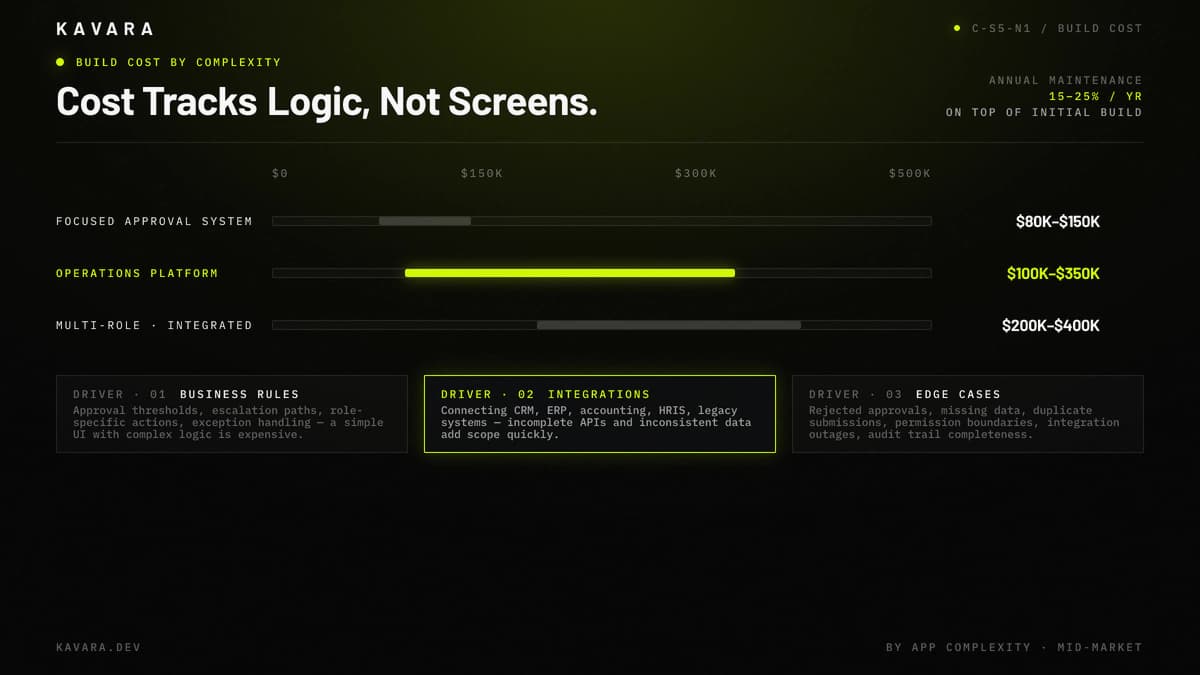
The biggest cost drivers are not visual screens. They are business rules, permissions, integrations, and edge cases. A simple interface with complex approval logic can cost more than a polished dashboard with limited workflow behavior. Legacy integrations add scope when APIs are incomplete, data is inconsistent, or manual review is needed before records sync.
Ongoing cost should be budgeted from the beginning. Internal applications require hosting, monitoring, security updates, dependency maintenance, bug fixes, user support, and feature iteration. A practical maintenance budget is often 15% to 25% of the initial build cost per year.
Cost should be measured against operational waste. If employees spend 30 hours per week moving data and reconciling reports, labor cost can justify custom development before productivity, accuracy, compliance, and customer experience improvements are counted.
What Should Be Clear Before Build Starts
Before build starts, the workflow needs enough clarity to make timeline and risk visible: roles, source-of-truth systems, approval rules, reporting, migration, and launch owners. Cost is only one decision; the same scope controls timeline, adoption, and failure risk. A focused approval tool moves quickly when those decisions are known. A multi-role platform slows when workflow ownership, integration access, or operating rules change.
How Long Does an Internal Business Application Take
An internal business application typically takes 3 to 8 months from discovery to launch. Focused tools with one workflow and limited integrations may launch in 8 to 12 weeks. Multi-role operations platforms with several integrations, migration requirements, and reporting needs often take 4 to 8 months.
Timeline depends on scope clarity, stakeholder access, integration readiness, and decision speed. Internal applications require input from the people who do the work, not only leadership. If operators, managers, finance, compliance, and IT are available during discovery and review cycles, the project moves faster. If the workflow is rediscovered during development, timeline risk increases. Our web application development process guide explains how discovery, design, QA, launch, and iteration control those schedule risks.
What Makes Internal Business Applications Fail
Internal business applications fail when they automate the wrong process, ignore edge cases, or lose user trust. The most common failure is building software around the official workflow while the real workflow happens somewhere else. Discovery has to capture how work moves, including exceptions, shortcuts, approvals, and manual judgment.
The diagnostic below pairs each failure mode with its symptom and its mitigation.
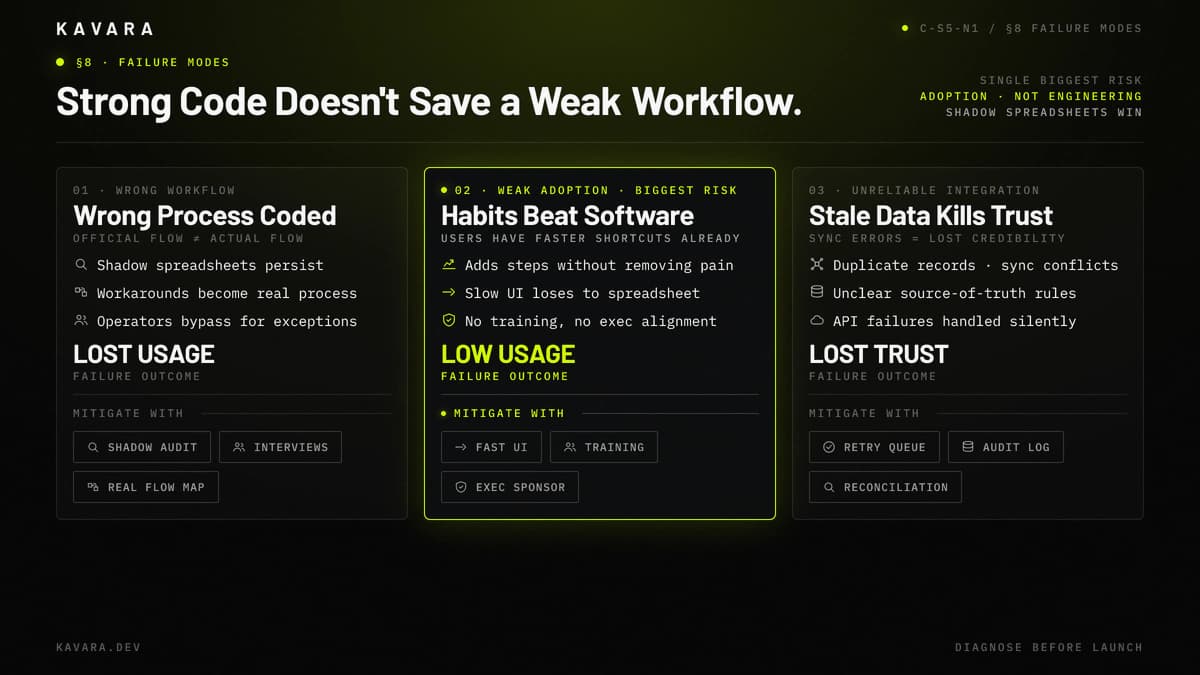
The second failure is weak adoption. Internal users already have habits, spreadsheets, and shortcuts. If the application adds steps without removing pain, people avoid it. Adoption requires fast interfaces, clear ownership, useful reporting, training, and leadership alignment.
The third failure is unreliable integration. If the application depends on CRM, ERP, accounting, or support data, users must trust that data. Sync errors, stale records, duplicate entities, and unclear source-of-truth rules can make the system less reliable than the manual process it replaced.
Avoiding these failures requires the same discipline as any production web application development project: discovery before design, architecture before development, QA before launch, and iteration after real users expose what the process needs. CISQ's 2022 Cost of Poor Software Quality report estimated $2.41 trillion in US poor-software-quality cost and $1.52 trillion in technical debt, which is why Kavara's delivery process treats QA, monitoring, and post-launch correction as operating safeguards, not optional cleanup.
Next Steps
Internal business application development is the right fit when operational workflows have outgrown spreadsheets, generic SaaS tools, and manual coordination. The strongest candidates are workflows with repeated actions, multiple roles, integration needs, compliance requirements, and measurable operating cost.
Kavara builds internal business applications through production-grade custom software development, not temporary tools. We map the workflow, design role-specific interfaces, engineer the data and integration layer, launch the application, and support iteration after adoption begins.
Explore our custom software engineering to see how internal applications fit alongside workflow automation, API integration, legacy modernization, and cloud-native development. Contact Kavara to scope an internal application for your operations team.