Client Portal Development for Businesses
A client portal is the secure, external-facing application your clients log into to share documents, view invoices, and communicate with your team — and building one that clients actually use requires more than a login page bolted onto your website. It is the external access layer over the systems you already run — your CRM, your billing platform, your document storage — giving each client a single, authenticated place to work with you. Done well, it replaces scattered email attachments and status calls with reliable self-service.
This page covers client-facing portals: the software your external customers and clients log into. Employee portals and vendor or partner portals are separate builds, so we keep them out of scope here.
Client portal development for a mid-market business is production engineering, not template configuration. We build client portals as a focused branch of our enterprise web portal development and broader custom web application development work — engineered to your data, your integrations, and your compliance requirements, not a no-code tool you outgrow in a year. We build and launch them as production software, so the portal holds up as your client base grows.
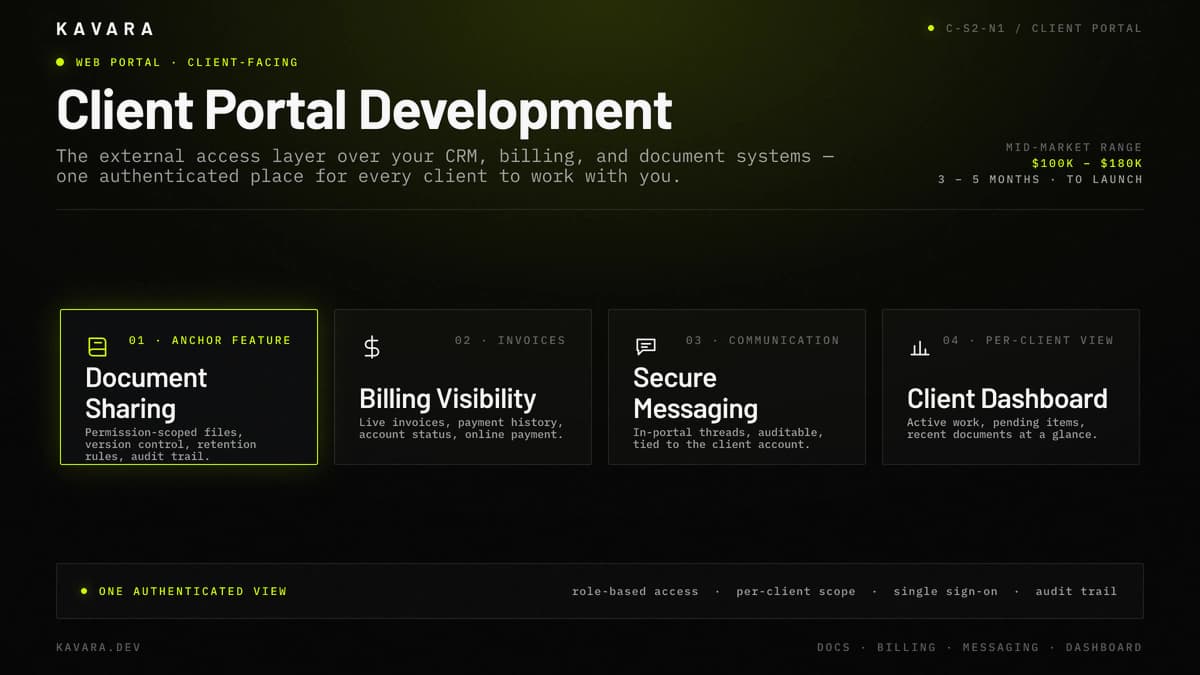
The feature map below shows how a client-facing portal brings document sharing, billing visibility, secure messaging, and a per-client dashboard into one authenticated view.
What Is a Client Portal
A client portal is a secure, authenticated web application that gives your external clients a single place to access documents, invoices, project status, and communication specific to their relationship with your business. What makes it client-facing is external customer access: the users are your external customers, and each sees only their own account data through role-based access, never another client's. That external-facing scope separates a client portal from an internal employee portal or a vendor and partner portal, which serve different users and are separate builds. Those client portals are one branch of our enterprise web portal development practice, alongside employee and vendor portals.
Businesses build client portals to replace email-and-attachment coordination with a reliable, auditable self-service access point. When clients retrieve their own documents and invoices on demand, support load drops and every interaction is logged.
A client portal sits as an access layer over the systems you already run — your CRM, your billing platform, your document storage — not a replacement for them. Client portal development is largely the work of connecting those systems to a secure external interface. What a client portal must actually do for those clients comes down to a specific set of features.
Core Client Portal Features We Build
Every client portal we build starts from the same core feature set, then adds what a specific client relationship requires. We build client portals as production software, so each feature holds up under daily client use, not demoed once and forgotten.
Secure document sharing with version control is usually the anchor feature: clients upload and download permission-scoped files, retention rules govern how long documents live, and an audit trail records who accessed what and when. Because the files are client data, document sharing is scoped to the individual client.
Billing and invoice visibility gives clients a live view of invoices, payment history, and account status, and an integrated gateway lets them pay online. Billing and invoice visibility removes much of the routine "where is my invoice" load from your team.
Secure client communication keeps conversations inside the portal, not scattered across email. In-portal messaging and threads produce an auditable record tied to the client's account, so secure client communication stays inside your controlled environment.
Self-service dashboards give each client a landing view of active work, pending items, and recent documents — which makes the portal self-service, since clients answer their own questions instead of calling. Digital signatures and approvals let clients sign off inside the portal, and notifications flag new documents, messages, and status changes.
Features only matter if clients can navigate them without training — which is why client portal UX is a build decision, not a cosmetic one.
Client Portal UX, Onboarding, and Self-Service Design
A client portal succeeds or fails on adoption — if clients cannot find what they need in seconds, they revert to calling and emailing, and the portal becomes shelfware. Self-service UX is the first design priority: a clear per-client dashboard, obvious primary actions like view invoice, upload document, and message the team, and navigation shallow enough that no client needs a manual.
Client onboarding decides whether that adoption ever starts. The first-login experience, guided setup, credential or SSO provisioning, and importing the client's existing documents and history determine whether the portal is useful on day one or empty on arrival. We scope and sequence client onboarding inside our structured delivery process so provisioning, data import, and training happen before go-live.
Branding matters because the portal should feel like part of your service: it carries your brand — or the client's, in white-label scenarios — so clients experience one continuous relationship, not a bolt-on tool. Accessibility and responsive design matter because clients reach the portal from desktop and phone, so production-grade design on both is a baseline requirement of client portal development, not an add-on — a portal that only works on a laptop loses the self-service value it was built for.
Because clients handle sensitive documents and payments here, access control and security are foundational, not optional.
Security and Access Control for Client-Facing Portals
A client portal exposes account data to people outside your organization, so access control is the part of the build that carries the most risk. External-user authentication is where it starts: when the client organization runs its own identity provider, we support SSO; when it does not, we require a strong password plus multi-factor authentication.
Role-based access and per-client data isolation do the heavy lifting once a user is authenticated. Each client sees only their own account, and role-based access separates external client users from your internal staff and admins so the two never share a permission set. We verify, through testing, that a client can never reach another client's data through any URL, API call, export, or search result.
Client-access audit trails record every document view, download, message, and payment, which makes disputes and compliance reviews answerable rather than guesswork. Encryption protects documents and messages in transit and at rest. Beyond these client-scoped controls, the full authentication, authorization, and data-protection standards behind client portal security are covered in our web application security guidance.
Access control only works when the portal is correctly wired into the systems that hold the client's real data — which makes integration the next decision.
Integrating a Client Portal with Your Business Systems
A client portal is only as useful as the systems it connects to — the value is showing clients real, current data from the tools you already run, not a second place to re-enter it. CRM integration comes first for most builds: the portal pulls account, contact, and relationship data so it reflects the exact client record your team already works from.
Billing and accounting integration surfaces invoices, payment status, and history directly from the system of record, and where clients pay online, an integrated payment gateway lets them settle those invoices in place. Document storage integration connects the portal to an existing document management system or cloud storage, so files stay synchronized and governed rather than duplicated.
Integration reliability separates a demo from production. Authenticated APIs, disciplined error handling, and sync monitoring keep the client from ever seeing stale, missing, or broken data — the fastest way to lose their trust. This connective work is standard custom web application development: the portal is the interface, but the engineering value is in wiring it correctly to the systems behind it.
What integration and features a client portal needs depends heavily on the industry it serves.
Industry-Specific Client Portal Requirements
Client portal requirements change with the industry — the feature set is similar, but the compliance and integration demands are not. The same core client portal takes on different architecture in each of these sectors:
- Healthcare (patient portals): A patient portal needs HIPAA-compliant authentication, per-patient data isolation, encrypted messaging, and EHR integration. A patient portal is a client portal with regulatory architecture layered on, and a HIPAA patient portal follows the same patient portal compliance architecture as the rest of our healthcare work.
- Financial services (client and investor portals): A financial services client portal needs SOC 2 and PCI-conscious architecture, account and portfolio visibility, secure document exchange, and audit-ready logging. These client and investor portals are part of our financial services application development practice, built to SOC 2 and PCI-conscious standards.
- Professional services and B2B (legal, accounting, agencies): A professional-services client portal centers on project status, deliverable sharing, billing visibility, and secure client communication that hold up across long-term client relationships. The compliance load is lighter, so the build weight shifts toward workflow and client experience.
Across every industry, the first question buyers ask is what a client portal costs.
How Much Does Client Portal Development Cost
Client portal development typically costs $100,000 to $180,000, depending on the number of client roles, document and billing complexity, and how many existing systems the portal integrates with. That band reflects US production budgets for a portal clients actually depend on, built with real integration and security work — not offshore hourly math for a template.
Four things move a client portal budget within that range: the number of distinct client user roles, the count of CRM, billing, and document integrations, the compliance requirements the data carries, and whether online payment processing is in scope. For phase-by-phase budget allocation and how client portals compare to other application types, see our custom web application development cost guide. Ongoing cost then runs roughly 15 to 25 percent of the initial build each year, covering hosting, security updates, integration upkeep, and iteration as your client base grows.
Cost tracks closely with timeline, which is the next practical question.
How Long Does Client Portal Development Take
Client portal development typically takes 3 to 5 months from discovery to launch, depending on integration count, compliance requirements, and feature scope. A focused client portal — documents, messaging, a dashboard, and a single integration — reaches launch in 3 to 4 months. A standard client portal that adds billing and online payment, multiple integrations, and role complexity runs 4 to 5 months. A regulated client portal, with HIPAA or SOC 2 obligations and EHR or financial-system integration, can approach 5 to 6 months as compliance and integration testing extend the timeline.
What Is the Difference Between a Client Portal and a Customer Portal
A client portal serves a defined set of named business clients in an ongoing relationship, while a customer portal serves a large, often anonymous base of end customers in transactional self-service. The difference is relationship depth: a client portal is account-based and B2B, built around a known roster of clients, whereas a customer portal is built for B2C volume and mass self-registration. Their feature sets follow from that. A client portal centers on document sharing, billing visibility, and direct communication; a customer portal centers on orders, support tickets, and high-volume self-service. Access models differ too — per-client accounts your team provisions versus open sign-up at scale.
Should You Build a Custom Client Portal or Use Off-the-Shelf Software
Choose off-the-shelf client portal software when your needs are generic and low-volume, and build a custom client portal when you need deep integration with your own systems, client-specific workflows, regulated data handling, or your brand and client experience as a differentiator. Off-the-shelf tools like the common no-code portal builders are the fastest way to start, but they cap out on integration depth and compliance control precisely where mid-market requirements begin. A custom client portal is production software you own — built to your data, your integrations, and your clients — so it keeps working as those requirements grow rather than forcing a migration once you outgrow the template.
Next Steps
A client portal is the external access layer your clients rely on — secure document sharing, billing and invoice visibility, and direct communication, integrated with the systems you already run and built as production software, not a template. Kavara builds and launches client portals for mid-market companies as one part of our custom web application development services for mid-market companies, alongside SaaS, dashboard, and enterprise software builds.
Every portal we build starts by scoping client roles, integrations, and the compliance the data carries. Contact our team to start a discovery conversation and scope your client portal.