Custom Website Development Services
Custom website development is the practice of building a content-focused business website from a designed content model and a deliberate rendering strategy rather than assembling one from a template, then holding that website to the performance, accessibility, and migration standards of a production application.
A website is built for content consumption; a web application is built for task execution. Both can be engineered to the same standard; most websites are not. Four decisions separate a custom website from a template build: a rendering strategy chosen on purpose, a Core Web Vitals budget the build is held to, a content model that survives editorial reality, and a migration path that keeps search equity.
We build application-grade websites for mid-market companies that have outgrown a template site or an aging CMS. We build the content model before the pages, launch against a performance budget rather than a launch date, and migrate existing sites without losing their rankings. Custom website development services are one branch of our custom web application development practice, alongside the SaaS platforms and portals.
What Is Custom Website Development
Custom website development is website engineering that designs the content model, the rendering strategy, and the performance budget for one specific business instead of inheriting all three from a theme.
Building a website rather than assembling one changes what the business owns. The content model is designed around how the business publishes, not inherited from a page-builder's template. The rendering strategy is chosen against how often content changes, not left to a framework default. Performance is a budget the build is measured against, not a launch-week cleanup. And the codebase is owned outright, not licensed from a platform that can change its terms.
We hold a custom website to the engineering standards of a production application: a headless CMS with a real content model, a Core Web Vitals budget enforced in continuous integration, a deployment pipeline with rollback. That does not make the website an application — it still exists to be read, browsed, and converted on.
Website development is one of eight service branches inside our custom web application development services, sharing the same architecture review, QA gates, and deployment pipeline. What changes for a mid-market website is the problem, not the discipline — which raises the question every mid-market buyer should settle first: is the thing you need actually a website at all?
Website or Web Application: Where the Line Falls
A website is built for content consumption — visitors read, browse, and convert. A web application is built for task execution — users authenticate, manipulate data, and complete work. The line falls at the database: if the value of the thing lives in what users do with their own data, it is an application.
The diagram below marks where the line falls.
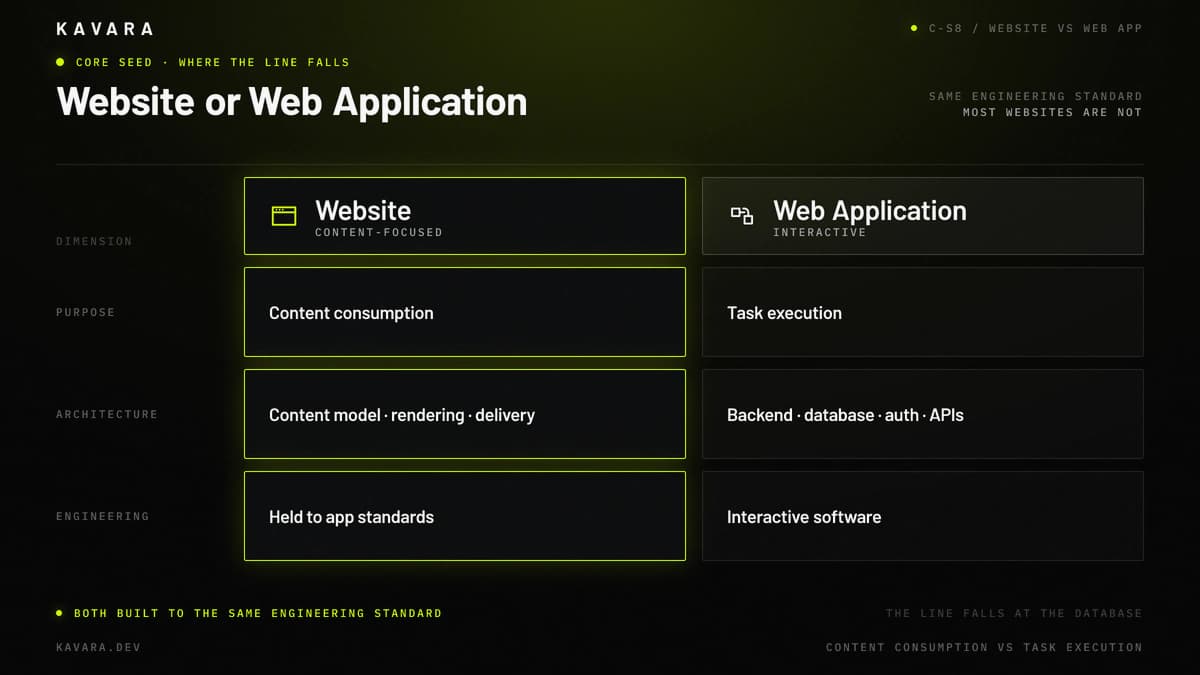
The technology approach diverges first. A website's hard problems are content modelling, rendering, and delivery. An application's hard problems are authentication, authorization, data integrity, and API design. Different problems, different architectures.
Timeline follows. Websites launch in weeks because scope is bounded by content and templates: once the content model is settled, the remaining work is finite. Applications launch in months because scope is bounded by workflows and edge cases, which are discovered rather than planned.
Investment follows timeline. A website's cost curve flattens after launch; an application's cost curve climbs with every workflow.
The grey zone is real. Gated content, member areas, and product configurators are applications wearing a website's clothes; we scope them as applications. When the workflow rather than the content is the product, the build belongs in our custom software development practice. Once the thing is genuinely a website, the next question is which kind we are building.
Websites and Web Platforms We Build
We build three kinds of custom website, separated by how much of the business runs through them:
- Content-focused business websites — the marketing site, the product site, the careers site. These run on a headless CMS with a custom design system, pages generated statically or regenerated incrementally, and a Core Web Vitals budget enforced before release. The editorial team ships content without opening a ticket with a developer. Most business website development projects belong here, and most of them are badly served by a theme.
- Web platforms — a content-focused website carrying real operational load. A web platform adds multi-market localization, a complex content model with dozens of interrelated content types, editorial workflow and approvals, personalization, and integrations with CRM, marketing automation, and site search. Server-side rendering enters at this tier because pages genuinely vary per visitor, and a page that varies per visitor cannot be built once and cached forever.
- Commerce storefronts — headless commerce built on a custom storefront rather than a themed template. The shape is a custom storefront, payment integration, inventory synchronization, and B2B commerce workflows such as quotes, contract pricing, and account-level catalogs. Custom e-commerce platform development is its own discipline, with its own data models and its own compliance surface, and we treat it as one.
Website migration is not a fourth type. Replacing an existing site is a different job, not a different artifact, and it gets its own section below. All three types share one architecture, and it starts with separating content from presentation.
Website Architecture: Headless CMS, Rendering, and the Content Model
Website architecture is three decisions made in this order: how content is modelled, how pages are rendered, and how they are delivered.
The content model comes first. We model entities, not pages — a product, a case study, an author, a market — with fields shaped by how the business publishes. A content model built from page layouts breaks the first time marketing wants a new layout. The application layer behind a web platform — data stores, caching, scaling patterns — follows a separate set of web application architecture decisions.
The headless CMS comes second. Content lives in a system with no opinion about presentation and reaches the frontend through a content API. Editors work in one place, the same content feeds web, email, and product surfaces, and the public origin carries no CMS admin. Decoupling the CMS removes the most attacked surface on a conventional website, which is where our web application security architecture starts.
The rendering strategy comes third — the decision most website vendors never make out loud. We choose it by how often the content changes and whether the page varies per visitor:
- Static site generation (SSG) — content changes on an editorial cadence and every visitor sees the same page. The default for marketing sites.
- Incremental static regeneration (ISR) — content changes often but not per visitor. The default for content libraries, catalogs, and news.
- Server-side rendering (SSR) — the page varies per visitor: personalization, geographic localization, authenticated previews.
We do not ship server-side rendering because a framework supports it. We ship it when the page varies per request.
The diagram below traces content from model to browser.
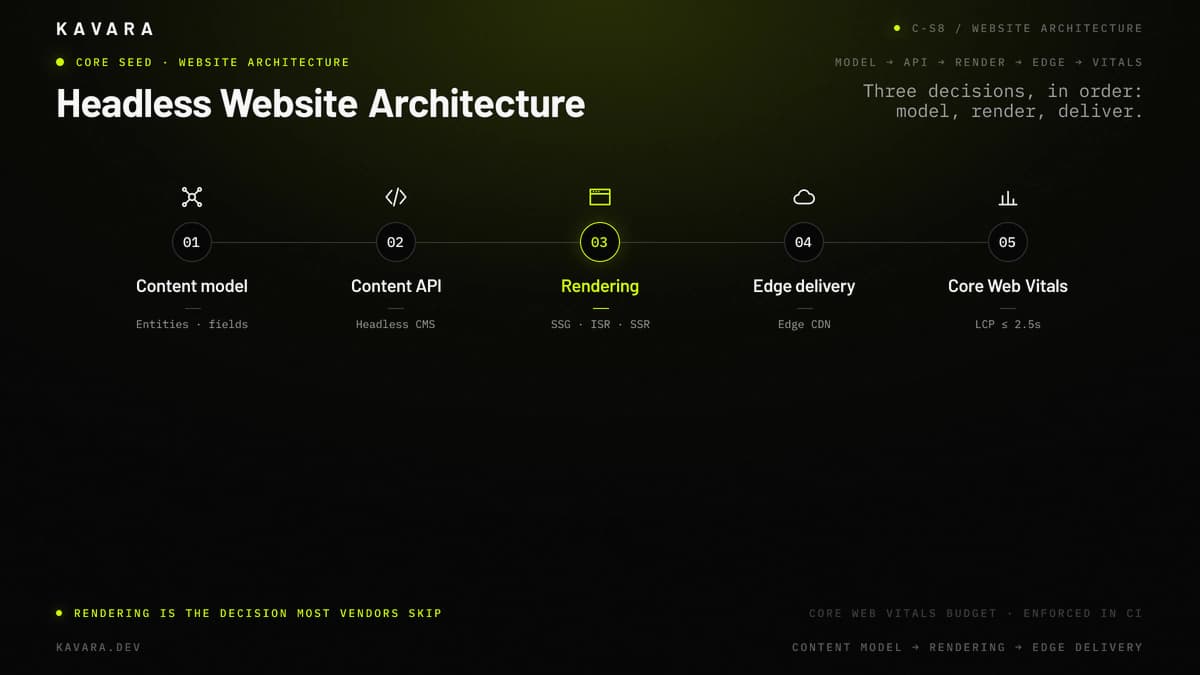
Delivery is last: output from an edge CDN, origin out of the critical path. Architecture decides what the page can do; the performance budget decides whether anyone waits for it.
Performance Engineering Against Core Web Vitals
We build every website against a performance budget, and the budget is Google's Core Web Vitals thresholds.
Largest Contentful Paint must land at 2.5 seconds or less, Interaction to Next Paint at 200 milliseconds or less, and Cumulative Layout Shift at 0.1 or less — the thresholds Google publishes on web.dev, measured at the 75th percentile of page loads across mobile and desktop. Interaction to Next Paint replaced First Input Delay and became a stable Core Web Vital in 2024, and it is the number our JavaScript budget is written against.
A budget changes what happens during the build, not after it. Images and fonts are the Largest Contentful Paint problem on almost every business website, so we size, format, and preload them as a build step, not a launch-week rescue. Cumulative Layout Shift is a layout discipline: reserved space for every image, embed, and late-loading module, set in the design system. Interaction to Next Paint is a JavaScript budget, and static pages ship less JavaScript — a performance argument for static site generation. All three are enforced in continuous integration: a pull request that regresses the budget does not merge into the main branch.
We build to WCAG 2.2 AA on the same pass. The discipline that fixes layout shift — reserved space, semantic structure, predictable focus order — is what makes a site usable with a keyboard and a screen reader.
A budget protects a site we build from scratch. Most mid-market websites are not built from scratch. They are replaced.
Website Migration and Re-Platforming Without Losing Search Equity
A website migration succeeds when traffic and rankings survive it. Everything else — the new design, the new CMS, the faster pages — is worthless if the organic traffic does not arrive to see it.
URL mapping comes before design. Every live URL on the old site is crawled and mapped to a destination before a single page is designed, because unmapped URLs are the default cause of post-launch traffic loss. The crawl, not the sitemap, is the source of truth: a sitemap describes what a CMS believes exists, a crawl describes what search engines indexed.
The redirect strategy follows the map. Permanent redirects, one hop, no chains, and the map tested against the live crawl, not the pages the new build happens to have. A redirect to a page that no longer serves the original intent is a lost ranking wearing a 301.
A migration is also the only cheap moment to fix a content model. Migrating a broken model into a new CMS buys a nicer editing interface for the same structural problems, so we redesign it during the move.
Analytics and search continuity close the job. Measurement, event tracking, and search-console coverage are verified before launch, so a regression shows up in days. Website migration and re-platforming services exist because this failure mode is silent.
Whether we are building from scratch or replacing what exists, the sequence is the same.
Our Website Development Process
We build websites through the same structured process we use for production applications, adapted from the seven-phase development process we run on every engagement, with four phases reshaped for the way a website fails.
- Discovery — a content inventory and a URL inventory before anything else. For a rebuild, the crawl of the existing site is the requirements document, and it surfaces pages nobody remembered publishing.
- Design — a design system, not a set of page comps. Components are what the editorial team will assemble pages from after we leave, so we design the components they need in year two, not the five layouts approved in week six.
- Architecture — content model first, rendering strategy second, CMS selection last. Choosing the CMS first is the most common and most expensive inversion in website development, because the CMS then dictates a content model nobody designed.
- QA and launch — the performance budget enforced in continuous integration, the redirect map verified against the live crawl, and analytics confirmed firing before DNS moves. We launch, then watch rankings for four weeks.
What you own at the end is a codebase, a CMS your editors can operate without us, and a documented content model. The technology we reach for serves that process, not the reverse.
Website Development Technology Stack
Technology selection for a custom website prioritizes rendering control, editorial usability, and delivery performance, in that order.
| Layer | Technologies | Why We Choose It for Websites |
|---|---|---|
| Frontend | Next.js, React, TypeScript | Per-route control over static, incremental, and server rendering in one codebase |
| Content | Headless CMS (Sanity, Contentful, Payload) | Content API decouples editorial from presentation; no CMS admin on the public origin |
| Styling | Design system, component library | Editors assemble pages from components; layouts do not require a developer |
| Delivery | Edge CDN (Vercel, Cloudflare) | Rendered output served from the edge; origin out of the critical path |
| Search & Data | Managed search, PostgreSQL where needed | Structured content queried without turning the site into an application |
| Quality | Lighthouse CI, automated accessibility checks | Performance and WCAG budgets enforced on every pull request |
The stack is chosen against the client's editorial reality and existing marketing systems. A team of two editors and a team of forty do not get the same CMS. Which brings us to what a custom website actually costs.
How Much Does Custom Website Development Cost
Under $25,000, you don't need custom website development. Buy a well-built theme and hire a good designer — below that threshold, custom architecture costs more than it returns.
Above that line, custom website development costs between $35,000 and $275,000, depending on how much of the business runs through the site.
Content-focused business websites — headless CMS, custom design system, static or incrementally regenerated rendering, a Core Web Vitals budget — typically cost $35,000 to $75,000. Web platforms — complex content model, localization, editorial workflow, integrations, and server-side rendering — typically cost $75,000 to $150,000. Commerce storefronts and migration-heavy platforms — a custom storefront, or a large URL inventory moved without losing rankings — typically cost $150,000 to $275,000.
Those two figures answer different questions. $25,000 is the value threshold below which a theme beats a custom build; $35,000 is where our cheapest custom engagement starts. Between them sits work we will tell you not to buy.
Cost is driven by the number of distinct content types, whether pages vary per visitor and therefore need server-side rendering, the number of source systems integrated, and the size of the URL inventory migrated. Ongoing costs run 15 to 25 percent of the initial build annually. For how website budgets compare against SaaS, portal, dashboard, and mobile builds, and for phase-by-phase allocation, see our web application development cost benchmarks.
Budget is the first question. Timeline is the second.
How Long Does Website Development Take
Custom website development typically takes 8 to 32 weeks from discovery to launch, depending on the size of the content model, whether pages render per visitor, and whether an existing site is being migrated.
A content-focused business website takes 8 to 14 weeks. A web platform takes 14 to 22 weeks. A commerce storefront or a migration-heavy platform takes 20 to 32 weeks.
Content is the primary timeline factor, not code. Design and build run on a predictable schedule once the content model is settled; content migration, content creation, and the internal approvals that govern both are what move launch dates. A rebuild with 400 pages and one part-time editor will not launch sooner because the engineering team works faster.
Should You Build a Custom Website or Use a Website Builder
Use a website builder until one of three ceilings stops you: the content model, the performance budget, or the platform itself. Build custom once you have hit one — not before.
The content-model ceiling arrives when your content types no longer fit the builder's page metaphor and editors duplicate content to make layouts work. The performance ceiling arrives when you cannot hit Core Web Vitals because the platform's JavaScript and its third-party scripts are not yours to remove. The platform ceiling arrives when the integrations you need do not exist and your content is not portable out.
Below those ceilings a builder is the right call, and we will say so. For the full build-versus-buy framework, including total cost of ownership over five years, read our custom vs off-the-shelf comparison.
When Do You Need a Web Application Instead of a Website
You need a web application when users log in and change their own data. If the site's value survives without accounts, it is a website.
Three triggers settle it. Users authenticate and see data that belongs only to them. The business runs a workflow through the interface — approvals, submissions, transactions with state. The interface has to stay correct when two people change the same record at once.
Any one of those and you are buying an application, with the backend architecture, database design, and API layer that implies. Those builds live elsewhere in our practice: SaaS platforms, client and employee portals, analytics dashboards, internal tools. A marketing site with a gated whitepaper is still a website; add a customer login and a billing history and you have two products sharing a domain.
What Is a Headless CMS and When Does It Make Sense
A headless CMS stores and structures content without controlling how it is displayed, delivering it to any frontend through a content API.
It makes sense in three situations. When the same content has to appear in more than one place — website, email, product UI — one source beats three copies drifting apart. When editorial velocity matters, a layout change should not require a deploy. And when the rendering strategy should be your decision rather than the platform's, a headless CMS leaves it with you.
It does not fit everywhere. A five-page site with one editor does not need a content API. A headless CMS adds an integration surface, a build pipeline, and a preview problem; a business that publishes twice a year feels all three and benefits from none.
Which Industries Need Custom Website Development
Custom website development pays for itself in industries where the website is a revenue channel or a regulated surface:
- Financial services — content velocity paired with disclosure control, versioning, and accessibility obligations.
- Healthcare — accessibility and content governance across patient, provider, payer, and investor audiences.
- Manufacturing — large, structured product catalogs that must stay in sync with internal systems.
- Professional services — content-led demand generation where Core Web Vitals affect acquisition cost directly.
- Education — WCAG obligations and multi-audience content models spanning prospective students, current students, faculty, and donors.
The common thread is a content model too structured for a theme and a performance requirement too specific for a platform. Neither is about the industry. Both are about how much of the business the website carries.
Next Steps
Custom website development for mid-market companies means content-focused business websites and web platforms built to the engineering standards of a production application. The rendering strategy, the performance budget, the content model, and the migration path are decisions we make on purpose, before design starts. Our guide on how to evaluate a development partner gives the scoring criteria and the questions to ask. Website development sits inside our custom web application development practice, sharing its headless CMS, Core Web Vitals, and delivery discipline. We build, we launch, and we migrate what already exists. Start with a content and URL inventory — that is where we scope every website build, so scope your website build with Kavara.