AI Automation for Business Processes
AI automation for business processes puts machine-learning and AI models to work inside the applications your team already uses — reading documents, routing requests, and flagging exceptions — so routine work runs automatically and people spend their time on the decisions that actually need judgment. It is intelligent automation embedded in production software: a model reads an invoice, classifies an inbound ticket, or scores a case, and the workflow around it either takes the next step automatically or escalates the exception to a person.
This page covers intelligent automation of business processes specifically — document processing, customer-service automation, decision support, and predictive-maintenance response. General LLM and ChatGPT integration and predictive-analytics modeling are separate builds, so we keep them out of scope here.
We build AI automation as a focused branch of custom web application development for mid-market companies — production software wired into the systems you already run, not a standalone bot and not a demo that impresses once and then stalls. What separates automation that lasts from a proof of concept that quietly dies is where it lives: inside your real applications, connected to real data and authenticated users, with people supervising the decisions that carry risk. We build, integrate, and automate the process so it runs reliably in daily operations, not just in a controlled demo.
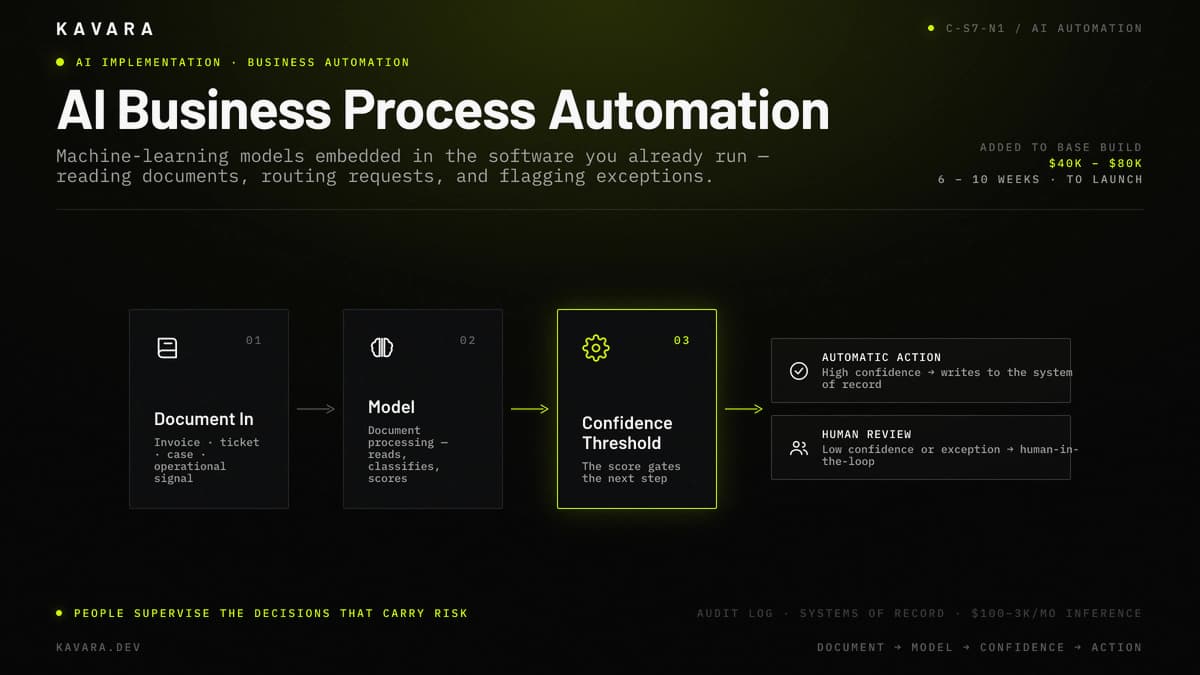
The workflow map below traces how an AI automation moves an input — a document, request, or operational signal — through the model and a confidence threshold to either an automatic action or human review.
What Is AI Automation for Business Processes
AI automation for business processes is the practice of embedding AI and machine-learning models into production business applications so they can classify, extract, route, and act on routine work automatically, escalating exceptions to human review when confidence is low or the decision carries risk. What makes it AI automation rather than rules-based automation is that it handles unstructured inputs — documents, natural language, images — and probabilistic decisions, exactly where the fixed if-then rules of RPA and macros break. That difference is why AI automation can read a scanned invoice or an open-ended email that a scripted bot cannot.
AI automation sits as a capability layer inside the applications you already run, not an isolated tool bolted on beside them. The model connects to your real data, your authenticated users, and a defined workflow, so its output becomes an action in a system of record rather than a suggestion in a separate window. This is what distinguishes production intelligent automation from a chatbot demo: business process automation only creates value when it is wired into the process it is meant to run, close enough to the data and the users to act on both.
AI automation is one capability within our AI implementation and integration services, alongside LLM integration and predictive analytics. Automation pays off only when it is pointed at the right work — so the first question is which business processes AI can reliably take over.
Business Processes We Automate with AI
Every AI automation we build starts from a specific, measurable process — not a general goal to "use AI." In practice, most AI automation is embedded into the internal business application development your operations team already depends on, not delivered as a separate tool, so the automation runs where the work already happens. From there, four process types cover the majority of what we automate for mid-market operations.
Intelligent document processing is the highest-volume automation for most teams: OCR combined with natural-language models extracts data from invoices, forms, contracts, and claims, then posts it into the systems of record. Instead of staff keying fields from a PDF, the document processing pipeline reads the document and writes structured data straight into your application.
Customer-service and request automation classifies and routes inbound tickets, emails, and requests, drafts responses for an agent to review, and deflects routine questions with retrieval over your own knowledge base. The model triages, and a person still owns anything sensitive or ambiguous.
Decision support and classification scores, prioritizes, or flags records — applications, transactions, or cases — so staff act on the right ones first. Here the model recommends and a person decides, which is what makes decision support safe for judgment-heavy work.
Predictive maintenance as automated response is business process automation applied to operational signals: a model detects an anomaly or failure pattern and automatically opens a work order or alert, turning a prediction into an action inside the workflow rather than a chart someone has to notice. Naming the process is the easy part; the engineering that makes automation trustworthy in production is where most AI projects succeed or fail.
How AI Automation Works Inside Your Applications
The reason AI automation succeeds or fails is rarely the model — it is how the model is wired into a production application people trust. AI automation is custom web application development with a model in the loop: the same discipline of data access, permissions, error handling, and testing that any production system needs, plus the extra work of governing a component that is probabilistic rather than deterministic.
It starts with model and workflow logic working together. The model produces a classification, an extraction, or a score, and the workflow logic decides what happens next based on that output — post the record, route it, hold it, or ask for input.
Confidence thresholds and human-in-the-loop escalation are what make that safe. Above a confidence threshold the system acts automatically; below it, the case escalates to human review, so accuracy problems surface as manageable exceptions instead of silent errors buried in your data. This human-in-the-loop design is the single most important reason production automation earns trust.
Integration and data do the connecting work. Authenticated APIs, permission filtering, and connections to your systems of record let the automation read and write real data under the same access rules your users already follow. Monitoring keeps it honest over time: accuracy-drift monitoring, audit logging, and inference-cost tracking keep a production-grade automation reliable and affordable long after launch. Without that monitoring, an automation that was accurate at launch can drift silently as the data around it changes, which is exactly how trust erodes. How this plays out in practice depends on the industry, because the processes worth automating — and the rules around them — change by sector.
Industry Applications of AI Business Process Automation
The automation pattern stays the same across industries — extract, classify, route, act, escalate — but the highest-value processes and the compliance rules around them differ. The same AI automation takes on different architecture depending on the sector it serves, because the compliance load and the highest-value processes both shift:
- Healthcare: Clinical and administrative document processing, patient-intake automation, and claims and coding classification carry the most value. This clinical document processing is part of our healthcare practice, built with HIPAA-aware architecture, per-record access control, and human review on any decision that touches clinical judgment.
- Financial services: Invoice and financial-document automation, transaction and fraud flagging, and KYC and onboarding classification lead here. That financial document automation is part of our financial services practice, built with audit logs and access control so every automated decision stays traceable for examiners.
- Logistics and manufacturing: Predictive-maintenance automation and exception detection are the highest-value processes, opening a work order or alert before a failure becomes an outage. Here business process automation reads operational signals and acts on them inside the workflow rather than waiting for a person to notice the problem first.
Whatever the industry, the pattern holds and the first budgeting question is the same: what AI automation costs to build and run.
How Much Does AI Automation Cost
AI automation for business processes typically adds $40,000 to $80,000 to the cost of the application it runs inside, depending on process complexity, data readiness, and whether the solution uses API-based or custom-trained models. Four things move that number: how many processes you automate, the quality and preparation of your data, the number of integrations, and how high the accuracy requirements are. A single, well-defined process on clean data is far cheaper than automating several interlocking processes at once, and automation that has to be near-perfect sits at the top of the range.
Automation cost is additive to base application development — it is a capability you add to a production application, not a standalone price. For what that base application costs across SaaS, portal, dashboard, and enterprise builds, see our web application development budget guide; the $40,000 to $80,000 automation figure sits on top of that base. Ongoing cost is modest by comparison: API-based inference runs roughly $100 to $3,000 per month depending on volume and caching, plus monitoring and periodic retraining. Cost tracks closely with timeline, data readiness, and how quickly the team adopts the automation — the practical questions buyers ask next.
How Long Does It Take to Implement AI Automation
Implementing AI automation typically adds 6 to 10 weeks to the timeline of the application it runs inside, depending on data readiness and how many processes are automated. A single, well-scoped process with clean, accessible data reaches production in about 4 to 6 weeks. Multi-process automation with integration work and moderate data preparation runs 6 to 10 weeks. Automation that first requires data collection, labeling, or migration off a legacy system takes 10 weeks or more, because the model cannot be trained until the data exists. Data preparation is the primary timeline driver, not model selection, which is why we assess data readiness before committing to a schedule.
Is Your Data Ready for AI Automation
Data readiness is the single biggest factor in whether an AI automation succeeds, because the automation can only be as reliable as the data it learns from and acts on. For automation, "ready" means three things: enough representative examples for the model to classify or extract accurately, data that is accessible rather than locked in a format nobody can reach, and data that is reasonably clean and properly permissioned. A model trained on thin or inconsistent examples produces unreliable output no matter how strong the underlying technology is.
We check data readiness with a short assessment during discovery, before committing to a build, so the automation is scoped against the data you actually have rather than the data you wish you had. When the data is not ready, a data-preparation step — collection, cleaning, and labeling — comes first, and that step usually becomes the primary driver of both timeline and cost. Confirming data readiness early is how we keep an AI automation from stalling halfway through the build.
What Is the ROI of AI Automation
The ROI of AI automation is measured in labor reduction — the hours a process took before automation versus after, plus the errors avoided and the speed gained. We define a measurable labor reduction target before the build, not after: for a document-heavy process, that might mean moving the work from many hours a week to a fraction of that, with a specific number everyone agrees to measure against. A target you set up front is what lets you prove the automation worked instead of arguing about whether it feels faster.
True ROI is the net figure, not the gross one. Ongoing inference and monitoring cost has to be subtracted from the labor reduction to get the real return, which is why we scope both sides — the savings and the run cost — before recommending a build. Framed that way, ROI stays a number the business owns rather than a vendor promise.
How Do You Manage Change When Automating a Business Process
Managing change is the difference between automation that sticks and automation staff quietly route around. The most reliable safeguard is human-in-the-loop design: staff supervise the automation, correct it when it is wrong, and come to trust it, instead of being handed a black box that makes decisions they cannot see or challenge. When people can override the model, they adopt it.
Phased rollout is the second safeguard. We start with one process, measure the result, and expand from there — the same discipline that keeps AI projects from stalling after an impressive demo. Training and transparency close the gap: we show staff why the model made a given decision and exactly how to override it, so the automation becomes a tool the team runs rather than a change imposed on them. Automation people understand is automation people keep using.
Next Steps
AI automation for business processes is intelligent automation — document processing, customer-service automation, decision support, and predictive-maintenance response — embedded in the production applications you already run, with human review on the decisions that matter. It works when it is engineered like production software: wired into real data, governed by confidence thresholds, and monitored after launch.
Kavara builds, launches, and integrates AI automation for mid-market companies as part of our AI implementation practice and our broader custom web application development services for operations-driven companies, alongside SaaS, portal, dashboard, and enterprise software builds. Every automation we build starts by identifying the highest-value process and confirming its data readiness. Get in touch to start a discovery conversation and scope the first process worth automating.